


 Home
HomeRetime
ReTime: Free Online Appointment Scheduler



Helps TikTok sellers, brands, MCNs, and TAPs discover winning products and find creators.

HelpLook is an AI-powered all-in-one knowledge base tool that helps businesses quickly build knowledge bases, help centers, and...

Your AI Workspace

302.AI is an enterprise-grade AI resource platform with pay-as-you-go pricing, API access to a full range of AI models, and ready-to-use online applications.

剧火AI — AI Screenwriter + Director, a One-Person Short Drama Studio In one sentence, what is it?

SalesRobot isn't just another tool in your sales arsenal—it's your new best friend in the world of automated outreach. This cloud-based gem lets you juggle multiple cold outreach campaigns on LinkedIn and through email, all while sipping your morning
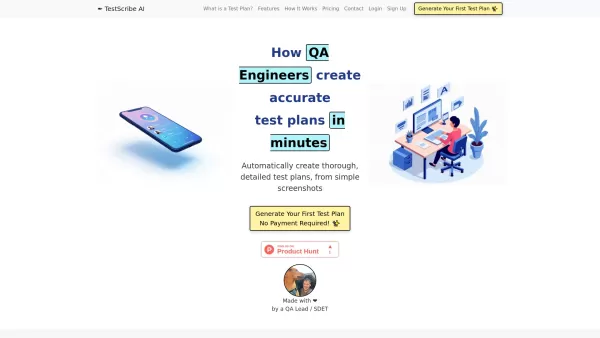
What is TestScribe AI? TestScribe AI revolutionizes software testing by automatically creating comprehensive test plans through artificial intelligence. This cloud-based solution helps testing teams and developers save countless hours on documentatio

What is Stacks?Stacks is an AI-powered agent designed to orchestrate various productivity tools, automating tasks and boosting work efficiency. It seamlessly connects different applications, enabling users to execute complex workflows smoothly. From

What is Linguix — Grammar Checker and AI Writing App?Linguix is an all-in-one grammar checker and AI-powered writing assistant that elevates your text across websites and applications. It supports multiple languages such as English, French, German, S

What is Langtail?Langtail is a powerful platform designed to streamline the management of Large Language Model (LLM) prompts, enhancing team collaboration and boosting the efficiency of AI development workflows. It's the go-to tool for developers and
Retime Product Information
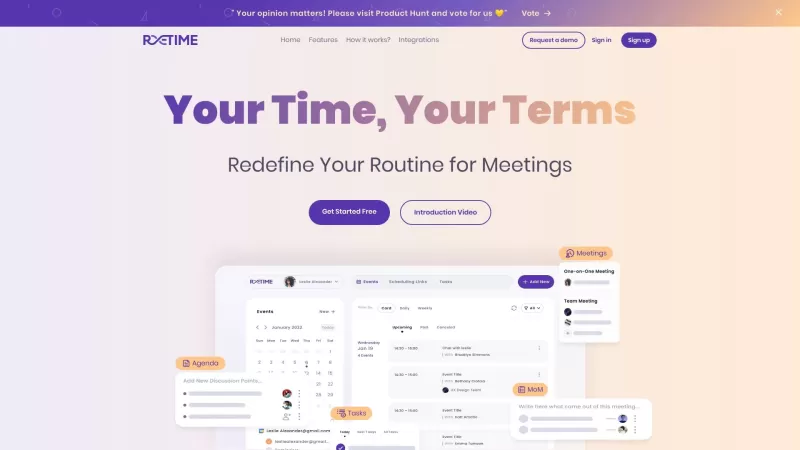
If you've ever felt like you're drowning in a sea of meetings and appointments, ReTime might just be the life raft you need. This free online scheduling software isn't just another tool; it's a game-changer that transforms how you handle your daily calendar. ReTime offers a fresh approach to scheduling, making it easier than ever to manage your time effectively.
How to Use ReTime?
Getting started with ReTime is a breeze. Here's how you can dive right in:
Set Your Schedule: Start by syncing ReTime with Google Calendar or manually setting your available times. It's all about making your schedule work for you.
Share and Invite: Once your schedule is set, share your unique booking page link or embed it on your website. This way, guests can easily pick a time that suits both of you, and the event automatically pops up in your calendar.
Effortless Booking: Your guests select from your available slots, and voila! The meeting is scheduled, and you're good to go.
ReTime's Core Features
ReTime isn't just about scheduling; it's packed with features that streamline your entire meeting process:
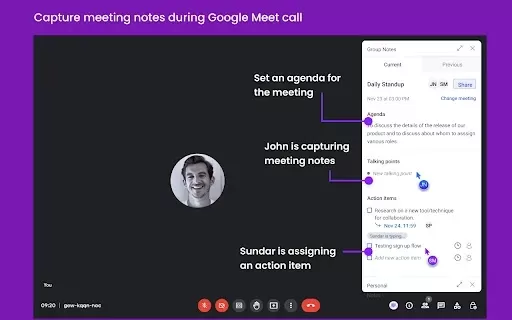
Agenda: Ever forget what you're supposed to discuss in a meeting? ReTime lets you jot down discussion points and keep track of your team's meetings.
Action Items: Assign tasks and track them effortlessly. No more wondering who's supposed to do what.
Define Availabilities: Set your preferred schedule or sync it with Google Calendar. It's all about flexibility.
Advanced Options: Customize your meeting preferences and settings to fit your unique needs.
Date Override: Got a special event coming up? Override your default availability for specific dates.
Calendar Sync: ReTime plays nicely with Google Calendar, Zoho, Office365 Calendar, and more. Your schedule, consolidated.
Time Zone Scheduling: Working with a global team? No problem. ReTime handles meetings across different time zones like a pro.
ReTime's Use Cases
Whether you're a busy professional, part of a remote team, or just someone who wants to streamline their life, ReTime has you covered:
Professionals and Businesses: If you're looking for a powerful yet simple tool to manage your meetings and appointments, ReTime is your go-to.
Remote Teams and Workers: Streamline collaboration and communication with ease, making remote work feel as smooth as in-person meetings.
Organizations and Individuals: Say goodbye to last-minute and conflicting meetings. ReTime helps you keep your schedule organized and conflict-free.
Companies and Individuals: Get a consolidated view of your schedule across different calendars and platforms. It's like having a personal assistant for your time management.
FAQ from ReTime
- How to sync ReTime with Google Calendar?
- Syncing ReTime with Google Calendar is straightforward. Just connect your Google Calendar within ReTime, and your schedules will sync seamlessly.
- Can I customize the meeting preferences and settings in ReTime?
- Absolutely! ReTime offers advanced options where you can tailor your meeting preferences and settings to suit your needs.
- Which calendar platforms does ReTime integrate with?
- ReTime integrates with Google Calendar, Zoho, Office365 Calendar, and more, ensuring you can manage your schedule across multiple platforms.
- Can ReTime be used by remote teams?
- Yes, ReTime is perfect for remote teams, helping to streamline collaboration and communication across different time zones.
- What are the main benefits of using ReTime for scheduling meetings?
- The main benefits include easy scheduling, customizable preferences, seamless calendar integration, and efficient management of meetings across different time zones.
For any support, you can reach out to ReTime's customer service at [email protected]. ReTime, Inc. is the company behind this innovative tool. If you're ready to dive in, you can log in at ReTime Login or sign up at ReTime Sign up. Stay connected with ReTime on social media through LinkedIn, Twitter, and Instagram.
Retime Screenshot



2026 Latest Best AI Quiz Builder Platforms for Teachers, Tutors, and Cohort-Based Learning Programs! XIX.AI has curated a top-rated list of powerful game-changing tools that go through real-world tests to deliver accurate rankings. These must-try platforms help boost writing efficiency, streamline content creation, and simplify quiz design across all learning scenarios. Explore now to discover your perfect tool for unlocking your AI edge in teaching!
 13 tools
 xix.ai

2026 Latest Best AI Pull Request Review Tools for GitHub Teams are here on XIX.AI! This top-rated curated list showcases powerful game-changing solutions that streamline refactoring, bug fixing, and security gap detection across all team workflows. Enjoy a free vs paid comparison along with real-world tests and detailed rankings to help you find the perfect tool that boosts productivity significantly. Explore now to unlock your AI edge!
12 tools
xix.ai

2026 Latest Best Top-rated AI Text to Speech Tools for Natural Voiceovers are here on XIX.AI! This curated list features powerful, game-changing options that deliver crystal-clear voices for every use case, backed by real-world tests and weekly updated rankings. Get a free vs paid comparison to find the must-try solution that boosts your productivity instantly. Explore now to Unlock your AI edge!
11 tools
xix.ai

2026 Latest Best Manga AI Background Generators Ranked Top-Rated! This curated collection showcases powerful game-changing tools perfect for creating high-quality chapter backgrounds, book covers, and promotional art. Every option has undergone rigorous real-world tests to ensure reliability. Get a free vs paid comparison along with detailed insights. Explore now to discover your perfect tool and unlock your AI edge in manga creation.
6 tools
xix.ai

2026 Latest Best Top-rated AI Object Removal Editors for portraits travel product shots! XIX.AI curates a powerful game-changing collection regularly updated with weekly rankings. These tools offer real-world tests to help you quickly remove unwanted elements, boost content quality, and save tons of time without compromising results. Must-try for anyone aiming to unlock their AI creation edge. Explore now!
10 tools
xix.ai

2026 Latest Best Top-rated AI Text to Speech Tools for Online Courses are curated by XIX.AI based on rigorous real-world tests and weekly updated rankings. These powerful tools help creators deliver crystal-clear audio content effortlessly, boosting writing efficiency and streamlining course production. Check out the free vs paid comparison to find your perfect fit. Explore now to unlock your AI edge in online education.
10 tools
xix.ai


