


 Home
HomePesto (Pragli) Scheduler for Google Calendar



Helps TikTok sellers, brands, MCNs, and TAPs discover winning products and find creators.

HelpLook is an AI-powered all-in-one knowledge base tool that helps businesses quickly build knowledge bases, help centers, and...

Your AI Workspace

302.AI is an enterprise-grade AI resource platform with pay-as-you-go pricing, API access to a full range of AI models, and ready-to-use online applications.

剧火AI — AI Screenwriter + Director, a One-Person Short Drama Studio In one sentence, what is it?

SalesRobot isn't just another tool in your sales arsenal—it's your new best friend in the world of automated outreach. This cloud-based gem lets you juggle multiple cold outreach campaigns on LinkedIn and through email, all while sipping your morning
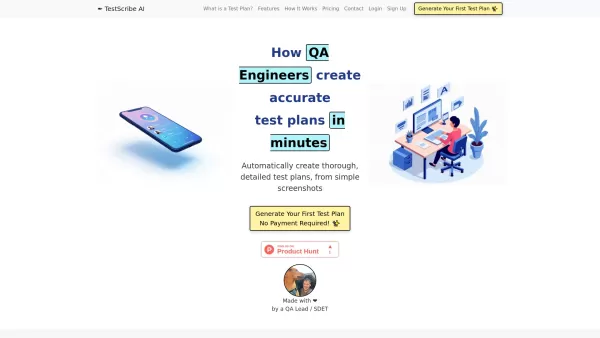
What is TestScribe AI? TestScribe AI revolutionizes software testing by automatically creating comprehensive test plans through artificial intelligence. This cloud-based solution helps testing teams and developers save countless hours on documentatio

What is Stacks?Stacks is an AI-powered agent designed to orchestrate various productivity tools, automating tasks and boosting work efficiency. It seamlessly connects different applications, enabling users to execute complex workflows smoothly. From

What is Linguix — Grammar Checker and AI Writing App?Linguix is an all-in-one grammar checker and AI-powered writing assistant that elevates your text across websites and applications. It supports multiple languages such as English, French, German, S

What is Langtail?Langtail is a powerful platform designed to streamline the management of Large Language Model (LLM) prompts, enhancing team collaboration and boosting the efficiency of AI development workflows. It's the go-to tool for developers and
Pesto (Pragli) Scheduler for Google Calendar Product Information
What is the Pesto (Pragli) Scheduler for Google Calendar?
The Pesto (Pragli) Scheduler for Google Calendar is a convenient tool that simplifies scheduling within Pesto's virtual workspace. With a single click, users can generate Google Calendar events linked to Pesto rooms, making it easy for team members to join. This seamless integration saves time and boosts the efficiency of organizing meetings in a digital space, keeping everyone aligned and enhancing collaborative efforts.
Who is the Pesto (Pragli) Scheduler for Google Calendar designed for?
- Distributed remote teams
- Organizations relying on Google Calendar
- Project coordinators and managers
- Independent freelancers
- Teams focused on collaboration
How do you use the Pesto (Pragli) Scheduler for Google Calendar?
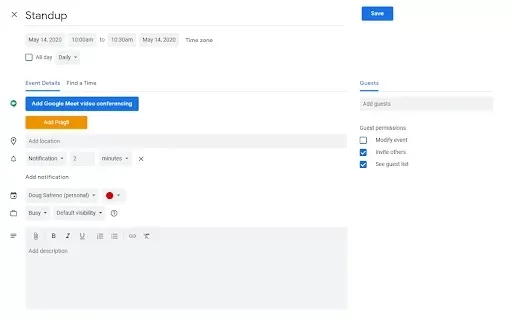
- Step 1: Install the Pesto Scheduler extension from the Chrome Web Store.
- Step 2: Launch your Google Calendar.
- Step 3: Set up a new calendar event.
- Step 4: Click the Pesto button that appears during event creation.
- Step 5: Choose the relevant Pesto room for your meeting.
- Step 6: Save the event, and it will be scheduled in both Google Calendar and Pesto.
Platform
- chrome
Core Features & Benefits of Pesto (Pragli) Scheduler for Google Calendar
Key Features
- One-click scheduling
- Direct Google Calendar integration
- Pesto room selection
Primary Benefits
- Reduces time spent on scheduling
- Improves team collaboration
- Provides quick access to virtual meeting rooms
Main Use Cases & Applications
- Coordinating remote team meetings
- Organizing project discussions
- Scheduling client calls
Frequently Asked Questions about Pesto (Pragli) Scheduler for Google Calendar
How does the Pesto Scheduler work?
The Pesto Scheduler connects with Google Calendar to enable straightforward scheduling of events directly into Pesto rooms.
Is this extension free to use?
Yes, the Pesto Scheduler is completely free.
Can I use it with other calendar platforms?
Currently, it is compatible only with Google Calendar.
What if I don't have a Pesto account?
A Pesto account is required to access the scheduled meeting rooms.
Does it work offline?
No, an active internet connection is necessary to use the extension.
Can I customize my event details?
Yes, you can fully customize all event details before saving.
How do I uninstall the extension?
You can remove it from the extensions management page in your Chrome settings.
Is there a mobile app for Pesto?
Pesto does not currently offer a dedicated mobile application.
Can I sync Pesto rooms with other calendars?
Syncing is only supported with Google Calendar at this time.
Is customer support available?
Yes, support can be contacted through the official Pesto website.
Pesto (Pragli) Scheduler for Google Calendar Company Information
Website:
NACompany Name:
PestoSupport Email:
NAFacebook:
NAX (Twitter):
NAYouTube:
NAInstagram:
NATikTok:
NALinkedIn:
NA
Pesto (Pragli) Scheduler for Google Calendar Screenshot


2026 Latest Best Top-Rated AI Outline Generators for Long-Form SEO Articles, meticulously curated by XIX.AI. These powerful tools offer game-changing assistance in creating high-quality content quickly, boosting writing efficiency significantly. Get a free vs paid comparison along with real-world tests and detailed rankings to help you find the must-try option that suits your needs. Explore now to unlock your AI edge.
 8 tools
 xix.ai

2026 Latest Best AI Study Tools for Homework and Exam Prep! XIX.AI curates a top-rated list of powerful, game-changing tools that help students boost productivity, streamline homework completion, and ace exams through real-world tests. Get a free vs paid comparison, detailed rankings, and must-try options to unlock your AI edge. Explore now!
10 tools
xix.ai

2026 Latest Best AI Vocal Demo Tools for Songwriters, Hook Creators, and Multi-Language Content Teams! XIX.AI has curated a top-rated list of powerful game-changing tools that go through rigorous real-world tests. You’ll find detailed free vs paid comparison data, comprehensive rankings, and must-try options to help you boost writing efficiency and unlock your creative potential. Explore now to discover your perfect tool for all your content needs!
9 tools
xix.ai

2026 Latest Best Top-rated AI Competitive Research Tools for Small Businesses! XIX.AI has curated a highly powerful game-changing collection, updated weekly with rigorous real-world tests and detailed rankings. You can find a comprehensive free vs paid comparison to help you identify the must-try tools that boost your productivity and give you a competitive edge. Explore now to discover your perfect tool!
9 tools
xix.ai

2026 Latest Best Photoshop AI retouch tools for ecommerce apparel, skin cleanup, and color consistency! This top-rated curated list features powerful game-changing solutions that help you boost writing efficiency, streamline content creation, and achieve perfect visual results effortlessly. Each tool has undergone real-world tests through weekly updated rankings, complete with free vs paid comparison details. Backed by XIX.AI, it’s the must-try guide for anyone aiming to unlock your AI edge. Explore now!
10 tools
xix.ai

2026 Latest Best Top-Rated AI Prompt Libraries for optimizing all types of ChatGPT workflows. XIX.AI has curated a powerful, game-changing collection that goes through rigorous real-world tests to ensure top performance. You can find detailed free vs paid comparisons and expert rankings to help you choose the must-try tools that boost your productivity and unlock your AI edge. Explore now!
11 tools
xix.ai


