


 Home
HomeNadi



Helps TikTok sellers, brands, MCNs, and TAPs discover winning products and find creators.

HelpLook is an AI-powered all-in-one knowledge base tool that helps businesses quickly build knowledge bases, help centers, and...

Your AI Workspace

302.AI is an enterprise-grade AI resource platform with pay-as-you-go pricing, API access to a full range of AI models, and ready-to-use online applications.

剧火AI — AI Screenwriter + Director, a One-Person Short Drama Studio In one sentence, what is it?

What is GPT2Markdown?GPT2Markdown is a Chrome extension that streamlines the process of exporting your ChatGPT conversations into Markdown format. With a single click, it allows you to download your chat history as a Markdown (.md) file directly to y

What is NOA?NOA Tech provides innovative technology solutions to enhance your business productivity. Utilizing advanced AI tools and custom automation, we identify operational bottlenecks, implement automation strategies, and empower your team to con

What is Parker AI?Parker AI is an advanced artificial intelligence meeting assistant created to streamline how product conversations are captured, analyzed, and managed. It connects with leading communication platforms like Zoom and Slack, documentin
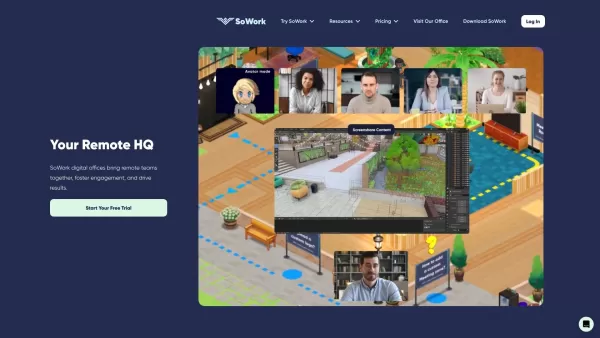
What is SoWork?SoWork provides a virtual office platform that helps remote teams collaborate effortlessly. Its features include proximity-based video and audio calls that start automatically as colleagues "walk" near each other, fostering spontaneous
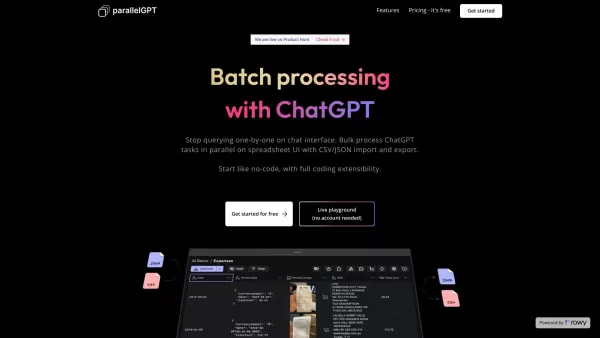
What is ParallelGPT?ParallelGPT is an innovative platform for bulk processing of ChatGPT tasks. Utilizing a spreadsheet-style interface, it allows users to easily import and export prompts in CSV or JSON formats and execute them concurrently. This en
Nadi Product Information
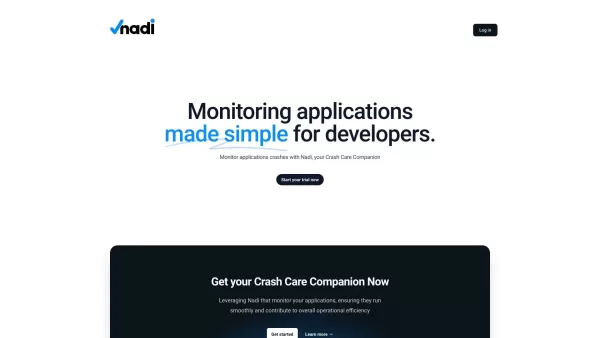
What is Nadi?
Nadi Pro is a comprehensive crash monitoring solution built for developers. It delivers real-time alerts and detailed diagnostic reports, enabling swift troubleshooting and issue resolution. Designed to streamline crash oversight, Nadi Pro provides deep insights into crash causes and frequency, helping to minimize downtime and enhance user experience.
Who uses Nadi?
- Developers
- Software Engineers
- IT Operations Teams
- Quality Assurance Teams
How to use Nadi
- Step 1: Create an account on nadi.pro.
- Step 2: Install Nadi Pro within your application.
- Step 3: Configure settings to match your app's requirements.
- Step 4: Monitor real-time alerts and crash reports.
- Step 5: Analyze detailed reports to pinpoint issues.
- Step 6: Troubleshoot and resolve crashes using the provided insights.
Platform
- Web
- macOS
- Windows
Nadi's Core Features & Benefits
Core Features
- Real-time crash monitoring
- Detailed crash reports
- Instant alerts
- User-friendly dashboard
- Customizable settings
Key Benefits
- Reduce application downtime
- Improve user experience
- Quickly identify and resolve issues
- Enhance app performance
- Simplified crash monitoring process
Main Use Cases & Applications
- Monitoring application crashes in real-time
- Analyzing crash data to improve app performance
- Generating detailed crash reports
- Customizing alerts and settings for optimal monitoring
- Troubleshooting and resolving application issues rapidly
FAQs about Nadi
What is Nadi Pro?
Nadi Pro is a real-time application crash monitoring tool designed for developers.
How do I install Nadi Pro?
Install Nadi Pro by signing up on nadi.pro and following the provided installation guide.
What platforms does Nadi Pro support?
Nadi Pro supports web, Windows, and macOS platforms.
Can I customize alerts in Nadi Pro?
Yes, Nadi Pro allows you to fully customize alerts and settings based on your needs.
How does Nadi Pro help improve app performance?
By delivering detailed crash reports and real-time alerts, Nadi Pro helps you quickly identify and resolve issues, thereby improving overall app performance.
Who can use Nadi Pro?
Nadi Pro is ideal for developers, software engineers, IT operations teams, and quality assurance teams.
Is there a trial version of Nadi Pro?
Yes, you can start a free trial by signing up on nadi.pro.
Are there any alternatives to Nadi Pro?
Yes, alternatives include Sentry, Crashlytics, Raygun, and Bugsnag.
Does Nadi Pro offer real-time monitoring?
Yes, Nadi Pro provides real-time crash monitoring and instant alerts.
What kind of reports does Nadi Pro provide?
Nadi Pro provides comprehensive, detailed crash reports to help you analyze and resolve issues effectively.
Nadi Company Information
Website:
https://nadi.proCompany Name:
NadiSupport Email:
NAFacebook:
NAX (Twitter):
NAYouTube:
NAInstagram:
https://www.instagram.com/officialnadi/?hl=enTikTok:
NALinkedIn:
NA
Nadi Screenshot


2026 Latest Best Manga AI Background Generators Ranked Top-Rated! This curated collection showcases powerful game-changing tools perfect for creating high-quality chapter backgrounds, book covers, and promotional art. Every option has undergone rigorous real-world tests to ensure reliability. Get a free vs paid comparison along with detailed insights. Explore now to discover your perfect tool and unlock your AI edge in manga creation.
 6 tools
 xix.ai

2026 Latest Best Top-rated AI Object Removal Editors for portraits travel product shots! XIX.AI curates a powerful game-changing collection regularly updated with weekly rankings. These tools offer real-world tests to help you quickly remove unwanted elements, boost content quality, and save tons of time without compromising results. Must-try for anyone aiming to unlock their AI creation edge. Explore now!
10 tools
xix.ai

2026 Latest Best Top-rated AI Text to Speech Tools for Online Courses are curated by XIX.AI based on rigorous real-world tests and weekly updated rankings. These powerful tools help creators deliver crystal-clear audio content effortlessly, boosting writing efficiency and streamlining course production. Check out the free vs paid comparison to find your perfect fit. Explore now to unlock your AI edge in online education.
10 tools
xix.ai

2026 Latest Best Top-Rated AI Blog Title Tools for Higher Click Through Rates! XIX.AI has carefully curated a powerful, game-changing collection of top tools that go through rigorous real-world tests. You’ll find a free vs paid comparison, weekly updated rankings, and detailed insights to help you boost your blog’s traffic efficiently. Must-try options are highlighted to help you unlock your AI edge. Explore now!
10 tools
xix.ai

2026 Latest Best Top-rated AI Task Routing Tools for Support Workflows! XIX.AI has curated a highly powerful game-changing collection of must-try solutions, all undergoing rigorous real-world tests and updated weekly. These tools streamline workflows, boost productivity, and help teams deliver faster, more efficient support. Explore now to discover your perfect tool and unlock your AI edge!
17 tools
xix.ai

2026 Latest Best Top-Rated AI Citation and Paper Summary Tools Curated by XIX.AI. Get powerful game-changing solutions for quick content creation, improved writing efficiency, and boosting productivity. We offer a free vs paid comparison along with real-world tests and weekly updated rankings to help you find the must-try tool that fits your needs perfectly. Explore now to Unlock your AI edge.
10 tools
xix.ai


