


 Home
HomeMiro
Miro: Collaboration Tool for Distributed Teams



Helps TikTok sellers, brands, MCNs, and TAPs discover winning products and find creators.

HelpLook is an AI-powered all-in-one knowledge base tool that helps businesses quickly build knowledge bases, help centers, and...

Your AI Workspace

302.AI is an enterprise-grade AI resource platform with pay-as-you-go pricing, API access to a full range of AI models, and ready-to-use online applications.

剧火AI — AI Screenwriter + Director, a One-Person Short Drama Studio In one sentence, what is it?

SalesRobot isn't just another tool in your sales arsenal—it's your new best friend in the world of automated outreach. This cloud-based gem lets you juggle multiple cold outreach campaigns on LinkedIn and through email, all while sipping your morning

What is Stacks?Stacks is an AI-powered agent designed to orchestrate various productivity tools, automating tasks and boosting work efficiency. It seamlessly connects different applications, enabling users to execute complex workflows smoothly. From

What is Linguix — Grammar Checker and AI Writing App?Linguix is an all-in-one grammar checker and AI-powered writing assistant that elevates your text across websites and applications. It supports multiple languages such as English, French, German, S
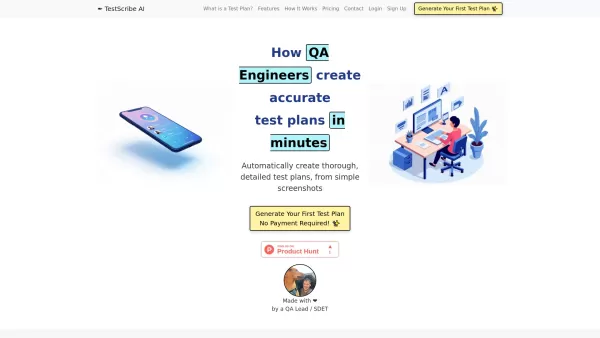
What is TestScribe AI? TestScribe AI revolutionizes software testing by automatically creating comprehensive test plans through artificial intelligence. This cloud-based solution helps testing teams and developers save countless hours on documentatio

What is Langtail?Langtail is a powerful platform designed to streamline the management of Large Language Model (LLM) prompts, enhancing team collaboration and boosting the efficiency of AI development workflows. It's the go-to tool for developers and
Miro Product Information
Miro isn't just another tool on your digital workspace; it's a vibrant hub where remote teams can come together to brainstorm, plan, and create. Imagine a platform where distance doesn't matter, where everyone can dive into the same project from anywhere in the world. That's Miro for you—a visual collaboration platform designed to make teamwork as seamless and engaging as if you were all in the same room.
How to Dive Into Miro?
Getting started with Miro is as easy as signing up with your work email for a free account. Once you're in, you'll find yourself in a world of possibilities. Create and join teams, set up your own boards, and start inviting your colleagues to join the fun. Miro is versatile, offering a range of features from visual project management to diagramming, process mapping, and even content and data visualization. And if you're into workshops or need to collaborate asynchronously, Miro has got you covered. Want to make your workflow even smoother? Miro integrates with over 100 tools, so you can connect your favorites and start collaborating without missing a beat.
Miro's Toolbox: Core Features
Visual Project Management Diagramming and Process Mapping Product Development Workflows Content and Data Visualization Workshops and Async Collaboration Miro AI Apps and Integrations Developer ResourcesMiro in Action: Use Cases
Technical Diagramming Whiteboarding Wireframing Mind Mapping Retrospectives Scaled Product Planning Process Mapping Customer Journey Mapping Strategy and PlanningFAQ from Miro
- Is Miro suitable for distributed teams?
- Absolutely! Miro is tailor-made for teams spread across the globe, ensuring everyone can collaborate effectively no matter where they are.
- Can I integrate Miro with my existing tools?
- Yes, you can! With over 100 integrations, Miro fits right into your existing workflow, enhancing your productivity without the hassle.
- What are the core features of Miro?
- Miro boasts a wide array of features including visual project management, diagramming, process mapping, product development workflows, content and data visualization, workshops, async collaboration, Miro AI, apps and integrations, and developer resources.
- What are some use cases for Miro?
- From technical diagramming to whiteboarding, wireframing, mind mapping, retrospectives, scaled product planning, process mapping, customer journey mapping, and strategy planning, Miro supports a diverse set of use cases to fuel your creativity and productivity.
- What pricing plans does Miro offer?
- To find out more about Miro's pricing plans, head over to Miro's pricing page.
For any questions or support, you can reach out to Miro's team. Their support email and other customer service contacts are readily available. If you're looking for more ways to get in touch, check out the contact us page.
Curious about the brains behind Miro? The company is simply known as Miro, and you can learn more about them by visiting the about us page.
Ready to log in or sign up? You can do so at Miro's login page or Miro's sign up page.
Stay connected with Miro on social media! Follow them on Facebook, YouTube, LinkedIn, Twitter, and Instagram to keep up with the latest updates and insights.
Miro Screenshot



2026 Latest Best Manga AI Background Generators Ranked Top-Rated! This curated collection showcases powerful game-changing tools perfect for creating high-quality chapter backgrounds, book covers, and promotional art. Every option has undergone rigorous real-world tests to ensure reliability. Get a free vs paid comparison along with detailed insights. Explore now to discover your perfect tool and unlock your AI edge in manga creation.
 6 tools
 xix.ai

2026 Latest Best Top-rated AI Object Removal Editors for portraits travel product shots! XIX.AI curates a powerful game-changing collection regularly updated with weekly rankings. These tools offer real-world tests to help you quickly remove unwanted elements, boost content quality, and save tons of time without compromising results. Must-try for anyone aiming to unlock their AI creation edge. Explore now!
10 tools
xix.ai

2026 Latest Best Top-rated AI Text to Speech Tools for Online Courses are curated by XIX.AI based on rigorous real-world tests and weekly updated rankings. These powerful tools help creators deliver crystal-clear audio content effortlessly, boosting writing efficiency and streamlining course production. Check out the free vs paid comparison to find your perfect fit. Explore now to unlock your AI edge in online education.
10 tools
xix.ai

2026 Latest Best Top-Rated AI Blog Title Tools for Higher Click Through Rates! XIX.AI has carefully curated a powerful, game-changing collection of top tools that go through rigorous real-world tests. You’ll find a free vs paid comparison, weekly updated rankings, and detailed insights to help you boost your blog’s traffic efficiently. Must-try options are highlighted to help you unlock your AI edge. Explore now!
10 tools
xix.ai

2026 Latest Best Top-rated AI Task Routing Tools for Support Workflows! XIX.AI has curated a highly powerful game-changing collection of must-try solutions, all undergoing rigorous real-world tests and updated weekly. These tools streamline workflows, boost productivity, and help teams deliver faster, more efficient support. Explore now to discover your perfect tool and unlock your AI edge!
17 tools
xix.ai

2026 Latest Best Top-Rated AI Citation and Paper Summary Tools Curated by XIX.AI. Get powerful game-changing solutions for quick content creation, improved writing efficiency, and boosting productivity. We offer a free vs paid comparison along with real-world tests and weekly updated rankings to help you find the must-try tool that fits your needs perfectly. Explore now to Unlock your AI edge.
10 tools
xix.ai


Miro is absolutely amazing for our remote squad! 🎨 We use it daily for brainstorming sessions and project planning. The infinite canvas makes it feel like we're all in the same room. Sometimes it lags a bit with complex diagrams, but overall a game-changer for collaboration. Highly recommend! 🚀
Miro's like a virtual playground for brainstorming! 🧠 Super intuitive for remote teams, but sometimes it feels a bit overwhelming with all the features. Still, love how it brings everyone together!


