


 Home
HomeJulius - Chrome Extension
AI-powered Google Sheets analysis



Helps TikTok sellers, brands, MCNs, and TAPs discover winning products and find creators.

HelpLook is an AI-powered all-in-one knowledge base tool that helps businesses quickly build knowledge bases, help centers, and...

Your AI Workspace

302.AI is an enterprise-grade AI resource platform with pay-as-you-go pricing, API access to a full range of AI models, and ready-to-use online applications.

剧火AI — AI Screenwriter + Director, a One-Person Short Drama Studio In one sentence, what is it?

What is AI Excel Bot?AI Excel Bot uses advanced AI algorithms to help you build complex Excel and Google Sheets formulas in seconds. By leveraging natural language processing, it makes writing, editing, and understanding formulas much easier. Whether

What is Bubbly?BubblyAI is a comprehensive platform that transforms data analysis for businesses. By leveraging advanced AI algorithms, it automates extracting actionable insights from complex datasets, empowering users to make confident, data-driven

Ever felt like you're stuck trying to solve complex business issues, but your tech skills just aren't up to snuff? Enter Wand, your new best friend in the world of AI. This tool is designed to be a game-changer, allowing anyone, regardless of their techni
Ever wondered how to keep elections transparent and fair? Meet REVISOR - Your Unblinking Poll Watcher, a cutting-edge software package that leverages the power of neural networks to ensure the integrity of electoral processes. This tool is like having an

Ever wondered what Diya is all about? Well, let me introduce you to this fantastic AI-powered multilingual virtual assistant that's revolutionizing the way websites interact with their visitors. Diya isn't just any virtual assistant; it comes with a human
Julius - Chrome Extension Product Information
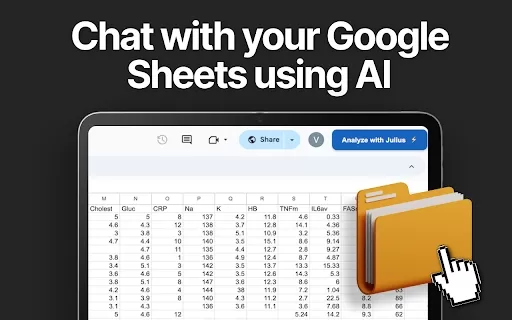
Ever heard of Julius? It's not just any AI tool—it's a smart data analyst that seamlessly integrates with Google Sheets, leveraging the power of ChatGPT. Imagine having a personal assistant that dives into your data and pulls out insights you never knew existed. That's Julius for you!
How to Harness the Power of Julius AI Chrome Extension
Getting started with Julius is a breeze. Here's how you can jump right in:
- First, add the Julius Chrome extension to your browser. It's like welcoming a new teammate to your squad.
- Next, open the Google Sheet you want to analyze. Think of it as setting the stage for Julius to perform its magic.
- Make sure to set the sharing permissions to Public. This might sound a bit nerve-wracking, but trust me, it's safe with Julius.
- Finally, hit that 'Analyze with Julius' button, and watch as your data comes to life with insights and visualizations.
Julius AI Chrome Extension's Core Features
Versatile Data Analysis
Julius isn't just a one-trick pony. It can handle all sorts of data analysis, making it a versatile tool for any data enthusiast or professional. Whether you're crunching numbers or looking for patterns, Julius has got you covered.
Dynamic Graph Maker
Who doesn't love a good graph? Julius lets you create dynamic, eye-catching graphs that make your data not just understandable but also visually appealing. It's like turning numbers into a work of art!
Data Insights Made Easy
The beauty of Julius is how it simplifies complex data into easy-to-digest insights. It's like having a data whisperer that can tell you exactly what your data is trying to say.
Write Reports with AI
Say goodbye to the days of laboriously writing reports. With Julius, you can generate concise, AI-powered reports that capture the essence of your data without the hassle. It's like having a ghostwriter that knows data inside out.
Julius AI Chrome Extension's Use Cases
Generate Tailored Charts from Google Sheet Data
Need a specific chart to make your point? Julius can generate tailored charts directly from your Google Sheet data, ensuring your presentations are not only informative but also stunning.
Filter and Transform Data Effortlessly
With Julius, filtering and transforming data becomes as easy as pie. No more wrestling with complex formulas or spending hours on data cleaning—Julius does it all with a few clicks.
Write Concise AI-Generated Reports
When it comes to reports, Julius knows how to keep it short and sweet. It can generate concise, AI-driven reports that highlight the key points of your data analysis, making it perfect for busy professionals.
FAQ from Julius
- Is Julius AI free to use?
- Curious about the cost? Julius offers a free tier, so you can start exploring its capabilities without spending a dime. Of course, there are premium options if you want to unlock more advanced features, but the basics are on the house!
Julius - Chrome Extension Screenshot



2026 Latest Best AI Pull Request Review Tools for GitHub Teams are here on XIX.AI! This top-rated curated list showcases powerful game-changing solutions that streamline refactoring, bug fixing, and security gap detection across all team workflows. Enjoy a free vs paid comparison along with real-world tests and detailed rankings to help you find the perfect tool that boosts productivity significantly. Explore now to unlock your AI edge!
 12 tools
 xix.ai

2026 Latest Best Top-rated AI Text to Speech Tools for Natural Voiceovers are here on XIX.AI! This curated list features powerful, game-changing options that deliver crystal-clear voices for every use case, backed by real-world tests and weekly updated rankings. Get a free vs paid comparison to find the must-try solution that boosts your productivity instantly. Explore now to Unlock your AI edge!
11 tools
xix.ai

2026 Latest Best Manga AI Background Generators Ranked Top-Rated! This curated collection showcases powerful game-changing tools perfect for creating high-quality chapter backgrounds, book covers, and promotional art. Every option has undergone rigorous real-world tests to ensure reliability. Get a free vs paid comparison along with detailed insights. Explore now to discover your perfect tool and unlock your AI edge in manga creation.
6 tools
xix.ai

2026 Latest Best Top-rated AI Object Removal Editors for portraits travel product shots! XIX.AI curates a powerful game-changing collection regularly updated with weekly rankings. These tools offer real-world tests to help you quickly remove unwanted elements, boost content quality, and save tons of time without compromising results. Must-try for anyone aiming to unlock their AI creation edge. Explore now!
10 tools
xix.ai

2026 Latest Best Top-rated AI Text to Speech Tools for Online Courses are curated by XIX.AI based on rigorous real-world tests and weekly updated rankings. These powerful tools help creators deliver crystal-clear audio content effortlessly, boosting writing efficiency and streamlining course production. Check out the free vs paid comparison to find your perfect fit. Explore now to unlock your AI edge in online education.
10 tools
xix.ai

2026 Latest Best Top-Rated AI Blog Title Tools for Higher Click Through Rates! XIX.AI has carefully curated a powerful, game-changing collection of top tools that go through rigorous real-world tests. You’ll find a free vs paid comparison, weekly updated rankings, and detailed insights to help you boost your blog’s traffic efficiently. Must-try options are highlighted to help you unlock your AI edge. Explore now!
10 tools
xix.ai


이번 주에 Julius 크롬 확장 프로그램을 시도해봤어요! 구글 시트와 연결되는 게 정말 마음에 들었어요. 데이터를 보고 통찰력 있는 분석을 해주는 AI 도우미 같은 느낌? 😊 몇 번의 클릭만으로 복잡한 데이터를 쉽게 요약할 수 있어서 업무 효율이 많이 좋아졌어요. 다만 가끔 응답이 조금 느려서 답답할 때도 있었네요. 좀 더 빠르면 완벽할 텐데!
これはすごい!データ分析の作業がかなり楽になりました。何時間もかかる作業が数分で終わるなんて感動😭。デザインも使いやすくて、Googleシートとの連携がシームレス。ただ、月額課金がちょっと高いかも…でも便利すぎて手放せない!
Julius is a game-changer for Google Sheets! 😍 It’s like having a data wizard by your side, crunching numbers and spitting out insights faster than I can brew coffee. ChatGPT integration makes it feel like I’m chatting with a super-smart friend who gets my data. Only gripe? Sometimes it’s a bit too eager to impress with fancy charts. Still, total lifesaver for quick analysis!


