


 Home
HomeGitBrain
Git Workflow Simplified: Boost Productivity



Helps TikTok sellers, brands, MCNs, and TAPs discover winning products and find creators.

HelpLook is an AI-powered all-in-one knowledge base tool that helps businesses quickly build knowledge bases, help centers, and...

Your AI Workspace

302.AI is an enterprise-grade AI resource platform with pay-as-you-go pricing, API access to a full range of AI models, and ready-to-use online applications.

剧火AI — AI Screenwriter + Director, a One-Person Short Drama Studio In one sentence, what is it?

Ever stumbled upon Cherry Studio AI and wondered what it's all about? Well, let me break it down for you. Cherry Studio AI isn't just another run-of-the-mill AI tool; it's a powerhouse desktop client that lets you dive into advanced AI interactions across

Discover Plume AI: Your Ultimate Academic Writing AssistantAre you tired of struggling with your academic writing? Well, say hello to Plume AI, the innovative AI assistant that's here to revolutionize the way you write! Designed with students in mind, Plume AI harnesses the power of cutting-edge art

Ever wondered how to turn your jumbled thoughts and complex queries into something you can actually grasp? Enter The Visualizer, your new best friend in the world of learning and creativity. This nifty tool takes your written queries, URLs, and even PDFs,

Ever wished for a trusty sidekick to help you navigate the digital world with ease? Enter Sider, your personal AI companion designed to seamlessly blend into your daily routine. Starting off as a handy Chrome/Edge extension, Sider transforms your browsing

Ever wondered what Ninja AI is all about? Well, let me tell you, it's like having a Swiss Army knife for your digital needs! Ninja AI isn't just another AI tool; it's a powerhouse that brings together over 24 top-notch Large Language Models (LLMs) to help
GitBrain Product Information
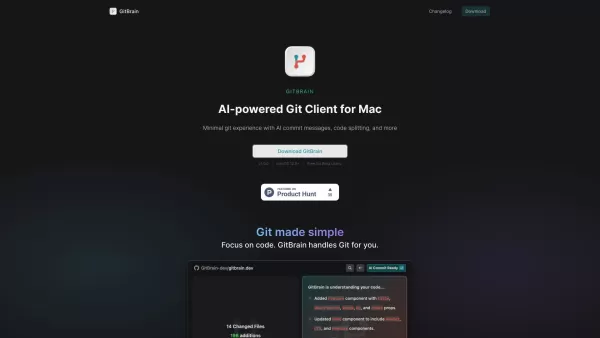
Ever found yourself wrestling with Git on your Mac, wishing there was a smarter way to manage your code? Enter GitBrain—your new best friend in the world of coding. It's not just another Git client; it's an AI-powered marvel designed to streamline your Git workflow and boost your coding productivity to new heights. With GitBrain, you're not just pushing and pulling code; you're leveraging intelligent insights that understand your code changes and suggest the best Git operations for you.
How to Get Started with GitBrain
Getting started with GitBrain is a breeze. First, you'll want to download and install the app on your Mac. Once it's up and running, the GitBrain panel springs to life, automatically sniffing out the project you're tinkering with in your favorite IDE. The design is all about speed and ease, with keyboard shortcuts that make Git operations feel like second nature. But here's where it gets cool—GitBrain uses AI to slice your code changes into multiple, well-structured commits, and it even crafts customizable commit messages for you. Plus, with the self-code review feature, you can double-check your work before pushing it out into the world. And let's not forget the slick, native UI that feels right at home on your Mac.
Unpacking GitBrain's Core Features
AI-Powered Git Client
GitBrain isn't just about pushing and pulling; it's about understanding your code and suggesting the best moves.
Intelligent Code Change Understanding
It digs into your code, figuring out what you've changed and why, making your Git life easier.
Suggested Git Operations
With GitBrain, you're never left guessing. It tells you what to do next, based on what it knows about your project.
Code Splitting into Multiple AI-Generated Commits
Your code changes get neatly organized into commits that make sense, thanks to AI.
Customizable Commit Messages
You can tweak those auto-generated commit messages to fit your style perfectly.
Self-Code Review Feature
Before you commit, take a moment to review your changes. GitBrain makes it easy.
Auto-Detection of Current Project from Favorite IDEs
No need to tell GitBrain what you're working on—it figures it out for you.
Keyboard Shortcuts for Efficient Git Workflow
Speed through your Git operations with shortcuts that feel like they were made just for you.
Optimized Performance and Native UI for Mac
GitBrain runs smoothly on your Mac, with a UI that looks and feels like it belongs there.
Why You'll Love Using GitBrain
Whether you're looking to simplify your Git workflow, ramp up your coding productivity, or just manage your code changes more efficiently, GitBrain has you covered. It's perfect for those moments when you need to review your code before committing or when you want seamless Git management on your Mac. It's like having a coding buddy who's always one step ahead, making your Git experience smoother and more productive.
Frequently Asked Questions About GitBrain
- What operating system does GitBrain support?
- GitBrain is designed exclusively for Mac.
- Can I customize the commit messages generated by GitBrain?
- Absolutely! GitBrain lets you tailor those messages to your heart's content.
- Does GitBrain work with my favorite IDE?
- Yes, it automatically detects and integrates with your preferred IDE.
- Is GitBrain a native Mac application?
- It sure is, providing a seamless and native experience on your Mac.
- What are some of the core features of GitBrain?
- From AI-powered Git operations to intelligent code change understanding, customizable commit messages, and self-code review, GitBrain packs a punch.
Interested in giving GitBrain a try? Check out the pricing details here. It's brought to you by the folks at GitBrain, who are all about making your coding life easier.
GitBrain Screenshot


2026 Latest: Explore our curated rankings of the best AI tools for generating structured prompts for content and coding. Discover top-rated, powerful solutions to boost your accuracy and workflow efficiency, with weekly updated comparisons. Unlock your next-level productivity with XIX.AI.
 10 tools
 xix.ai


このGitBrain、AIを使ってGitの作業を効率化してくれるのね!普段コマンドラインでやっていた操作が視覚的に分かりやすくて感動😊 リベースとかマージが怖くなくなったかも。でも、AIがコードの意図まで理解してコミットメッセージを生成するって本当?ちょっと不思議…
GitBrain is a game-changer for Mac users! 😎 Super intuitive, saves me from Git headaches, and the AI suggestions are spot-on. Only wish it had more language support!


