


 Home
HomeFile Organizer 2000
AI Plugin for Note Organization



Helps TikTok sellers, brands, MCNs, and TAPs discover winning products and find creators.

HelpLook is an AI-powered all-in-one knowledge base tool that helps businesses quickly build knowledge bases, help centers, and...

Your AI Workspace

302.AI is an enterprise-grade AI resource platform with pay-as-you-go pricing, API access to a full range of AI models, and ready-to-use online applications.

剧火AI — AI Screenwriter + Director, a One-Person Short Drama Studio In one sentence, what is it?
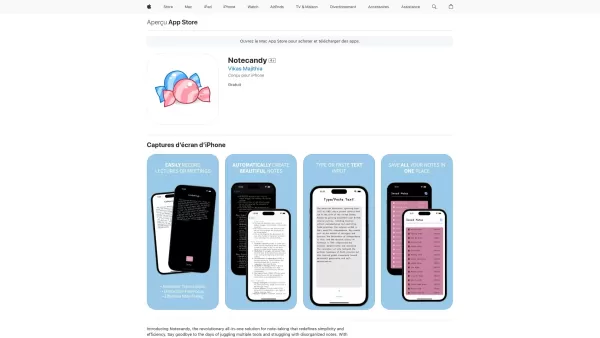
Ever found yourself in a lecture or meeting, scribbling notes frantically, only to realize later that half of it is illegible or you missed some key points? Enter Notecandy—an iOS app that's like your personal note-taking assistant, but way cooler. It uses AI to turn your recorded lectures or meetin

What is Akiflow?Akiflow is your go-to digital planner and calendar that's all about boosting your productivity. It pulls together your tasks and schedules from a bunch of different tools, making it super easy to manage your time and get stuff done.How to Use Akiflow?Getting started with Akiflow is a

If you're constantly juggling multiple browser tabs for work and personal life, then you might want to check out Side Space. This nifty tool is an AI-powered vertical tab manager extension designed to help you keep your browsing experience organized and e
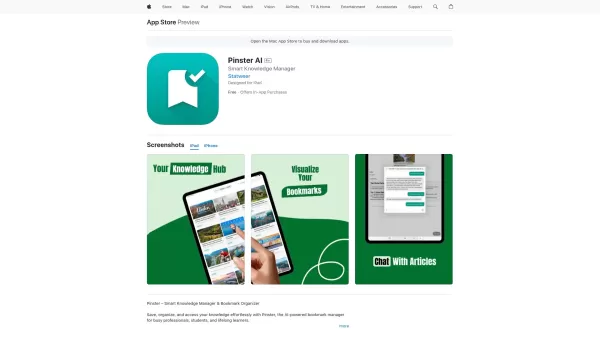
Pinster AI isn't just your average bookmark manager; it's like having a smart assistant that helps you keep your digital life in order. Imagine having a tool that not only saves your links, PDFs, and images but also organizes them in a way that makes sens
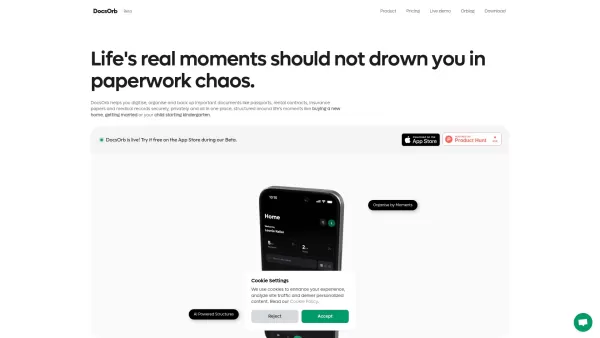
What is DocsOrb?DocsOrb revolutionizes document organization by offering an intelligent platform tailored for families, students, and global citizens. This AI-enhanced system transforms how you manage critical paperwork - from passports to medical re
File Organizer 2000 Product Information
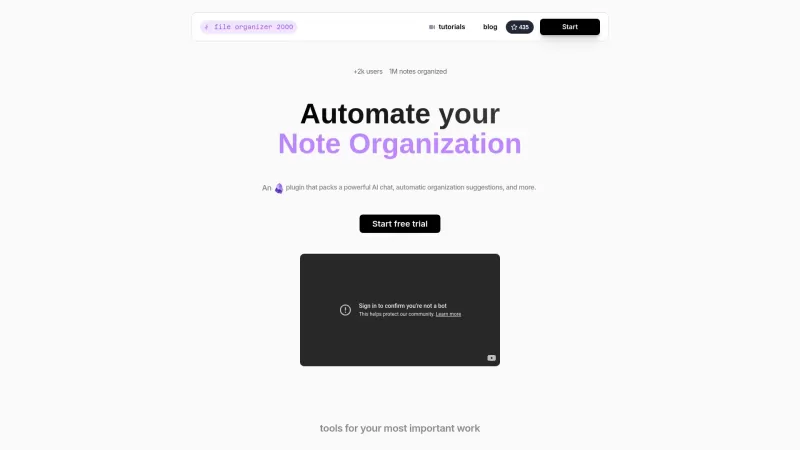
Discover the magic of File Organizer 2000, an AI-powered plugin for Obsidian that's here to revolutionize your note-taking experience. This tool is designed to streamline your workflow, making it easier to manage notes, images, and even voice memos with a level of efficiency that'll boost your productivity through the roof.
Getting started with File Organizer 2000 is a breeze. Just install the plugin within Obsidian and let the guided setup walk you through the process. Before you know it, you'll be using AI-powered suggestions and tools to automatically organize your notes like a pro.
Let's dive into what makes File Organizer 2000 tick:
AI Chat Integration: Say goodbye to manual sorting. With AI chat integration, categorizing your notes becomes a snap, enhancing your organizational skills without the hassle.
Automatic Organization: Whether it's notes, images, or voice memos, this plugin takes care of organizing them all, so you can focus on what matters most.
Handwriting Transcription: Got handwritten notes? No problem. File Organizer 2000 can transcribe them into Obsidian, keeping everything in one neat place.
Customizable Patterns: Tailor the organization to fit your unique style. With customizable patterns, you're in control of how your files are arranged.
So, how can you make the most out of File Organizer 2000? Here are some use cases that might just change the way you work:
Declutter Your Obsidian: Let the plugin automatically sort your notes, reducing clutter and making your digital space more manageable.
Transcribe Handwritten Notes: Transform your scribbles into organized digital notes within Obsidian, saving you time and effort.
Voice Memo Management: Handle your voice memos with ease, thanks to AI suggestions that help categorize and organize them effectively.
Got questions? We've got answers in our FAQ section:
How to use the plugin?: It's simple! Install it in Obsidian, follow the setup, and let the AI do the heavy lifting.
Is there a free version available?: Check out our pricing page to see what options are available for you.
What if I am a student or educator?: We offer special packages for students and educators, so be sure to take a look.
Need to get in touch? Here's how you can reach us:
- Support Email: [email protected]
Curious about the company behind this game-changing tool? Here's a quick rundown:
- Company Name: File Organizer 2000
Ready to dive in? Here are the links you need:
Sign Up: https://app.fileorganizer2000.com
Want to see it in action? Check out our:
- YouTube Channel: https://www.youtube.com/watch?v=NQjZcL4sThs&list=PLgRcC-DFR5jdUxbSBuNeymwYTH_FSVxio
For those who like to get under the hood, here's our:
- GitHub Repository: https://github.com/different-ai/file-organizer-2000
With File Organizer 2000, organizing your digital life has never been easier or more enjoyable. Give it a try and see the difference it can make!
File Organizer 2000 Screenshot

2026 Latest Best Top-Rated AI Productivity Assistants for Managing Tasks, Notes, and Priorities! XIX.AI curates a powerful game-changing collection that has undergone rigorous real-world tests. You’ll find detailed free vs paid comparison insights, helpful rankings, and must-try options to boost your workflow efficiency significantly. Explore now to discover your perfect tool and unlock your AI edge!
 14 tools
 xix.ai


Tried File Organizer 2000 for a week and it's honestly a game-changer for my Obsidian vault! Sorting voice memos and linking notes is so much faster now 😂. My only minor gripe is it sometimes over-categorizes my rough drafts, but the productivity boost is real. Worth checking out if your notes are a mess!
파일 정리가 이렇게 쉬웠나? 🤯 Obsidian에서 File Organizer 2000 사용한 지 일주일 됐는데, 노트랑 음성메모 자동 분류 기능이 진짜 삶의 질 올려줘요. 다만 AI가 가끔 이상한 폴더에 저장하는 건 좀 웃기더라구요 ㅋㅋ
File Organizer 2000 is a lifesaver for my chaotic Obsidian vault! 🤯 Finally stopped wasting hours manually tagging notes - the AI auto-sorting is scary accurate. Though I wish it had more customization options for power users. Still, 10/10 would recommend to any Obsidian fan!
File Organizer 2000 is a game-changer! 😍 It sorted my messy Obsidian notes in seconds, and the AI suggestions for tags are spot-on. My workflow's never been smoother, though I wish it supported more file types. Still, a must-have for note-taking nerds like me!
File Organizer 2000 es bastante útil para gestionar mis notas en Obsidian. Es eficiente pero a veces se confunde con mis memorandos de voz. Aún así, una herramienta sólida que ha mejorado mi flujo de trabajo. ¡Vale la pena probarlo!


