


 Home
HomeCompose - Write Emails with AI
AI Email Writer | Compose Faster



Helps TikTok sellers, brands, MCNs, and TAPs discover winning products and find creators.

HelpLook is an AI-powered all-in-one knowledge base tool that helps businesses quickly build knowledge bases, help centers, and...

Your AI Workspace

302.AI is an enterprise-grade AI resource platform with pay-as-you-go pricing, API access to a full range of AI models, and ready-to-use online applications.

剧火AI — AI Screenwriter + Director, a One-Person Short Drama Studio In one sentence, what is it?

What is Orba?Orba is an AI-powered platform that personalizes interactions with your website visitors to enhance engagement and drive more conversions. It provides automated SDR outbound services, featuring an AI-driven website chatbot and personaliz
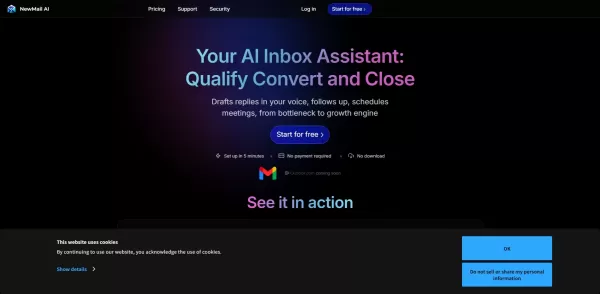
What is NewMail AI?NewMail AI provides a comprehensive suite of features that simplify email management. Powered by advanced AI algorithms, it automatically sorts incoming emails, highlights urgent messages, and proposes intelligent responses to boos

What is Ezsales AI?EzSales.ai is an advanced AI-powered platform that optimizes LinkedIn lead generation. It delivers highly accurate and current contact information, including verified email addresses and phone numbers, to help users build connectio
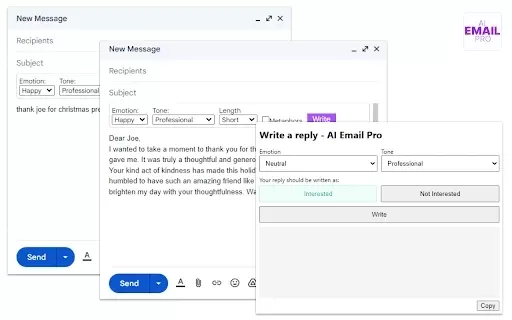
What is AI Email Pro?AI Email Pro is an intelligent email assistant that leverages artificial intelligence to help users draft emails swiftly and effectively. Its user-friendly interface allows you to create professional email drafts by simply enteri

What is TradeWind AI? TradeWind AI is the world's leading expert in sales lead development. It harnesses real-time data analysis from billions of global companies to precisely identify and engage potential customers. Available around the clock, it em
Compose - Write Emails with AI Product Information
What is Compose - Write Emails with AI?
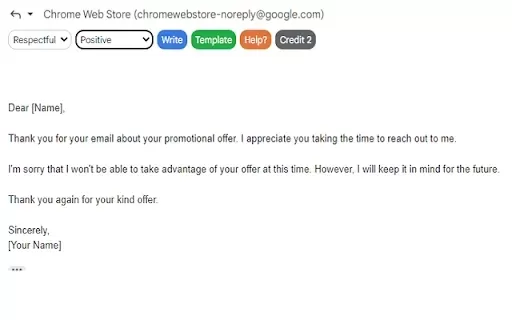
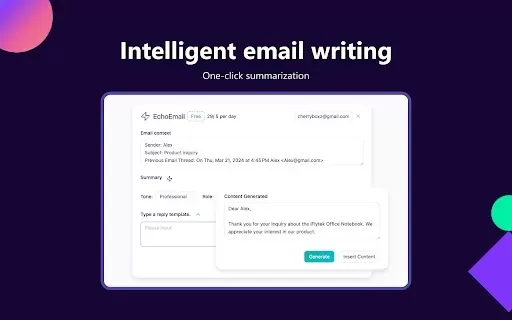
Compose - Write Emails with AI is a Chrome extension that simplifies email creation. Using a sophisticated AI model, it automatically drafts emails based on your instructions. Ideal for busy professionals or anyone facing writer's block, it helps you craft accurate, polished emails in seconds, so you can concentrate on your core message.
Who can benefit from Compose - Write Emails with AI?
- Busy Professionals
- Students
- Marketers
- Customer Support Teams
- Small Business Owners
How to use Compose - Write Emails with AI
- Step 1: Install the Compose extension from the Chrome Web Store.
- Step 2: Click the extension icon while composing an email.
- Step 3: Enter your email's main topic or context in the prompt box.
- Step 4: Click 'Compose' for the AI to generate your content.
- Step 5: Review and edit the AI-generated draft as needed.
- Step 6: Send your perfectly crafted email with confidence!
Platform
- Google Chrome
Compose - Write Emails with AI's Core Features & Benefits
Key Features
- AI-Powered Email Drafting
- Rapid Response Creation
- Professional Tone Customization
Primary Benefits
- Dramatically reduces time spent writing emails
- Eliminates writer's block
- Guarantees polished, professional communication
Main Use Cases & Applications
- Customer Support Replies
- Business & Professional Communication
- Academic & Educational Correspondence
- Marketing & Outreach Campaigns
Frequently Asked Questions About Compose - Write Emails with AI
What is Compose - Write Emails with AI?
It's a free Chrome extension that uses artificial intelligence to create professional emails instantly.
How does the AI generate emails?
The AI intelligently processes your input and context to construct appropriate email content.
Is it easy to use?
Yes, it features a simple, intuitive interface. Generating an email takes just a few clicks.
Can I customize the AI-generated emails?
Yes, you have full control to review, edit, and personalize every draft before sending.
Is there a cost for using this extension?
No, the extension is completely free to download and use from the Chrome Web Store.
Do I need strong writing skills to use it?
No, the AI does the heavy lifting, making it accessible to users of all skill levels.
What types of emails can I create?
It can handle a wide variety, from business and academic emails to personal correspondence.
Can it help with email replies?
Yes, it is excellent for drafting quick, professional responses to incoming messages.
Is it available on other browsers?
Currently, it is exclusively available as a Google Chrome extension.
How do I install the extension?
Simply visit the Chrome Web Store and search for 'Compose - Write Emails with AI' to install it.
Compose - Write Emails with AI Company Information
Website:
https://composechrome.comCompany Name:
ComposeSupport Email:
Facebook:
NAX (Twitter):
NAYouTube:
NAInstagram:
NATikTok:
NALinkedIn:
NA
Compose - Write Emails with AI Screenshot


2026 Latest Best Top-rated AI Text to Speech Tools for Natural Voiceovers are here on XIX.AI! This curated list features powerful, game-changing options that deliver crystal-clear voices for every use case, backed by real-world tests and weekly updated rankings. Get a free vs paid comparison to find the must-try solution that boosts your productivity instantly. Explore now to Unlock your AI edge!
 11 tools
 xix.ai

2026 Latest Best Manga AI Background Generators Ranked Top-Rated! This curated collection showcases powerful game-changing tools perfect for creating high-quality chapter backgrounds, book covers, and promotional art. Every option has undergone rigorous real-world tests to ensure reliability. Get a free vs paid comparison along with detailed insights. Explore now to discover your perfect tool and unlock your AI edge in manga creation.
6 tools
xix.ai

2026 Latest Best Top-rated AI Object Removal Editors for portraits travel product shots! XIX.AI curates a powerful game-changing collection regularly updated with weekly rankings. These tools offer real-world tests to help you quickly remove unwanted elements, boost content quality, and save tons of time without compromising results. Must-try for anyone aiming to unlock their AI creation edge. Explore now!
10 tools
xix.ai

2026 Latest Best Top-rated AI Text to Speech Tools for Online Courses are curated by XIX.AI based on rigorous real-world tests and weekly updated rankings. These powerful tools help creators deliver crystal-clear audio content effortlessly, boosting writing efficiency and streamlining course production. Check out the free vs paid comparison to find your perfect fit. Explore now to unlock your AI edge in online education.
10 tools
xix.ai

2026 Latest Best Top-Rated AI Blog Title Tools for Higher Click Through Rates! XIX.AI has carefully curated a powerful, game-changing collection of top tools that go through rigorous real-world tests. You’ll find a free vs paid comparison, weekly updated rankings, and detailed insights to help you boost your blog’s traffic efficiently. Must-try options are highlighted to help you unlock your AI edge. Explore now!
10 tools
xix.ai

2026 Latest Best Top-rated AI Task Routing Tools for Support Workflows! XIX.AI has curated a highly powerful game-changing collection of must-try solutions, all undergoing rigorous real-world tests and updated weekly. These tools streamline workflows, boost productivity, and help teams deliver faster, more efficient support. Explore now to discover your perfect tool and unlock your AI edge!
17 tools
xix.ai


