


 Home
HomeCodeSense AI
CodeSense AI: Boost Productivity in VS Code



Helps TikTok sellers, brands, MCNs, and TAPs discover winning products and find creators.

HelpLook is an AI-powered all-in-one knowledge base tool that helps businesses quickly build knowledge bases, help centers, and...

Your AI Workspace

302.AI is an enterprise-grade AI resource platform with pay-as-you-go pricing, API access to a full range of AI models, and ready-to-use online applications.

剧火AI — AI Screenwriter + Director, a One-Person Short Drama Studio In one sentence, what is it?

Ever found yourself staring at a piece of code, scratching your head and wondering, "What on earth does this do?" Well, that's where Code Explain comes in—your trusty AI-powered sidekick that's here to make sense of any code that's got you puzzled. It's l
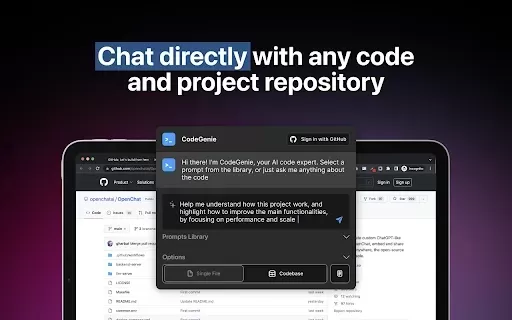
What is CodeGenie for Github?CodeGenie for GitHub is an intelligent assistant that uses ChatGPT to analyze and demystify code repositories on GitHub. It helps developers by interpreting code segments, offering clear explanations, and suggesting impro
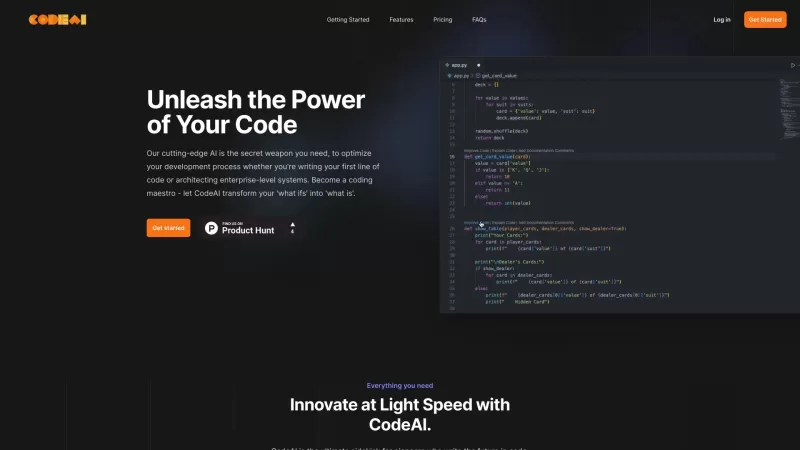
Ever wished you had a trusty sidekick to help you navigate the often complex world of coding? Meet CodeAI, the revolutionary VS Code extension that's like having a super-smart AI buddy by your side. Designed to streamline your development process, CodeAI

What is the Kimi Assistant AI Chrome Extension? The Kimi Assistant is an AI-powered plugin developed by UnionAi, building upon the core capabilities of Kimi. It facilitates seamless communication in both Chinese and English, delivering reliable and a
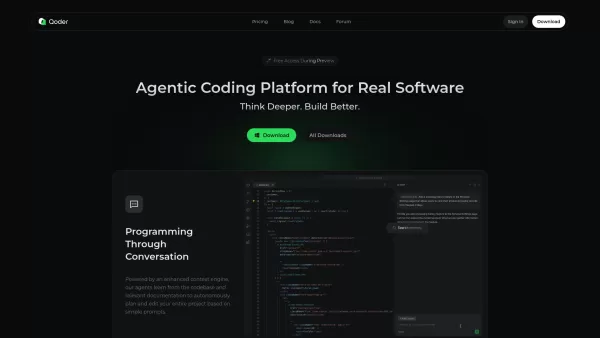
What is Qoder?Qoder represents a revolutionary leap in AI-assisted development - think of it as having an expert programming partner that truly understands your entire code ecosystem. Unlike traditional coding assistants that work with isolated snipp
CodeSense AI Product Information
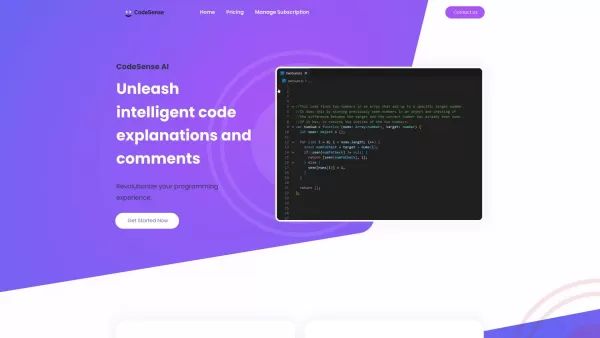
Imagine you're diving into a world where coding becomes not just easier but almost magical. That's the realm CodeSense AI brings you into—a Visual Studio Code extension that's like having a super-smart coding buddy right in your editor. It's all about boosting your productivity, sharpening your code quality, and making your life as a developer a whole lot easier.
Getting Started with CodeSense AI
So, how do you tap into this magic? It's simple: just install the CodeSense AI extension in your Visual Studio Code. Once it's set up, you can start using its AI-driven tools. Just select a piece of code or a whole project, and choose what you need—whether it's a quick comment or a deep dive into code explanations.
Unpacking CodeSense AI's Core Features
Code Comment Generation
Ever wished you could instantly add those perfect, descriptive comments to your code? CodeSense AI does just that, turning your snippets into well-documented masterpieces with ease.
Code Explanation
Stuck on a piece of code? CodeSense AI breaks it down for you, providing detailed explanations that make even the trickiest parts clear as day.
Improved Documentation
With AI-generated comments, your codebase documentation gets a serious upgrade. It's like having a professional documentarian right at your fingertips.
Onboarding and Training
Whether you're bringing new team members on board or teaching students the ropes, CodeSense AI's explanations are a godsend. They make complex concepts accessible and understandable.
Time Efficiency
Why spend hours writing comments and explanations when CodeSense AI can do it in a snap? It's like having a time machine for your coding tasks.
Scalability
Dealing with a massive codebase? No sweat. CodeSense AI helps you document and explain vast amounts of code quickly, making it easier to keep your software systems up to date and running smoothly.
Real-World Applications of CodeSense AI
- Enhancing codebase documentation: Make your code speak for itself with clear, concise comments.
- Onboarding new team members: Get new developers up to speed faster with comprehensive code explanations.
- Teaching programming concepts: Use CodeSense AI to break down complex ideas for students.
- Saving time and effort: Let the AI handle the grunt work of generating comments and explanations.
- Maintaining complex systems: Keep your software systems in top shape with easier documentation and updates.
Frequently Asked Questions
- Can the AI handle large codebases or only individual code snippets?
- CodeSense AI is designed to handle both individual snippets and large codebases with ease.
- Is there a trial period or demo available to test the extension before committing to a subscription?
- Yes, you can try out CodeSense AI with a demo or trial period before deciding on a subscription.
- Will more features be supported in the future?
- Absolutely, the team behind CodeSense AI is always working on new features to enhance your coding experience.
For any further questions or support, you can reach out to CodeSense AI's team through their contact us page. And if you're curious about pricing, check out their pricing page. Oh, and don't forget to follow them on Instagram for the latest updates and coding tips!
CodeSense AI Screenshot

2026 Latest Best Manga AI Background Generators Ranked Top-Rated! This curated collection showcases powerful game-changing tools perfect for creating high-quality chapter backgrounds, book covers, and promotional art. Every option has undergone rigorous real-world tests to ensure reliability. Get a free vs paid comparison along with detailed insights. Explore now to discover your perfect tool and unlock your AI edge in manga creation.
 6 tools
 xix.ai

2026 Latest Best Top-rated AI Object Removal Editors for portraits travel product shots! XIX.AI curates a powerful game-changing collection regularly updated with weekly rankings. These tools offer real-world tests to help you quickly remove unwanted elements, boost content quality, and save tons of time without compromising results. Must-try for anyone aiming to unlock their AI creation edge. Explore now!
10 tools
xix.ai

2026 Latest Best Top-rated AI Text to Speech Tools for Online Courses are curated by XIX.AI based on rigorous real-world tests and weekly updated rankings. These powerful tools help creators deliver crystal-clear audio content effortlessly, boosting writing efficiency and streamlining course production. Check out the free vs paid comparison to find your perfect fit. Explore now to unlock your AI edge in online education.
10 tools
xix.ai

2026 Latest Best Top-Rated AI Blog Title Tools for Higher Click Through Rates! XIX.AI has carefully curated a powerful, game-changing collection of top tools that go through rigorous real-world tests. You’ll find a free vs paid comparison, weekly updated rankings, and detailed insights to help you boost your blog’s traffic efficiently. Must-try options are highlighted to help you unlock your AI edge. Explore now!
10 tools
xix.ai

2026 Latest Best Top-rated AI Task Routing Tools for Support Workflows! XIX.AI has curated a highly powerful game-changing collection of must-try solutions, all undergoing rigorous real-world tests and updated weekly. These tools streamline workflows, boost productivity, and help teams deliver faster, more efficient support. Explore now to discover your perfect tool and unlock your AI edge!
17 tools
xix.ai

2026 Latest Best Top-Rated AI Citation and Paper Summary Tools Curated by XIX.AI. Get powerful game-changing solutions for quick content creation, improved writing efficiency, and boosting productivity. We offer a free vs paid comparison along with real-world tests and weekly updated rankings to help you find the must-try tool that fits your needs perfectly. Explore now to Unlock your AI edge.
10 tools
xix.ai


CodeSense AI is a game-changer for my workflow! 🚀 Having a super-smart buddy right in VS Code feels like magic. It handles boilerplate so efficiently, making coding feel less like work and more like creativity. Highly recommend for anyone wanting to boost productivity without losing control of their code. ✨


