


 Home
HomeChat Cache
Local ChatGPT Prompt Manager



Helps TikTok sellers, brands, MCNs, and TAPs discover winning products and find creators.

HelpLook is an AI-powered all-in-one knowledge base tool that helps businesses quickly build knowledge bases, help centers, and...

Your AI Workspace

302.AI is an enterprise-grade AI resource platform with pay-as-you-go pricing, API access to a full range of AI models, and ready-to-use online applications.

剧火AI — AI Screenwriter + Director, a One-Person Short Drama Studio In one sentence, what is it?

Ever wondered what Magai is all about? Well, let me tell you, it's a game-changer for content creators. Magai isn't just another tool; it's a next-generation AI platform designed to revolutionize the way you create and refine your content. With its intuit
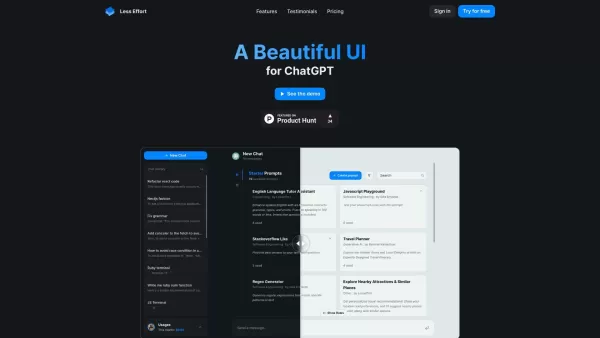
Ever stumbled upon Lesseffort? It's not just another app; it's a game-changer for those of us who love diving into the world of AI. Imagine a sleek, easy-to-navigate interface that makes chatting with ChatGPT, powered by OpenAI's genius, feel like a breez

What Is Prompastic? Prompastic helps creators and power users craft better prompts for generative AI. Instead of writing everything from scratch, you build prompts using structured inputs like a scene description, optional fine-tuning details (style,
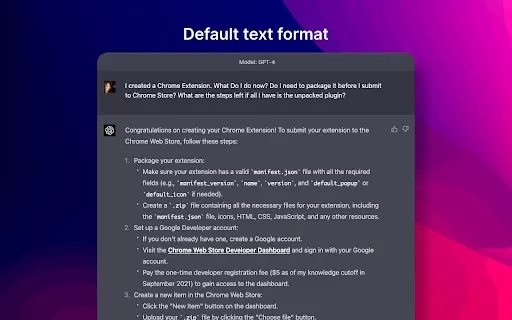
What is the GPT4 Chat Settings Chrome Extension? The GPT4 Chat Settings Chrome Extension enhances your GPT4 chat interactions by providing ready-to-use prompts for your sessions. It helps you achieve better formatting and results. You can create and
Chat Cache Product Information
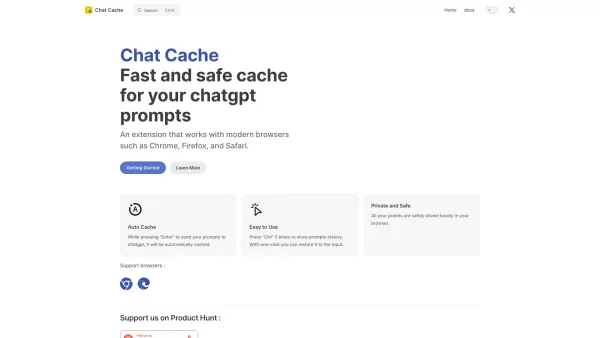
Ever found yourself wishing you could revisit those brilliant prompts you crafted for ChatGPT? Well, that's where Chat Cache comes into play. This nifty extension acts as your personal assistant, ensuring all your ChatGPT prompts are safely tucked away in a local backup. Say goodbye to the hassle of losing your creative sparks!
How to Make the Most Out of Chat Cache
Getting started with Chat Cache is as easy as pie. Just install the extension, and voila! It'll start working its magic, automatically caching your prompts as you engage with ChatGPT. No need to lift a finger; it's all done in the background, letting you focus on what you do best—creating.
Exploring Chat Cache's Core Features
Local Backup for ChatGPT Prompts
At the heart of Chat Cache is its ability to keep a local backup of all your ChatGPT prompts. This means your creative ideas and well-crafted queries are securely stored on your device, ready for you to access anytime, anywhere.
Real-World Applications of Chat Cache
Efficiently Save, Manage, and Reuse Manual ChatGPT Prompts
Imagine you've spent hours perfecting a prompt for a project. With Chat Cache, you can save that prompt for future use, manage your collection of prompts with ease, and reuse them whenever inspiration strikes or when you need a quick reference. It's like having a digital notebook dedicated to your ChatGPT interactions, making your workflow smoother and more productive.
Frequently Asked Questions About Chat Cache
- Which browsers does Chat Cache support?
- Chat Cache is designed to work seamlessly with a variety of browsers. Check the extension's documentation for a full list of supported browsers.
- How do I access my prompts history?
- Accessing your prompts history is a breeze. Just head over to the Chat Cache interface within your browser, and you'll find all your saved prompts neatly organized.
- Where are my prompts stored?
- Your prompts are stored locally on your device, ensuring both privacy and accessibility. No cloud storage means you have full control over your data.
So, if you're looking to streamline your ChatGPT experience and keep your prompts at your fingertips, give Chat Cache a try. It's like having a personal assistant for your digital creativity!
Chat Cache Screenshot





2026 Latest Best Top-rated AI Text to Speech Tools for Natural Voiceovers are here on XIX.AI! This curated list features powerful, game-changing options that deliver crystal-clear voices for every use case, backed by real-world tests and weekly updated rankings. Get a free vs paid comparison to find the must-try solution that boosts your productivity instantly. Explore now to Unlock your AI edge!
 11 tools
 xix.ai

2026 Latest Best Manga AI Background Generators Ranked Top-Rated! This curated collection showcases powerful game-changing tools perfect for creating high-quality chapter backgrounds, book covers, and promotional art. Every option has undergone rigorous real-world tests to ensure reliability. Get a free vs paid comparison along with detailed insights. Explore now to discover your perfect tool and unlock your AI edge in manga creation.
6 tools
xix.ai

2026 Latest Best Top-rated AI Object Removal Editors for portraits travel product shots! XIX.AI curates a powerful game-changing collection regularly updated with weekly rankings. These tools offer real-world tests to help you quickly remove unwanted elements, boost content quality, and save tons of time without compromising results. Must-try for anyone aiming to unlock their AI creation edge. Explore now!
10 tools
xix.ai

2026 Latest Best Top-rated AI Text to Speech Tools for Online Courses are curated by XIX.AI based on rigorous real-world tests and weekly updated rankings. These powerful tools help creators deliver crystal-clear audio content effortlessly, boosting writing efficiency and streamlining course production. Check out the free vs paid comparison to find your perfect fit. Explore now to unlock your AI edge in online education.
10 tools
xix.ai

2026 Latest Best Top-Rated AI Blog Title Tools for Higher Click Through Rates! XIX.AI has carefully curated a powerful, game-changing collection of top tools that go through rigorous real-world tests. You’ll find a free vs paid comparison, weekly updated rankings, and detailed insights to help you boost your blog’s traffic efficiently. Must-try options are highlighted to help you unlock your AI edge. Explore now!
10 tools
xix.ai

2026 Latest Best Top-rated AI Task Routing Tools for Support Workflows! XIX.AI has curated a highly powerful game-changing collection of must-try solutions, all undergoing rigorous real-world tests and updated weekly. These tools streamline workflows, boost productivity, and help teams deliver faster, more efficient support. Explore now to discover your perfect tool and unlock your AI edge!
17 tools
xix.ai


