


 Home
HomeAddSubtitle
Video Subtitles Translation Tool - Speed Up Workflow



Helps TikTok sellers, brands, MCNs, and TAPs discover winning products and find creators.

HelpLook is an AI-powered all-in-one knowledge base tool that helps businesses quickly build knowledge bases, help centers, and...

Your AI Workspace

302.AI is an enterprise-grade AI resource platform with pay-as-you-go pricing, API access to a full range of AI models, and ready-to-use online applications.

剧火AI — AI Screenwriter + Director, a One-Person Short Drama Studio In one sentence, what is it?

Introducing AniEraser: The Ultimate AI Clothes RemoverIf you've ever wanted to edit photos like a pro without the hassle of complicated tools or software installations, AniEraser is here to change the game. This cutting-edge online tool uses advanced AI t

What is Undressbaby AI?Undressbaby is a cutting-edge, AI-driven platform that lets users creatively alter their photos and videos. From swapping faces to trying on virtual outfits, it offers a simple yet powerful solution. Just upload your media, and
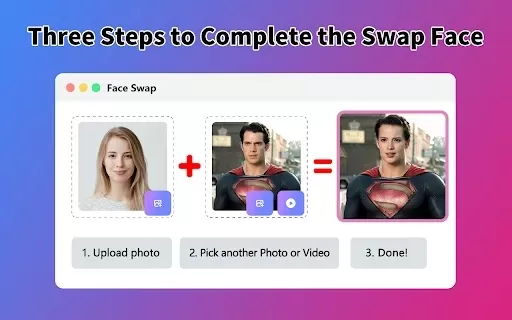
What is Face Swap - AI Face Swapper?Face Swap AI Face Swapper is a cutting-edge online tool that enables effortless face swapping in photos and videos. Powered by sophisticated artificial intelligence, it allows you to seamlessly replace faces, swap

Ever wanted to give your videos a quirky twist or a professional touch? Look no further than KreadoAI Video Face Swap! This nifty tool is a game-changer for anyone looking to seamlessly replace faces in videos. What's even better? It's absolutely free and

What is VideoWatermarkRemover AI? VideoWatermarkRemover is a free, AI-powered online tool that quickly and easily removes watermarks from videos. It supports popular formats like MP4, MOV, and AVI, and can detect and erase both static and moving wate
AddSubtitle Product Information
AddSubtitle: Empowering Creators Everywhere
Imagine having a tool that takes your ideas and turns them into polished, professional-grade content in minutes—not hours. That’s what AddSubtitle offers. Whether you're a content creator, marketer, educator, or even a journalist, AddSubtitle gives you the power to transform raw footage into something remarkable. From adding subtitles to translating videos across 60+ languages, creating lifelike AI voiceovers, and editing videos as easily as typing out a document—this platform is designed to supercharge your workflow while keeping creativity at its core.
The beauty of AddSubtitle lies in its simplicity. No complicated setups, no endless downloads, just seamless integration into your existing processes. Let’s dive into why this tool has become a game-changer for anyone serious about their work.
Why AddSubtitle Stands Out
There’s nothing quite like AddSubtitle when it comes to speed and flexibility. Here’s what makes it special:
Lightning-Fast Production: Say goodbye to tedious manual labor. With intelligent automation, AddSubtitle can instantly generate styled subtitles, translate voices and captions across dozens of languages, and even craft natural-sounding AI voiceovers. Editing videos feels more intuitive than ever—you can tweak every detail with pixel-perfect precision.
Total Creative Freedom: Want your content to stand out? AddSubtitle lets you fine-tune every aspect of your project. Need a unique voice? Clone your own tone or choose from hundreds of natural-sounding AI voices. Customize subtitle styles, positions, and sizes until they perfectly match your vision. Translation? On-demand, in any language you desire.
Getting Started with AddSubtitle
Ready to harness the power of AddSubtitle? Here’s how you can get started:
- Head over to your dashboard and decide which feature suits your needs: Add Subtitles, Translate Video, Add Voiceover, or Rewrite Video.
- Upload your media file—it could be anything from a YouTube clip to a raw recording.
- Customize your settings to align with your goals. Adjust font sizes, colors, voice tones, and more.
- Click “Submit,” sit back, and let the magic happen.
- Once processing is complete, dive into the editing panel. You’ll find advanced tools like bilingual subtitles, voice cloning, and seamless translations. It’s like having a personal assistant for your projects.
- Still need help? Click the profile icon in the top-right corner to access support resources, FAQs, and even connect directly with our vibrant Discord community. Got feedback? Share it there—it’s where creators thrive together.
Core Features You’ll Love
AddSubtitle doesn’t just promise; it delivers. Here’s a quick rundown of its standout abilities:
- Auto-subtitle Generation: Generate subtitles in over 60 languages with a single click.
- Accurate Translations: Ensure your message resonates globally with precise translations.
- AI-Powered Voice Translation & Dubbing: Seamlessly integrate foreign languages into your videos.
- Natural-Sounding AI Voiceovers: Elevate your content with lifelike narration.
- Voice Cloning: Recreate your voice in seconds using just 10 seconds of audio.
- Edit Videos by Editing Text: Modify subtitles directly within the video interface.
- Cloud-Based Accessibility: Access everything online—no installations required.
- YouTube Integration: Easily sync your YouTube links to streamline workflows.
Who Uses AddSubtitle?
From solo creators to corporate teams, AddSubtitle serves a wide range of industries:
- Content Creators: Streamline production and captivate audiences.
- Online Educators: Reach students worldwide with multilingual lessons.
- Marketing Teams: Boost engagement through localized campaigns.
- Filmmakers: Enhance storytelling with global appeal.
- E-commerce Brands: Personalize customer experiences.
- Social Media Managers: Maximize reach with optimized content.
- Corporate Training: Simplify learning with accessible materials.
- Journalists & News Organizations: Deliver timely updates to diverse audiences.
Frequently Asked Questions
Still curious? Let’s answer some common queries:
- How is AddSubtitle different from other video editors? Unlike competitors, AddSubtitle focuses exclusively on enhancing accessibility, creativity, and efficiency in video creation.
- How many languages does your AI translator support? Over 60 languages and counting!
- Do I need to download any software? Nope—everything happens online.
- Can I add multi-language subtitles? Absolutely—bilingual subtitles are a breeze.
- Is it available on mobile? Yes, you can access it from anywhere.
- Is it free? Basic features are free, but premium plans offer enhanced capabilities.
- Is my data secure? Rest assured, your privacy is paramount.
For additional support, reach out via email or join our active Discord community. We’re here to help!
About Us
AddSubtitle Inc. is committed to empowering creators everywhere. Based in [address], we strive to innovate and simplify the way you bring stories to life. Learn more about us here.
Join the Community
Already a fan? Start your journey today at AddSubtitle Login. New to the scene? Sign up here and explore pricing options here.
Stay inspired and connected:
- YouTube: AddSubtitle AI
- LinkedIn: TaleCast
Let’s make great things happen together!
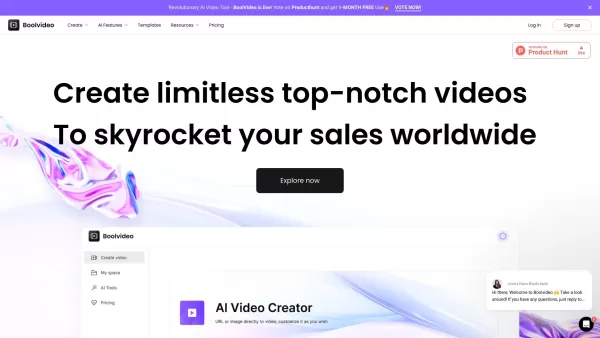
AddSubtitle Screenshot
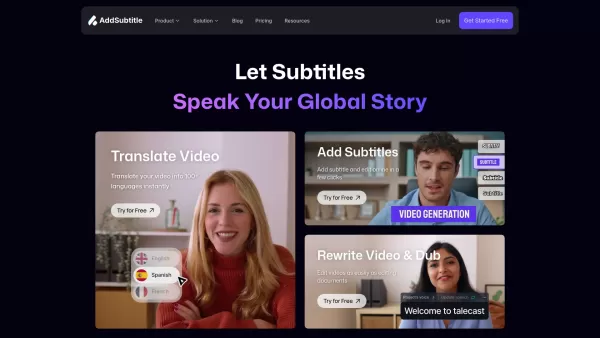

2026 Latest Best Manga AI Background Generators Ranked Top-Rated! This curated collection showcases powerful game-changing tools perfect for creating high-quality chapter backgrounds, book covers, and promotional art. Every option has undergone rigorous real-world tests to ensure reliability. Get a free vs paid comparison along with detailed insights. Explore now to discover your perfect tool and unlock your AI edge in manga creation.
 6 tools
 xix.ai

2026 Latest Best Top-rated AI Object Removal Editors for portraits travel product shots! XIX.AI curates a powerful game-changing collection regularly updated with weekly rankings. These tools offer real-world tests to help you quickly remove unwanted elements, boost content quality, and save tons of time without compromising results. Must-try for anyone aiming to unlock their AI creation edge. Explore now!
10 tools
xix.ai

2026 Latest Best Top-rated AI Text to Speech Tools for Online Courses are curated by XIX.AI based on rigorous real-world tests and weekly updated rankings. These powerful tools help creators deliver crystal-clear audio content effortlessly, boosting writing efficiency and streamlining course production. Check out the free vs paid comparison to find your perfect fit. Explore now to unlock your AI edge in online education.
10 tools
xix.ai

2026 Latest Best Top-Rated AI Blog Title Tools for Higher Click Through Rates! XIX.AI has carefully curated a powerful, game-changing collection of top tools that go through rigorous real-world tests. You’ll find a free vs paid comparison, weekly updated rankings, and detailed insights to help you boost your blog’s traffic efficiently. Must-try options are highlighted to help you unlock your AI edge. Explore now!
10 tools
xix.ai

2026 Latest Best Top-rated AI Task Routing Tools for Support Workflows! XIX.AI has curated a highly powerful game-changing collection of must-try solutions, all undergoing rigorous real-world tests and updated weekly. These tools streamline workflows, boost productivity, and help teams deliver faster, more efficient support. Explore now to discover your perfect tool and unlock your AI edge!
17 tools
xix.ai

2026 Latest Best Top-Rated AI Citation and Paper Summary Tools Curated by XIX.AI. Get powerful game-changing solutions for quick content creation, improved writing efficiency, and boosting productivity. We offer a free vs paid comparison along with real-world tests and weekly updated rankings to help you find the must-try tool that fits your needs perfectly. Explore now to Unlock your AI edge.
10 tools
xix.ai


