


 Home
HomeYour Personal Bully
Custom Chrome Extension Roasts Websites with AI Keywords: Chrome Extension, AI, Website Roasts



Helps TikTok sellers, brands, MCNs, and TAPs discover winning products and find creators.

HelpLook is an AI-powered all-in-one knowledge base tool that helps businesses quickly build knowledge bases, help centers, and...

Your AI Workspace

302.AI is an enterprise-grade AI resource platform with pay-as-you-go pricing, API access to a full range of AI models, and ready-to-use online applications.

剧火AI — AI Screenwriter + Director, a One-Person Short Drama Studio In one sentence, what is it?

What is QuickBox AI?QuickBox AI offers a handy browser extension that integrates a suite of AI tools directly into your browser. Pressing cmd+k (or ctrl+k) brings up a compact overlay on your current tab, enabling instant access to AI utilities. You
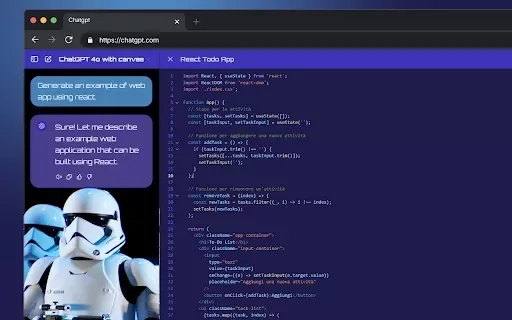
What is StylerGPT: ChatGPT Customization?StylerGPT is a Chrome extension that reimagines your ChatGPT interface as a fully customizable digital workspace. Choose from diverse color palettes, upload custom backgrounds, adjust fonts, and more to create
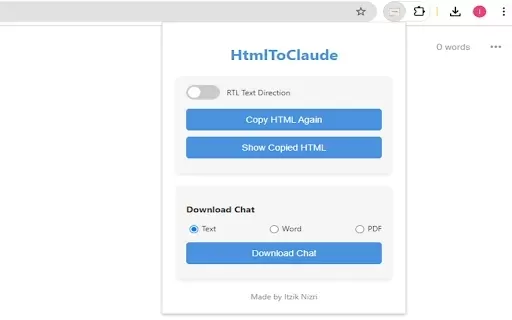
What is HtmlToClaude?HtmlToClaude is a Chrome extension that simplifies your work with Claude AI. It enables you to effortlessly capture HTML content from any webpage and paste it directly into your conversations with Claude. The tool also lets you d

What is Make a Sign?MakeSign is an online platform that enables users to easily design custom signs. It offers a broad selection of templates, design tools, and customization features to help you create professional and attention-grabbing signage for
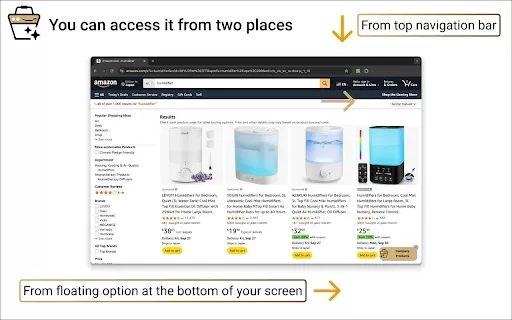
What is Product Comparison Tool?The Smart Amazon Product Comparer is a free Chrome extension that helps you make smarter buying choices on Amazon. It leverages OpenAI's ChatGPT to deliver AI-driven analysis, automatically evaluating product features,
Your Personal Bully Product Information
What is Your Personal Bully?
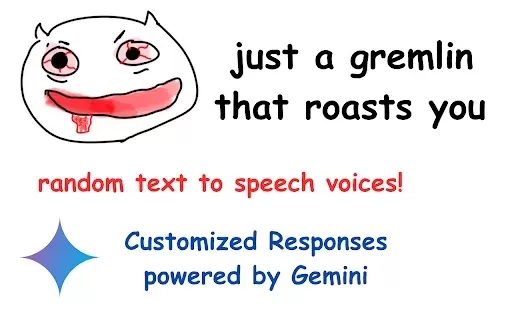
Your Personal Bully is an inventive Chrome extension crafted to inject a dose of humor into your web browsing. By letting you create a custom list of websites, the extension leverages AI and web scraping to analyze site content and deliver uniquely funny, personalized insults. It serves as both an entertainment source and a motivational aid, functioning similarly to a creative site blocker. Whether you're after a good laugh or a novel method to manage your browsing time, Your Personal Bully offers full customization to match your style.
Who is Your Personal Bully designed for?
- General internet users
- People seeking amusement online
- Individuals wanting motivation while browsing the web
How to use Your Personal Bully
- Step 1: Build your list by adding the websites you want the extension to target.
- Step 2: Visit one of the sites on your list.
- Step 3: Simply click anywhere on the page to let the extension know you're there.
- Step 4: Receive a custom, humorous roast generated from the site's own content.
Platform
- Web
- Chrome
Core Features & Benefits of Your Personal Bully
Key Features
- Tailored humorous insults
- AI-powered content analysis
- Web scraping technology
- Customizable target website list
Key Benefits
- Infuses browsing with humor
- Provides a motivational push
- Offers a fully adaptable user experience
Primary Use Cases & Applications
- Making everyday internet surfing more entertaining
- Encouraging users to spend less time on specific sites
- Tailoring the extension for personal fun
Frequently Asked Questions about Your Personal Bully
What is Your Personal Bully?
Your Personal Bully is a Chrome extension that provides personalized, humorous roasts based on the content of the websites you visit.
How does it work?
The extension employs AI and web scraping to examine a site's content and generate a custom roast when you interact with a targeted page.
Is it free?
Yes, using the extension is completely free.
What platforms are supported?
It is designed for the Chrome web browser.
Is it customizable?
Yes, you have full control over which websites are on your target list.
Does it store or sell my data?
No, your data is not stored or sold to any third parties.
How do I install it?
Install it directly from the Chrome Web Store and add it to your browser.
Can it motivate me to stop visiting certain sites?
Yes, by delivering playful roasts, it acts as a creative deterrent for visiting specific websites.
Can I disable it temporarily?
Yes, you can easily disable it anytime through your Chrome browser settings.
Who developed this extension?
The extension was created by Eric Hou.
Your Personal Bully Company Details
Your Personal Bully Screenshot



2026 Latest Best AI Pull Request Review Tools for GitHub Teams are here on XIX.AI! This top-rated curated list showcases powerful game-changing solutions that streamline refactoring, bug fixing, and security gap detection across all team workflows. Enjoy a free vs paid comparison along with real-world tests and detailed rankings to help you find the perfect tool that boosts productivity significantly. Explore now to unlock your AI edge!
 12 tools
 xix.ai

2026 Latest Best Top-rated AI Text to Speech Tools for Natural Voiceovers are here on XIX.AI! This curated list features powerful, game-changing options that deliver crystal-clear voices for every use case, backed by real-world tests and weekly updated rankings. Get a free vs paid comparison to find the must-try solution that boosts your productivity instantly. Explore now to Unlock your AI edge!
11 tools
xix.ai

2026 Latest Best Manga AI Background Generators Ranked Top-Rated! This curated collection showcases powerful game-changing tools perfect for creating high-quality chapter backgrounds, book covers, and promotional art. Every option has undergone rigorous real-world tests to ensure reliability. Get a free vs paid comparison along with detailed insights. Explore now to discover your perfect tool and unlock your AI edge in manga creation.
6 tools
xix.ai

2026 Latest Best Top-rated AI Object Removal Editors for portraits travel product shots! XIX.AI curates a powerful game-changing collection regularly updated with weekly rankings. These tools offer real-world tests to help you quickly remove unwanted elements, boost content quality, and save tons of time without compromising results. Must-try for anyone aiming to unlock their AI creation edge. Explore now!
10 tools
xix.ai

2026 Latest Best Top-rated AI Text to Speech Tools for Online Courses are curated by XIX.AI based on rigorous real-world tests and weekly updated rankings. These powerful tools help creators deliver crystal-clear audio content effortlessly, boosting writing efficiency and streamlining course production. Check out the free vs paid comparison to find your perfect fit. Explore now to unlock your AI edge in online education.
10 tools
xix.ai

2026 Latest Best Top-Rated AI Blog Title Tools for Higher Click Through Rates! XIX.AI has carefully curated a powerful, game-changing collection of top tools that go through rigorous real-world tests. You’ll find a free vs paid comparison, weekly updated rankings, and detailed insights to help you boost your blog’s traffic efficiently. Must-try options are highlighted to help you unlock your AI edge. Explore now!
10 tools
xix.ai


