


 Home
Home


Helps TikTok sellers, brands, MCNs, and TAPs discover winning products and find creators.

HelpLook is an AI-powered all-in-one knowledge base tool that helps businesses quickly build knowledge bases, help centers, and...

Your AI Workspace

302.AI is an enterprise-grade AI resource platform with pay-as-you-go pricing, API access to a full range of AI models, and ready-to-use online applications.

剧火AI — AI Screenwriter + Director, a One-Person Short Drama Studio In one sentence, what is it?
Yoink AI Product Information
What is Yoink AI?
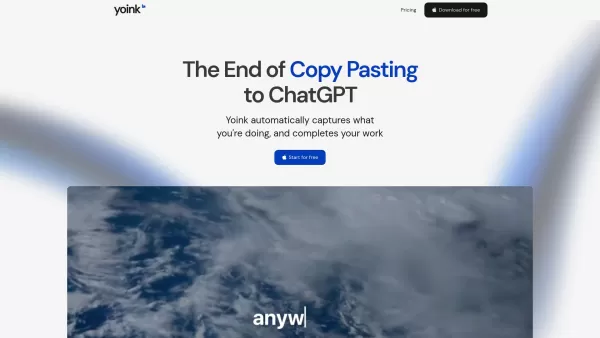
Yoink is the AI companion that works across your entire Mac. Craft text with AI effortlessly, in any application. With one simple hotkey, Yoink: 1. Immediately understands your context—whether you're composing an email in Gmail, editing a document, or brainstorming in Notion. 2. Creates customized text right where your cursor is, eliminating tab-switching, copy-pasting, and workflow disruptions. 3. Writes in the same tone as your existing content, working seamlessly and invisibly so you can concentrate on your ideas, not your tools. Key features are: 1. Universal and Context-Aware: Instead of interrupting you like a chatbot, Yoink integrates directly into your workflow, editing or finishing text inline while adapting to your personal style with customized Voices. 2. One Global Shortcut: Wherever you write, simply press ⌘⇧Y to activate Yoink instantly. No matter the app, your AI assistant is always a keystroke away, ready to generate or edit text on the spot. 3. Personalized Voices: Yoink lets you build custom writing styles called "Voices" to guide its output. Just provide a few examples and instructions, and Yoink will create a personalized Voice you can reuse everywhere.
How to use Yoink AI?
Download the Mac app. Then, just press ⌘⇧Y in any text field to activate Yoink. Type your instruction (if you have one) and Yoink will generate, rewrite, or complete your text right at your cursor. To change writing styles, add a Voice (⌘⇧+) to your prompt. You can create custom Voices by giving examples and instructions, then use them anywhere for a consistent tone. No setup or app switching is needed—Yoink works wherever you write, from emails and documents to chat. Stay in your flow and let Yoink manage the words, so you can focus on your ideas.
Yoink AI's Core Features
Universal Activation: Instantly launch Yoink in any text field on your Mac
Context-Aware Writing: Yoink automatically captures your current context (text and screen)
Inline Editing: Edits appear directly where you left off
Personalized Voices: Build custom voice profiles for your writing by providing examples
Stay in Flow: Remain focused on your ideas while Yoink handles the words. Never lose your creative momentum.
Yoink AI's Use Cases
Email drafting
Code documentation
Twitter/X posts
Instagram captions
TikTok comments
LinkedIn posts
Reddit posts
Blog outlines
Support replies
Resume editing
Marketing copy
Brainstorming ideas
Report writing
FAQ from Yoink AI
Do you have a Windows version?
Do you have an Enterprise plan?
Yoink AI Support Email & Customer service contact & Refund contact etc.
For more contact options, visit the contact us page()
Yoink AI Company
Yoink AI Company name: .
Yoink AI Company address: .
To learn more about Yoink AI, please visit the about us page().
Yoink AI Login
Yoink AI Login Link:
Yoink AI Sign up
Yoink AI Sign up Link:
Yoink AI Pricing
Yoink AI Pricing Link: https://www.useyoink.ai/pricing
Yoink AI Screenshot



2026 Latest Best Top-rated AI Text to Speech Tools for Natural Voiceovers are here on XIX.AI! This curated list features powerful, game-changing options that deliver crystal-clear voices for every use case, backed by real-world tests and weekly updated rankings. Get a free vs paid comparison to find the must-try solution that boosts your productivity instantly. Explore now to Unlock your AI edge!
 11 tools
 xix.ai

2026 Latest Best Manga AI Background Generators Ranked Top-Rated! This curated collection showcases powerful game-changing tools perfect for creating high-quality chapter backgrounds, book covers, and promotional art. Every option has undergone rigorous real-world tests to ensure reliability. Get a free vs paid comparison along with detailed insights. Explore now to discover your perfect tool and unlock your AI edge in manga creation.
6 tools
xix.ai

2026 Latest Best Top-rated AI Object Removal Editors for portraits travel product shots! XIX.AI curates a powerful game-changing collection regularly updated with weekly rankings. These tools offer real-world tests to help you quickly remove unwanted elements, boost content quality, and save tons of time without compromising results. Must-try for anyone aiming to unlock their AI creation edge. Explore now!
10 tools
xix.ai

2026 Latest Best Top-rated AI Text to Speech Tools for Online Courses are curated by XIX.AI based on rigorous real-world tests and weekly updated rankings. These powerful tools help creators deliver crystal-clear audio content effortlessly, boosting writing efficiency and streamlining course production. Check out the free vs paid comparison to find your perfect fit. Explore now to unlock your AI edge in online education.
10 tools
xix.ai

2026 Latest Best Top-Rated AI Blog Title Tools for Higher Click Through Rates! XIX.AI has carefully curated a powerful, game-changing collection of top tools that go through rigorous real-world tests. You’ll find a free vs paid comparison, weekly updated rankings, and detailed insights to help you boost your blog’s traffic efficiently. Must-try options are highlighted to help you unlock your AI edge. Explore now!
10 tools
xix.ai

2026 Latest Best Top-rated AI Task Routing Tools for Support Workflows! XIX.AI has curated a highly powerful game-changing collection of must-try solutions, all undergoing rigorous real-world tests and updated weekly. These tools streamline workflows, boost productivity, and help teams deliver faster, more efficient support. Explore now to discover your perfect tool and unlock your AI edge!
17 tools
xix.ai


