


 Home
HomeWordPress AI Audio/Video Transcriber



Helps TikTok sellers, brands, MCNs, and TAPs discover winning products and find creators.

HelpLook is an AI-powered all-in-one knowledge base tool that helps businesses quickly build knowledge bases, help centers, and...

Your AI Workspace

302.AI is an enterprise-grade AI resource platform with pay-as-you-go pricing, API access to a full range of AI models, and ready-to-use online applications.

剧火AI — AI Screenwriter + Director, a One-Person Short Drama Studio In one sentence, what is it?

What is Speech Translator?Speech Translator leverages Google's advanced speech recognition to deliver real-time translation for videos, audio, and live streams. This tool bridges language gaps, enabling seamless conversations and fostering clearer un

Ever wondered how to effortlessly turn your audio and video files into text? Enter Clipto, the powerhouse of AI transcription on the web. Imagine harnessing the same cutting-edge tech that fuels ChatGPT to convert your Zoom meetings, interviews, and

What is Revoldiv AI Chrome Extension? Revoldiv is a Chrome browser extension that instantly transcribes audio and video directly in your browser. It lets users follow along by reading live transcriptions and search for specific spoken words within po

Ever found yourself needing to turn spoken words into written text? Well, let me introduce you to tulz.AI—an AI-powered service that's all about making audio transcription a breeze. Whether it's a podcast, a business meeting, or any other spoken content,

Ever found yourself in need of a quick and accurate transcription of a video or audio file? That's where Video To Text AI comes into play. It's a slick AI-powered tool designed to effortlessly convert your media into text. Whether you're juggling YouTube
WordPress AI Audio/Video Transcriber Product Information
What is the WordPress AI Audio/Video Transcriber?
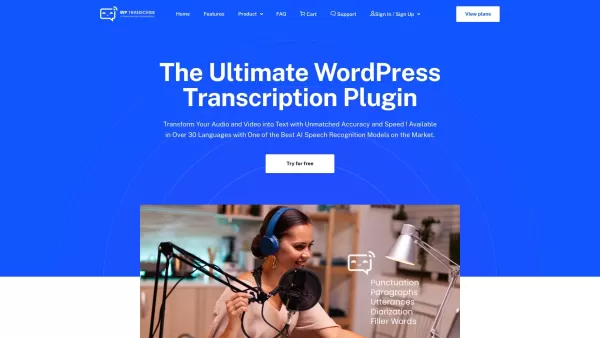
WP Transcribe AI is a powerful WordPress plugin that effortlessly converts audio files and YouTube videos into accurate, readable text. This AI-powered tool streamlines content creation by handling transcription directly within your WordPress dashboard. Supporting over 30 languages, it enhances productivity and makes your content more accessible and engaging. Simply upload files or paste YouTube links, then edit the transcribed text to perfectly suit your website's needs.
Who can benefit from the WordPress AI Audio/Video Transcriber?
- Content creators
- Bloggers
- Podcasters
- SEO specialists
- Journalists
- Marketers
How do I use the WordPress AI Audio/Video Transcriber?
- Step 1: Log into your WordPress admin account.
- Step 2: Download and install the WP Transcribe AI plugin.
- Step 3: Upload an audio/video file or paste a YouTube link into your post.
- Step 4: Click 'Transcribe' and allow the AI to process the content.
- Step 5: Review and edit the generated transcription.
- Step 6: Save and publish your updated post.
Platform
- Web
Core Features & Benefits of WordPress AI Audio/Video Transcriber
Key Features
- Audio file transcription
- YouTube video transcription
- Support for 30+ languages
- Editable transcription output
- Seamless WordPress integration
Primary Benefits
- Accelerates content production
- Saves valuable time and effort
- Boosts SEO performance
- Improves content accessibility
Main Use Cases & Applications
- Transcribing podcast episodes
- Converting YouTube video content to text
- Creating blog post content from audio
- Conducting market research interviews
- Optimizing content for search engines
Frequently Asked Questions
Is the transcribed text editable?
Yes, the AI-generated transcription is fully editable to ensure accuracy and fit your style.
Can I transcribe audio from YouTube links?
Absolutely. You can paste a YouTube link to transcribe the video's audio directly.
How many languages does it support?
WP Transcribe AI supports transcription in over 30 different languages.
Is there a limit on transcription hours?
Your license includes a set amount of transcription time. Additional credits are available for purchase if needed.
How do I activate the plugin?
Log into your account, visit 'My Account' to download the plugin, and enter your unique activation key.
Can I edit the text after transcription?
Yes, you have full control to edit and refine the transcribed text before publishing.
What file types can I upload?
You can upload common audio and video files, or use links from YouTube for transcription.
Does it transcribe live audio?
The plugin is designed for pre-recorded audio and video files, not live streams.
Are there different pricing plans?
Yes, WP Transcribe AI offers several flexible pricing plans to match different usage needs.
Is customer support available?
Yes, dedicated customer support is provided. You can reach out via the official support page.
Company Information
- WP Transcribe AI
- https://wptranscribe.ai
WordPress AI Audio/Video Transcriber Screenshot


2026 Latest Best AI Vocal Demo Tools for Songwriters, Hook Creators, and Multi-Language Content Teams! XIX.AI has curated a top-rated list of powerful game-changing tools that go through rigorous real-world tests. You’ll find detailed free vs paid comparison data, comprehensive rankings, and must-try options to help you boost writing efficiency and unlock your creative potential. Explore now to discover your perfect tool for all your content needs!
 9 tools
 xix.ai

2026 Latest Best Top-rated AI Competitive Research Tools for Small Businesses! XIX.AI has curated a highly powerful game-changing collection, updated weekly with rigorous real-world tests and detailed rankings. You can find a comprehensive free vs paid comparison to help you identify the must-try tools that boost your productivity and give you a competitive edge. Explore now to discover your perfect tool!
9 tools
xix.ai

2026 Latest Best Photoshop AI retouch tools for ecommerce apparel, skin cleanup, and color consistency! This top-rated curated list features powerful game-changing solutions that help you boost writing efficiency, streamline content creation, and achieve perfect visual results effortlessly. Each tool has undergone real-world tests through weekly updated rankings, complete with free vs paid comparison details. Backed by XIX.AI, it’s the must-try guide for anyone aiming to unlock your AI edge. Explore now!
10 tools
xix.ai

2026 Latest Best Top-Rated AI Prompt Libraries for optimizing all types of ChatGPT workflows. XIX.AI has curated a powerful, game-changing collection that goes through rigorous real-world tests to ensure top performance. You can find detailed free vs paid comparisons and expert rankings to help you choose the must-try tools that boost your productivity and unlock your AI edge. Explore now!
11 tools
xix.ai

2026 Latest Best AI Quiz Builder Platforms for Teachers, Tutors, and Cohort-Based Learning Programs! XIX.AI has curated a top-rated list of powerful game-changing tools that go through real-world tests to deliver accurate rankings. These must-try platforms help boost writing efficiency, streamline content creation, and simplify quiz design across all learning scenarios. Explore now to discover your perfect tool for unlocking your AI edge in teaching!
13 tools
xix.ai

2026 Latest Best AI Pull Request Review Tools for GitHub Teams are here on XIX.AI! This top-rated curated list showcases powerful game-changing solutions that streamline refactoring, bug fixing, and security gap detection across all team workflows. Enjoy a free vs paid comparison along with real-world tests and detailed rankings to help you find the perfect tool that boosts productivity significantly. Explore now to unlock your AI edge!
12 tools
xix.ai


