


 Home
HomeWhimsical
Align on your next build faster



Helps TikTok sellers, brands, MCNs, and TAPs discover winning products and find creators.

HelpLook is an AI-powered all-in-one knowledge base tool that helps businesses quickly build knowledge bases, help centers, and...

Your AI Workspace

302.AI is an enterprise-grade AI resource platform with pay-as-you-go pricing, API access to a full range of AI models, and ready-to-use online applications.

剧火AI — AI Screenwriter + Director, a One-Person Short Drama Studio In one sentence, what is it?

Ever stumbled upon Cherry Studio AI and wondered what it's all about? Well, let me break it down for you. Cherry Studio AI isn't just another run-of-the-mill AI tool; it's a powerhouse desktop client that lets you dive into advanced AI interactions across

Discover Plume AI: Your Ultimate Academic Writing AssistantAre you tired of struggling with your academic writing? Well, say hello to Plume AI, the innovative AI assistant that's here to revolutionize the way you write! Designed with students in mind, Plume AI harnesses the power of cutting-edge art

Ever wondered how to turn your jumbled thoughts and complex queries into something you can actually grasp? Enter The Visualizer, your new best friend in the world of learning and creativity. This nifty tool takes your written queries, URLs, and even PDFs,

Ever wished for a trusty sidekick to help you navigate the digital world with ease? Enter Sider, your personal AI companion designed to seamlessly blend into your daily routine. Starting off as a handy Chrome/Edge extension, Sider transforms your browsing

Ever wondered what Ninja AI is all about? Well, let me tell you, it's like having a Swiss Army knife for your digital needs! Ninja AI isn't just another AI tool; it's a powerhouse that brings together over 24 top-notch Large Language Models (LLMs) to help
Whimsical Product Information
Whimsical is more than just another tool—it's a dynamic workspace tailored for product teams, designed to streamline your creative process and boost productivity. Whether you're brainstorming, organizing, or planning, Whimsical offers a versatile platform that helps turn your ideas into reality.
How to Use Whimsical?
Using Whimsical is like having a Swiss Army knife for your projects. You can create a central hub for all your project information, making it easy for everyone to stay on the same page. The platform lets you brainstorm and organize ideas visually, which can be a game-changer for those chaotic creative sessions. You can also map out user flows and processes with ease, thanks to its flexible toolkit. And if you're into designing, building wireframes is a breeze with the drag-and-drop components. It's all about making your workflow smoother and more efficient.
Whimsical's Core Features
Flowcharts
Flowcharts in Whimsical are incredibly intuitive, allowing you to map out processes and workflows with ease. Whether you're planning a new feature or outlining a complex project, these flowcharts help you visualize the steps and keep everyone aligned.
Wireframes
Creating wireframes is a snap with Whimsical. With a library of drag-and-drop components, you can quickly build and iterate on your designs, ensuring that your final product meets user needs.
Mind Maps
Mind maps are perfect for those brainstorming sessions where ideas are flying left and right. Whimsical's mind maps help you capture and organize these ideas, making it easier to see the big picture and find connections you might have missed.
Docs
Whimsical's Docs feature allows you to create and share documents seamlessly. Whether it's project specs, meeting notes, or anything else, Docs keeps your information organized and accessible to the team.
Whimsical AI
Whimsical AI is like having a smart assistant by your side. It can help you generate ideas, suggest improvements, and even automate some of your workflow, making your life a whole lot easier.
Whimsical's Use Cases
Product Strategy
When it comes to product strategy, Whimsical helps you lay out your plans and goals visually, making it easier to communicate your vision to the team.
User Flows
Mapping out user flows is crucial for understanding how users will interact with your product. Whimsical makes it easy to create these flows, ensuring that your product is user-friendly and intuitive.
Mind Maps
Mind maps are fantastic for brainstorming sessions. They help you capture every idea and see how they connect, which can lead to some truly innovative solutions.
Brainstorming
Brainstorming can be chaotic, but Whimsical keeps things organized. You can throw out ideas, organize them, and see how they fit into your overall project.
Wireframes
Wireframes are essential for designing your product. Whimsical's drag-and-drop interface makes it easy to create and iterate on your designs, ensuring that you end up with a product that meets user needs.
Product Roadmaps
Product roadmaps help you plan out your project timeline. Whimsical's visual tools make it easy to create a roadmap that everyone can understand and follow.
Org Charts
Org charts are crucial for understanding the structure of your team. Whimsical's org chart feature helps you create clear, easy-to-read charts that keep everyone in the loop.
Release Planning
Release planning can be a headache, but Whimsical makes it easier. You can map out your release schedule and keep track of progress, ensuring that everything goes smoothly.
FAQ from Whimsical
- What can I use Whimsical for?
Whimsical is incredibly versatile. You can use it for product strategy, user flows, mind mapping, brainstorming, wireframing, creating product roadmaps, org charts, and release planning. It's like having a Swiss Army knife for your project management and design needs.
Whimsical Support Email & Customer service contact & Refund contact etc.
If you need help, the Whimsical support team is just an email away. You can reach them at [email protected]. For more ways to get in touch, check out their contact us page.
Whimsical Company
The brains behind Whimsical are Whimsical, Inc. They're the ones making sure you have the tools you need to succeed.
Whimsical Login
Ready to dive in? You can log into your Whimsical account here: https://whimsical.com/login.
Whimsical Sign up
New to Whimsical? Sign up and get started here: https://whimsical.com/signup.
Whimsical Pricing
Curious about the cost? Check out Whimsical's pricing options here: https://whimsical.com/pricing.
Whimsical Linkedin
Want to connect with Whimsical on LinkedIn? You can find them here: https://www.linkedin.com/company/whimsical.
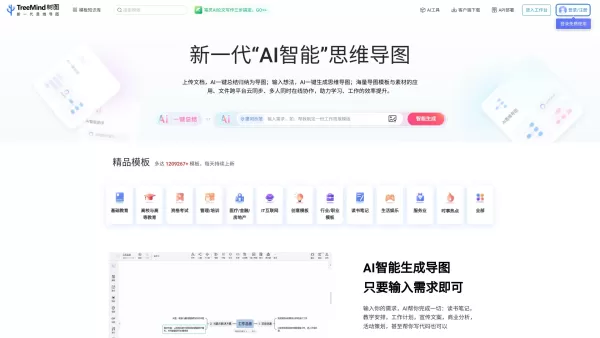
Whimsical Screenshot




2026 Latest Best Top-rated AI Object Removal Editors for portraits travel product shots! XIX.AI curates a powerful game-changing collection regularly updated with weekly rankings. These tools offer real-world tests to help you quickly remove unwanted elements, boost content quality, and save tons of time without compromising results. Must-try for anyone aiming to unlock their AI creation edge. Explore now!
 10 tools
 xix.ai

2026 Latest Best Top-rated AI Text to Speech Tools for Online Courses are curated by XIX.AI based on rigorous real-world tests and weekly updated rankings. These powerful tools help creators deliver crystal-clear audio content effortlessly, boosting writing efficiency and streamlining course production. Check out the free vs paid comparison to find your perfect fit. Explore now to unlock your AI edge in online education.
10 tools
xix.ai

2026 Latest Best Top-Rated AI Blog Title Tools for Higher Click Through Rates! XIX.AI has carefully curated a powerful, game-changing collection of top tools that go through rigorous real-world tests. You’ll find a free vs paid comparison, weekly updated rankings, and detailed insights to help you boost your blog’s traffic efficiently. Must-try options are highlighted to help you unlock your AI edge. Explore now!
10 tools
xix.ai

2026 Latest Best Top-rated AI Task Routing Tools for Support Workflows! XIX.AI has curated a highly powerful game-changing collection of must-try solutions, all undergoing rigorous real-world tests and updated weekly. These tools streamline workflows, boost productivity, and help teams deliver faster, more efficient support. Explore now to discover your perfect tool and unlock your AI edge!
17 tools
xix.ai

2026 Latest Best Top-Rated AI Citation and Paper Summary Tools Curated by XIX.AI. Get powerful game-changing solutions for quick content creation, improved writing efficiency, and boosting productivity. We offer a free vs paid comparison along with real-world tests and weekly updated rankings to help you find the must-try tool that fits your needs perfectly. Explore now to Unlock your AI edge.
10 tools
xix.ai

2026 Latest Best Top-Rated AI Productivity Tools for Daily Work! XIX.AI has curated a powerful, game-changing selection based on rigorous weekly updated rankings and real-world tests. You’ll find must-try options that boost writing efficiency, streamline content creation, and help you overcome daily work challenges. Get a free vs paid comparison to find the perfect fit for your needs. Explore now to unlock your AI edge!
9 tools
xix.ai


