


 Home
HomeWalling AI
Walling: Visual Idea & Project Organization Tool



Helps TikTok sellers, brands, MCNs, and TAPs discover winning products and find creators.

HelpLook is an AI-powered all-in-one knowledge base tool that helps businesses quickly build knowledge bases, help centers, and...

Your AI Workspace

302.AI is an enterprise-grade AI resource platform with pay-as-you-go pricing, API access to a full range of AI models, and ready-to-use online applications.

剧火AI — AI Screenwriter + Director, a One-Person Short Drama Studio In one sentence, what is it?

What Are Notion Templates for AI? Notion Templates for AI Integration to Supercharge Productivity Looking to harness the power of AI within your workflow? Notion Templates for AI Integration offers tailored solutions designed to streamline your day-to-day

BrandGhost is a game-changer for content creators, offering a slick social media automation platform that makes managing your online presence across various networks a breeze. It's like having a personal assistant dedicated to keeping your social media ga

What is Simbla?Simbla is a cloud-based no-code platform that allows users of any skill level to build professional websites and applications. Its intuitive drag-and-drop interface and responsive templates enable the creation of visually appealing, fu
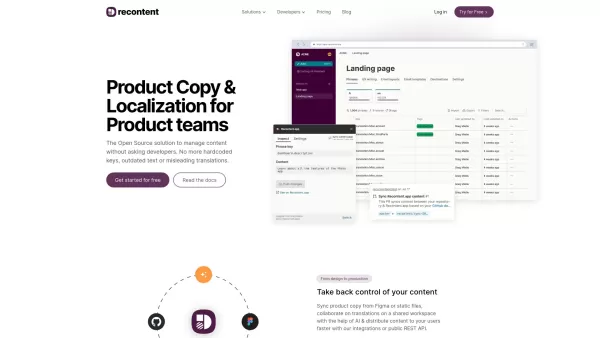
What is Recontent.app?Recontent.app is an open-source solution that empowers product teams to efficiently manage and localize their product copy. By connecting with tools like Figma and GitHub, it enables teams to synchronize text, collaborate on tra
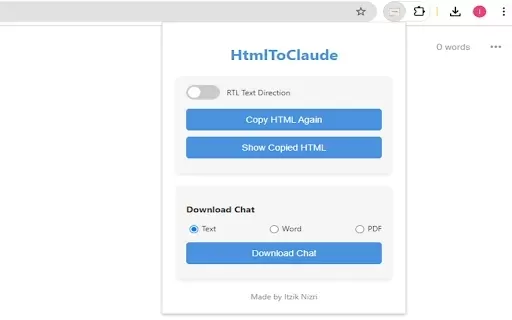
What is HtmlToClaude?HtmlToClaude is a Chrome extension that simplifies your work with Claude AI. It enables you to effortlessly capture HTML content from any webpage and paste it directly into your conversations with Claude. The tool also lets you d
Walling AI Product Information
What is Walling AI?
Walling is a productivity application that provides a visual workspace for organizing ideas, tasks, and projects. Its signature 'walls' offer a flexible and interactive canvas where users can incorporate notes, images, files, and various other content types. Walling enables real-time collaboration, empowering teams to share and develop ideas efficiently. Featuring an intuitive interface and integrated AI, Walling simplifies brainstorming and helps users structure and present their thoughts clearly.
Who uses Walling AI?
- Students
- Project Managers
- Product Designers
- Content Creators
- Marketing Teams
How to use Walling AI
- Step 1: Sign up for an account on the Walling website.
- Step 2: Create your first 'Wall' to begin structuring your ideas.
- Step 3: Add 'bricks' to your Wall, such as notes, images, links, and files.
- Step 4: Organize the bricks to fit your personal or team workflow.
- Step 5: Invite team members to collaborate on your Wall in real time.
- Step 6: Leverage Walling's AI capabilities for idea generation and content structuring.
- Step 7: Use the presentation mode to display your Wall as a slideshow or visual document.
- Step 8: Keep your Wall updated as your project progresses.
Platform
- Web
- macOS
- Windows
- iOS
- Android
Walling AI's Core Features & Benefits
The Core Features
- Visual Walls
- Real-time Collaboration
- AI Integration
- Flexible Content Bricks
- Presentation Mode
The Benefits
- Boosted Productivity
- Better Team Collaboration
- Streamlined Idea Management
- User-friendly Interface
- Adaptable for Various Scenarios
Walling AI's Main Use Cases & Applications
- Project Management
- Brainstorming Meetings
- Academic Projects
- Content Strategy
- Marketing Initiatives
Walling AI's Pros & Cons
The Pros
AI-driven idea and task creation speeds up project initialization and structuring.
The adaptable visual 'wall' canvas accommodates multiple content formats and enables polished presentations.
Available across platforms, including web, desktop applications, mobile apps, and browser extensions.
Collaboration tools like comments, voting, and task assignment enhance team coordination.
Shareable walls are mobile-responsive, ensuring impressive display on all devices.
The Cons
Open-source availability is not indicated.
Pricing tiers or a clear distinction between free and premium plans are not explicitly detailed on the homepage.
Limited information is provided about direct integrations with third-party tools or services.
Walling AI's Pricing
Has free plan | Yes |
|---|---|
Free trial details | |
Pricing model | Freemium |
Is credit card required | No |
Paid from | 6 USD |
Has lifetime plan | No |
Billing frequency | Annually |
Details of Pricing Plan
Free
0 USD
- Unlimited Bricks & Wall Sections
- Up to 10 Walls
- 20 AI credits
- 1 guest per Wall
- Up to 5 MB per file upload
- Sync across devices
Premium
6 USD
- All Free plan features
- Unlimited Walls
- Unlimited AI credits
- Custom color options
- White label walls
- Due dates and reminders
- Unlimited guests per Wall
- Unlimited file uploads
- Text (OCR) and color extraction from images
- API access and integrations
Team
6 USD
- All Premium plan features
- Shared Walls & Folders
- Private Walls & Folders for each member
- Shared Tags
- Advanced wall permissions
Discount:
A 50% discount on the first year of an annual plan is available for students, teachers, and nonprofit organizations.
For the latest prices, please visit: https://walling.app
Walling AI FAQs
What is Walling?
Walling is a visual productivity tool that enables users to arrange and present their concepts in a dynamic, interactive workspace.
How can I sign up for Walling?
You can register for Walling by visiting its official website and setting up an account.
Is Walling free to use?
Walling provides a free plan with essential tools and premium subscriptions for more advanced capabilities.
What platforms is Walling available on?
Walling can be accessed on the web, Android, iOS, macOS, and Windows.
Can I collaborate with others on Walling?
Yes, Walling supports real-time collaboration, allowing multiple users to work together seamlessly.
How do I add content to a Wall?
Content is added by creating 'bricks,' which support text, images, links, files, and other media.
Does Walling have AI features?
Yes, Walling incorporates AI tools to assist with brainstorming and content structuring.
Can I present my Wall?
Yes, Walling includes a presentation mode that transforms your Wall into a sleek visual document or slide deck.
How secure is Walling?
Walling is committed to user security and privacy, implementing strong measures to safeguard your information.
How can I contact Walling support?
For assistance, visit the Walling Help Center or reach out via the support page on their website.
Walling AI Company Information
Website:
https://walling.appCompany Name:
Walling Software Inc.Support Email:
N/AFacebook:
https://www.facebook.com/wallingapp/X (Twitter):
https://twitter.com/wallingapp?lang=enYouTube:
https://www.youtube.com/@Walling/featuredInstagram:
https://www.instagram.com/_.walling/TikTok:
N/ALinkedIn:
https://www.linkedin.com/company/walling
Walling AI Screenshot


2026 Latest Best Top-Rated AI Dialogue Bubble Tools for Visual Storytelling are here on XIX.AI! This curated collection features powerful, game-changing tools that help creators boost productivity and overcome creative bottlenecks. Get a free vs paid comparison, see real-world tests, and check the latest rankings to find the must-try solutions perfect for crafting engaging visual narratives. Explore now to discover your ideal tool!
 10 tools
 xix.ai

2026 Latest Best Top-Rated AI Creative Ideation Tools for Artists are curated by XIX.AI to help creators break through visual blocks and boost creativity instantly. These powerful game-changing tools offer real-world tests, detailed free vs paid comparison, and weekly updated rankings. Discover your perfect tool to accelerate content creation and unlock your AI edge today. Explore now!
14 tools
xix.ai

2026 Latest: Explore our curated rankings of the best AI tools for generating structured prompts for content and coding. Discover top-rated, powerful solutions to boost your accuracy and workflow efficiency, with weekly updated comparisons. Unlock your next-level productivity with XIX.AI.
10 tools
xix.ai


I’ve been using Walling AI for a few weeks now and I’m genuinely surprised how much it helps me visually organize my scattered thoughts 😅. The walls feel like a digital whiteboard but with way less mess. Still a bit buggy on mobile though, hope they fix it soon!


