


 Home
HomeVuAgain-2023 Chrome extension
VuAgain: AI Chrome Extension for Web Insights



Helps TikTok sellers, brands, MCNs, and TAPs discover winning products and find creators.

HelpLook is an AI-powered all-in-one knowledge base tool that helps businesses quickly build knowledge bases, help centers, and...

Your AI Workspace

302.AI is an enterprise-grade AI resource platform with pay-as-you-go pricing, API access to a full range of AI models, and ready-to-use online applications.

剧火AI — AI Screenwriter + Director, a One-Person Short Drama Studio In one sentence, what is it?

What is QuickBox AI?QuickBox AI offers a handy browser extension that integrates a suite of AI tools directly into your browser. Pressing cmd+k (or ctrl+k) brings up a compact overlay on your current tab, enabling instant access to AI utilities. You
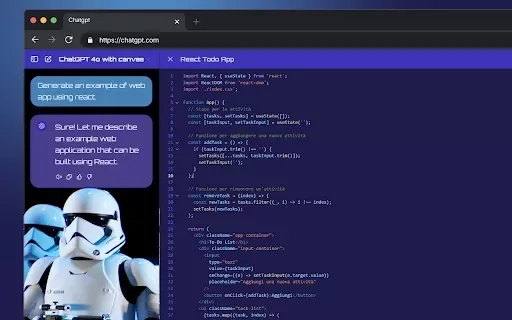
What is StylerGPT: ChatGPT Customization?StylerGPT is a Chrome extension that reimagines your ChatGPT interface as a fully customizable digital workspace. Choose from diverse color palettes, upload custom backgrounds, adjust fonts, and more to create
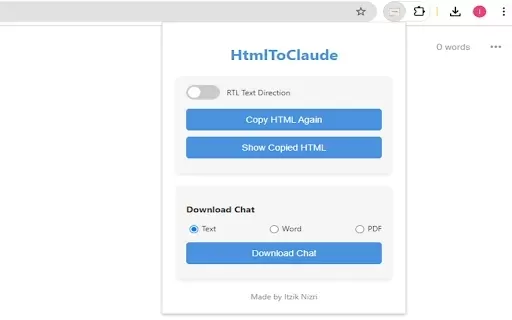
What is HtmlToClaude?HtmlToClaude is a Chrome extension that simplifies your work with Claude AI. It enables you to effortlessly capture HTML content from any webpage and paste it directly into your conversations with Claude. The tool also lets you d
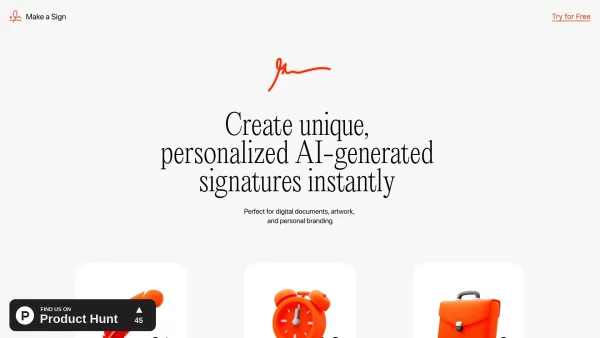
What is Make a Sign?MakeSign is an online platform that enables users to easily design custom signs. It offers a broad selection of templates, design tools, and customization features to help you create professional and attention-grabbing signage for
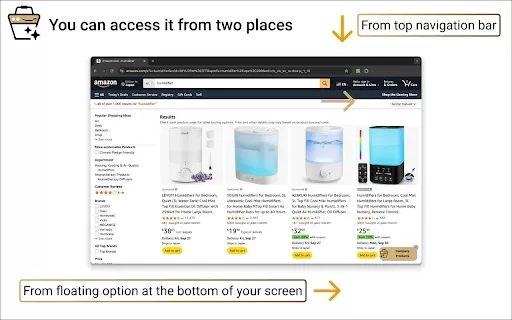
What is Product Comparison Tool?The Smart Amazon Product Comparer is a free Chrome extension that helps you make smarter buying choices on Amazon. It leverages OpenAI's ChatGPT to deliver AI-driven analysis, automatically evaluating product features,
VuAgain-2023 Chrome extension Product Information
What is the VuAgain-2023 Chrome extension?
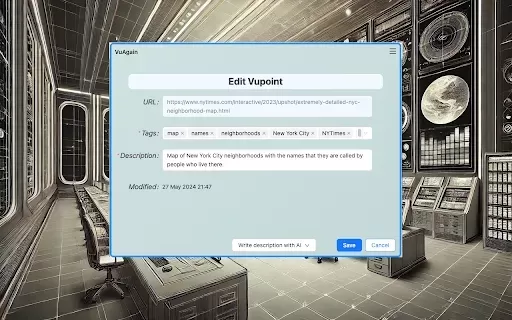
VuAgain is a Chrome extension that transforms your browsing into a searchable, AI-powered knowledge base. It leverages OpenAI to generate concise summaries and intelligently suggest tags for the web pages you visit, simplifying how you save and organize crucial information. You can use it as an essential bookmarking tool or for sophisticated knowledge management. Your data remains secure within a private Google Sheet on your own Drive, and you can share curated content collections with collaborators. The extension receives ongoing updates for continuous enhancement.
Who will benefit from the VuAgain-2023 Chrome extension?
- Students
- Researchers
- Professionals
- Knowledge workers
- Collaborative teams
How to use the VuAgain-2023 Chrome extension
- Step 1: Install the VuAgain extension from the Chrome Web Store.
- Step 2: Navigate to any webpage you wish to save or summarize.
- Step 3: Click the VuAgain icon in your Chrome toolbar.
- Step 4: Use the tool to create a summary, apply tags, and save the page.
- Step 5: View and manage your saved pages and summaries in your private Google Sheet.
- Step 6: Share specific curated collections with your team as required.
Platform
- Chrome
VuAgain-2023 Chrome Extension: Core Features & Benefits
Core Features
- AI-powered summaries
- Smart tag suggestions
- One-click bookmarking
- Private data storage
- Collaborative collections
Key Benefits
- Boosts productivity
- Systematically organizes vital information
- Facilitates team collaboration
- Guarantees data privacy
- Offers instant access to saved content
Primary Use Cases & Applications
- Structuring research for academic purposes.
- Streamlining bookmarks for quick knowledge access.
- Collaborating with colleagues on content curation.
- Collecting and summarizing materials for presentations.
- Building a personalized knowledge repository.
Frequently Asked Questions
How do I install the VuAgain extension?
Simply visit the Chrome Web Store page and click the 'Add to Chrome' button.
Is my data secure with VuAgain?
Absolutely. All your information is stored securely in a private Google Sheet within your own Google Drive.
Can I use VuAgain without AI features?
Yes, you can use it as a straightforward bookmarking tool independent of its AI capabilities.
How do I share my saved content with others?
You can easily share your curated collections by inviting collaborators directly through Google Sheets.
Is VuAgain a paid extension?
Currently, VuAgain does not list any charges for its users.
How can I report a bug or submit feedback?
Please reach out to the development team using the support email listed on the extension's store page.
Can I modify the suggested tags for my pages?
Yes, while VuAgain provides tag recommendations, you have full control to edit and customize them.
Is VuAgain compatible with other browsers?
VuAgain is currently developed specifically for the Chrome browser.
How often is VuAgain updated?
The extension is updated regularly. The most recent version is 1.5.0, released on February 24, 2025.
Can I access my saved pages offline?
Yes, you can access your saved data offline by enabling offline access for Google Drive and Google Sheets.
Company Information
- Degel Software
- https://chromewebstore.google.com/detail/vuagain-2023-chrome-exten/ojmloebpgnbdllomidoonplgjhhhiakl
VuAgain-2023 Chrome extension Screenshot


2026 Latest Best Top-rated AI Object Removal Editors for portraits travel product shots! XIX.AI curates a powerful game-changing collection regularly updated with weekly rankings. These tools offer real-world tests to help you quickly remove unwanted elements, boost content quality, and save tons of time without compromising results. Must-try for anyone aiming to unlock their AI creation edge. Explore now!
 10 tools
 xix.ai

2026 Latest Best Top-rated AI Text to Speech Tools for Online Courses are curated by XIX.AI based on rigorous real-world tests and weekly updated rankings. These powerful tools help creators deliver crystal-clear audio content effortlessly, boosting writing efficiency and streamlining course production. Check out the free vs paid comparison to find your perfect fit. Explore now to unlock your AI edge in online education.
10 tools
xix.ai

2026 Latest Best Top-Rated AI Blog Title Tools for Higher Click Through Rates! XIX.AI has carefully curated a powerful, game-changing collection of top tools that go through rigorous real-world tests. You’ll find a free vs paid comparison, weekly updated rankings, and detailed insights to help you boost your blog’s traffic efficiently. Must-try options are highlighted to help you unlock your AI edge. Explore now!
10 tools
xix.ai

2026 Latest Best Top-rated AI Task Routing Tools for Support Workflows! XIX.AI has curated a highly powerful game-changing collection of must-try solutions, all undergoing rigorous real-world tests and updated weekly. These tools streamline workflows, boost productivity, and help teams deliver faster, more efficient support. Explore now to discover your perfect tool and unlock your AI edge!
17 tools
xix.ai

2026 Latest Best Top-Rated AI Citation and Paper Summary Tools Curated by XIX.AI. Get powerful game-changing solutions for quick content creation, improved writing efficiency, and boosting productivity. We offer a free vs paid comparison along with real-world tests and weekly updated rankings to help you find the must-try tool that fits your needs perfectly. Explore now to Unlock your AI edge.
10 tools
xix.ai

2026 Latest Best Top-Rated AI Productivity Tools for Daily Work! XIX.AI has curated a powerful, game-changing selection based on rigorous weekly updated rankings and real-world tests. You’ll find must-try options that boost writing efficiency, streamline content creation, and help you overcome daily work challenges. Get a free vs paid comparison to find the perfect fit for your needs. Explore now to unlock your AI edge!
9 tools
xix.ai


