


 Home
HomeVideo To Text AI - Cheap Transcriptions



Helps TikTok sellers, brands, MCNs, and TAPs discover winning products and find creators.

HelpLook is an AI-powered all-in-one knowledge base tool that helps businesses quickly build knowledge bases, help centers, and...

Your AI Workspace

302.AI is an enterprise-grade AI resource platform with pay-as-you-go pricing, API access to a full range of AI models, and ready-to-use online applications.

剧火AI — AI Screenwriter + Director, a One-Person Short Drama Studio In one sentence, what is it?

What is Speech Translator?Speech Translator leverages Google's advanced speech recognition to deliver real-time translation for videos, audio, and live streams. This tool bridges language gaps, enabling seamless conversations and fostering clearer un

Ever wondered how to effortlessly turn your audio and video files into text? Enter Clipto, the powerhouse of AI transcription on the web. Imagine harnessing the same cutting-edge tech that fuels ChatGPT to convert your Zoom meetings, interviews, and

What is Revoldiv AI Chrome Extension? Revoldiv is a Chrome browser extension that instantly transcribes audio and video directly in your browser. It lets users follow along by reading live transcriptions and search for specific spoken words within po

Ever found yourself needing to turn spoken words into written text? Well, let me introduce you to tulz.AI—an AI-powered service that's all about making audio transcription a breeze. Whether it's a podcast, a business meeting, or any other spoken content,

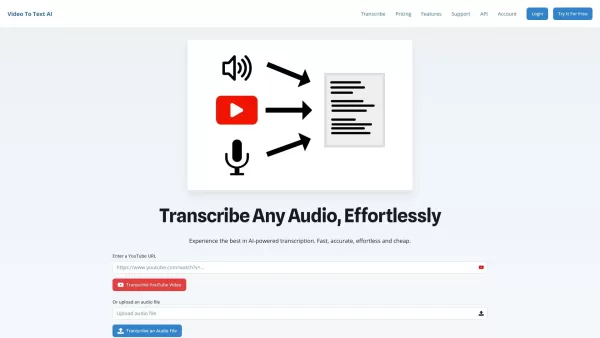
Ever found yourself in need of a quick and accurate transcription of a video or audio file? That's where Video To Text AI comes into play. It's a slick AI-powered tool designed to effortlessly convert your media into text. Whether you're juggling YouTube
Video To Text AI - Cheap Transcriptions Product Information
What is Video To Text AI - Cheap Transcriptions?
VideoToTextAI provides advanced AI-powered transcription services, specializing in the fast and precise conversion of audio and video into text. The platform delivers high-quality, error-free transcripts and supports a wide range of file formats. Designed for ease and efficiency, it saves users significant time and effort. Its intuitive interface makes it ideal for professionals like content creators, educators, and businesses seeking dependable transcription solutions.
Who uses Video To Text AI - Cheap Transcriptions?
- Content creators
- Educators
- Businesses
- Journalists
- Podcasters
- Researchers
- Students
How to use Video To Text AI - Cheap Transcriptions
- Step 1: Go to https://www.videototextai.com
- Step 2: Sign up or log into your account.
- Step 3: Upload your audio or video file.
- Step 4: Choose your transcription settings.
- Step 5: Initiate the transcription process.
- Step 6: Download or view your completed transcript.
Platform
- Web
Video To Text AI - Cheap Transcriptions's Core Features & Benefits
Core Features
- Fast transcription
- High accuracy
- Supports multiple file formats
- User-friendly interface
Benefits
- Saves time
- Boosts productivity
- Enhances content accessibility
- Reduces transcription errors
Video To Text AI - Cheap Transcriptions's Main Use Cases & Applications
- Making video content accessible with transcripts
- Creating video subtitles
- Documenting podcast episodes
- Transcribing academic lectures
- Converting meeting recordings into notes
Video To Text AI - Cheap Transcriptions's Pros & Cons
Pros
Automatically and accurately transcribes and translates video and audio files
Supports transcription and translation in over 100 languages
Includes AI chat features for summarizing and interacting with transcripts
Allows editing and customization of subtitles and captions
Offers multiple download formats (text, subtitles, video)
Free to use with no credit card required
Video To Text AI - Cheap Transcriptions's Pricing
Has free plan | YES |
|---|---|
Free trial details | Get 2 months free with annual billing |
Pricing model | Freemium |
Is credit card required | No |
Paid from | 9.99 USD |
Has lifetime plan | No |
Billing frequency | Monthly |
Details of Pricing Plan
Free
0 USD
- 60 credits monthly
- 1 hour of transcriptions or 3 minutes of rendering
- Transcribe files
- Translate files
- Edit and download text
- Edit and download subtitles
- Edit caption timestamps
- Create AI captions for video
- Chat with AI
- Watermark
- Upload files up to 30 minutes
Pro
9.99 USD
- 1200 credits monthly
- 20 hours of transcriptions or 1 hour of rendering
- Everything in Free, plus:
- No watermark
- Upload files up to 2 hours
- Speaker Recognition
- Additional credits available at a discount
- 24/7 Priority Customer Support
Discount:
Limited Time -50% Sale!
For the latest prices, please visit: https://www.videototextai.com/pricing
FAQs for Video To Text AI - Cheap Transcriptions
How accurate is VideoToTextAI?
VideoToTextAI delivers highly accurate transcriptions, though accuracy can vary depending on the audio or video quality.
What file formats are supported?
VideoToTextAI supports various audio and video file formats, including MP4, AVI, MP3, and more.
Is there a limit to the file size I can upload?
Yes, there is a file size limit. Specific details can be found on the upload page or in the platform's help section.
How long does it take to transcribe a file?
Transcription time depends on file length, but VideoToTextAI is designed to deliver results rapidly.
Can I edit the transcribed text?
Yes, you can review and edit the transcribed text within the platform before finalizing it.
Is my data secure on VideoToTextAI?
Yes, VideoToTextAI prioritizes data security and uses encryption to protect user information.
Do I need an account to use VideoToTextAI?
Yes, you need to sign up and create an account to access VideoToTextAI's services.
Can I transcribe in different languages?
Yes, VideoToTextAI supports transcription in multiple languages. Check the website for the full list of supported languages.
What is the pricing for VideoToTextAI?
Pricing details are available on the website's pricing page, with various plans based on usage and needs.
How can I contact support?
You can contact support via the support page or by emailing [email protected].
Video To Text AI - Cheap Transcriptions Company Information
- VideoToTextAI
- https://www.videototextai.com
Video To Text AI - Cheap Transcriptions Screenshot

2026 Latest Best Top-Rated AI Outline Generators for Long-Form SEO Articles, meticulously curated by XIX.AI. These powerful tools offer game-changing assistance in creating high-quality content quickly, boosting writing efficiency significantly. Get a free vs paid comparison along with real-world tests and detailed rankings to help you find the must-try option that suits your needs. Explore now to unlock your AI edge.
 8 tools
 xix.ai

2026 Latest Best AI Study Tools for Homework and Exam Prep! XIX.AI curates a top-rated list of powerful, game-changing tools that help students boost productivity, streamline homework completion, and ace exams through real-world tests. Get a free vs paid comparison, detailed rankings, and must-try options to unlock your AI edge. Explore now!
10 tools
xix.ai

2026 Latest Best AI Vocal Demo Tools for Songwriters, Hook Creators, and Multi-Language Content Teams! XIX.AI has curated a top-rated list of powerful game-changing tools that go through rigorous real-world tests. You’ll find detailed free vs paid comparison data, comprehensive rankings, and must-try options to help you boost writing efficiency and unlock your creative potential. Explore now to discover your perfect tool for all your content needs!
9 tools
xix.ai

2026 Latest Best Top-rated AI Competitive Research Tools for Small Businesses! XIX.AI has curated a highly powerful game-changing collection, updated weekly with rigorous real-world tests and detailed rankings. You can find a comprehensive free vs paid comparison to help you identify the must-try tools that boost your productivity and give you a competitive edge. Explore now to discover your perfect tool!
9 tools
xix.ai

2026 Latest Best Photoshop AI retouch tools for ecommerce apparel, skin cleanup, and color consistency! This top-rated curated list features powerful game-changing solutions that help you boost writing efficiency, streamline content creation, and achieve perfect visual results effortlessly. Each tool has undergone real-world tests through weekly updated rankings, complete with free vs paid comparison details. Backed by XIX.AI, it’s the must-try guide for anyone aiming to unlock your AI edge. Explore now!
10 tools
xix.ai

2026 Latest Best Top-Rated AI Prompt Libraries for optimizing all types of ChatGPT workflows. XIX.AI has curated a powerful, game-changing collection that goes through rigorous real-world tests to ensure top performance. You can find detailed free vs paid comparisons and expert rankings to help you choose the must-try tools that boost your productivity and unlock your AI edge. Explore now!
11 tools
xix.ai


