


 Home
HomeVadu AI



Helps TikTok sellers, brands, MCNs, and TAPs discover winning products and find creators.

HelpLook is an AI-powered all-in-one knowledge base tool that helps businesses quickly build knowledge bases, help centers, and...

Your AI Workspace

302.AI is an enterprise-grade AI resource platform with pay-as-you-go pricing, API access to a full range of AI models, and ready-to-use online applications.

剧火AI — AI Screenwriter + Director, a One-Person Short Drama Studio In one sentence, what is it?

What is Banana AI - Free AI Photo Editor?Banana AI is a free, AI-driven photo editor that uses Google's Nano Banana technology (Gemini 2.5 Flash Image) to transform your pictures with simple text commands. Easily remove unwanted objects, swap backgro

What is Deepfake Maker Nano Banana AI? Nano Banana AI is an advanced artificial intelligence platform that generates stunning images from text descriptions and facilitates seamless image-to-image transformations. This cutting-edge AI model revolution

What is Line Art Maker?Line Art Maker is an intuitive application that effortlessly transforms your photos into stunning line drawings. Powered by sophisticated algorithms, it precisely identifies outlines and turns your images into detailed sketches

What is TranslateImages?AI Image Translator is an advanced tool that precisely translates text embedded in images, keeping the original layout and format intact. It supports over a dozen languages, such as English, Hindi, Arabic, Chinese, Japanese, K

What is Nano Banana | Nanana AI? Nanana AI is the leading AI image generator and AI image editor on the market. It taps into the full potential of Google's revolutionary Nano Banana model to offer unmatched image creation and editing power. As an ear
Vadu AI Product Information
What is Vadu AI?
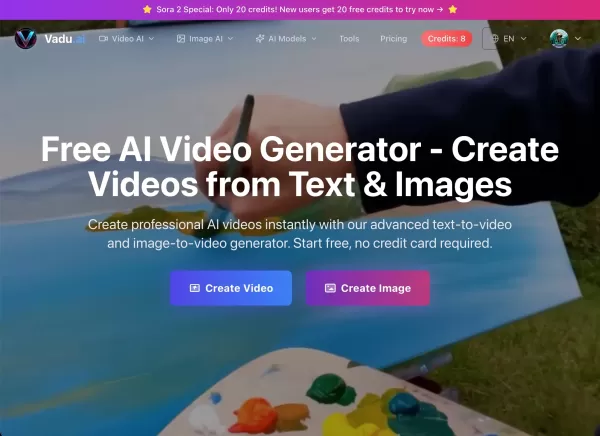
Vadu AI is the premier all-in-one platform for AI-powered video and image generation, designed to streamline creative workflows for content creators, marketers, designers, and businesses.**What is Vadu AI?**Vadu AI brings together the world's most advanced AI video and image generation models into a single, intuitive platform. Instead of managing multiple subscriptions and learning different tools, users can access OpenAI's Sora 2, Google's Veo 3 (with audio), Kling 2.0, Pixverse V5, Hailuo 02, WAN 2.5, Vidu Q1, and many others—all from one unified dashboard.**How It Works:**1. Select your preferred AI model based on your requirements (quality, speed, style)2. Enter a text prompt or upload an image3. Customize settings like duration, resolution, and aspect ratio4. Generate and download your video or image—completely free of watermarks
Who is Vadu AI for?
- Content Creators & YouTubers: Produce B-roll footage, intros, and visual effects
- Social Media Managers: Craft engaging short-form video content for TikTok, Instagram Reels
- Marketers & Advertisers: Quickly create promotional videos and product demonstrations
- Designers & Artists: Explore AI-generated artwork and animation concepts
- E-commerce Sellers: Transform product images into videos
- Educators: Develop visual learning aids and explanatory videos
- Small Businesses: Generate professional marketing content without costly production
- Filmmakers & Animators: Rapid prototyping and storyboard visualization
- Everyone: Anyone looking to explore AI video creation, no technical expertise needed
How to use Vadu AI?
- Step 1: Sign up for an account at vadu.ai. New users get 20 free credits to start creating right away.
- Step 2: Choose your tool: Select from Text-to-Video, Image-to-Video, Text-to-Image, or other options based on your project.
- Step 3: Pick from 10+ AI models including Sora 2, Google Veo 3, Kling 2.0, Pixverse V5, and more. Each model has unique strengths.
- Step 4: Write a detailed description of the video or image you want, or upload a reference image for Image-to-Video.
- Step 5: Adjust settings like duration (4s-25s), resolution (480P-1080P), aspect ratio (16:9, 9:16, 1:1), and style preferences.
- Step 6: Click generate and wait for your AI creation. Download the final result with no watermark.
Platform
- Web
Vadu AI's Core Features & Benefits
Core Features
- Multi-Model Access: Sora 2, Sora 2 Pro, Google Veo 3, Veo 3.1, Kling 2.0, Pixverse V5, Hailuo 02, WAN 2.5, Vidu Q1
- Text-to-Video Generation: Create videos from text descriptions, up to 25 seconds long
- Image-to-Video Animation: Turn static images into dynamic videos
- Text-to-Image Creation: Generate AI artwork with multiple style options
- Audio Generation: Automatically generate matching audio tracks (available with Google Veo 3)
- Multiple Resolutions: Output support for 480P, 720P, and 1080P
- Flexible Aspect Ratios: 16:9, 9:16, 1:1, 4:3, 3:4 for any platform or use case
- Video Duration Options: From 4 seconds to 25 seconds
Key Benefits
- All-in-One Platform: No need for multiple subscriptions—access all top AI models in one place
- Cost Effective: Flexible credits system saves money compared to individual model subscriptions
- No Watermarks: Professional-quality output ready for commercial use
- Easy to Use: Simple interface requires no technical skills or AI expertise
- High Quality: Access to premium models like Sora 2 Pro and Veo 3 for the best results
- Flexible Output: Multiple resolutions, durations, and aspect ratios for any use case
- Free to Start: 20 free credits for new users—no credit card required
Main Use Cases & Applications
- Social Media Content: Create viral short-form videos for TikTok, Instagram, YouTube Shorts
- Marketing Videos: Product demos, promotional content, advertising creatives
- E-commerce: Product visualization and animated product showcases
- Educational Content: Explainer videos, visual tutorials, learning materials
- Creative Projects: Music videos, art animations, concept visualization
- Storytelling: Storyboard creation, scene visualization, narrative content
- Brand Content: Logo animations, brand videos, visual identity content
- Presentations: Dynamic slides and visual aids for business presentations
Vadu AI's Pros & Cons
Pros
Comprehensive AI-powered multimedia creation
Multiple AI models optimized for various needs
Fast processing and instant results
No technical expertise needed
Free to start with premium options
Cons
No dedicated mobile or desktop apps mentioned
Limited information about offline capabilities
Unknown if open source or code access is available
Vadu AI Pricing
Has free plan | YES |
|---|---|
Free trial details | 7-day free trial for all paid plans, no credit card required |
Pricing model | Freemium |
Is credit card required | No |
Paid from | 9 USD |
Has lifetime plan | No |
Billing frequency | Monthly |
Details of Pricing Plan
Basic
9 USD
- 300 credits per month
- 1 parallel task
- All-in-one multi-model support
- No watermark
- Email support
Pro
17.4 USD
- 800 credits per month
- All Basic features
- 2 parallel tasks
- All-in-one multi-model support
- Priority processing
- Advanced AI models
- Priority email support
Ultimate
35.4 USD
- 2,000 credits per month
- All Pro features
- 3 parallel tasks
- All-in-one multi-model support
- Dedicated support
- Priority queue processing
Ultra
77.4 USD
- 5,000 credits per month
- All Ultimate features
- 5 parallel tasks
- Highest priority processing
- Dedicated support + SLA
Discount:
Save 40% when billed annually
For the latest prices, please visit: https://vadu.ai/pricing
Vadu AI FAQs
Is Vadu AI free to use?
Yes! New users receive 20 free credits upon signup. You can create videos immediately without a credit card. Additional credits can be purchased when needed.
What AI models are available on Vadu AI?
Vadu AI offers 10+ premium AI models including OpenAI Sora 2, Sora 2 Pro, Google Veo 3, Veo 3.1, Kling 2.0, Pixverse V5, Hailuo 02, WAN 2.5, Vidu Q1, and more. New models are added regularly.
Are there watermarks on generated videos?
No. All videos and images generated on Vadu AI are watermark-free and ready for commercial or personal use.
What's the maximum video length I can generate?
Video duration varies by model. Sora 2 Pro supports up to 25 seconds, while most other models support 5-10 second videos. Multiple clips can be combined for longer content.
What resolutions are supported?
Vadu AI supports 480P, 720P, and 1080P resolutions depending on the model selected. Some models like Sora 2 Pro offer higher quality 1080P output.
Can I generate videos from my own images?
Yes! The Image-to-Video feature allows you to upload any image and transform it into a dynamic video using AI animation.
Does Vadu AI support audio generation?
Yes, select models like Google Veo 3 and Veo 3.1 can automatically generate matching audio tracks for your videos.
What languages does Vadu AI support?
Vadu AI supports 17 languages including English, Chinese, Japanese, Korean, Spanish, French, German, and more for a global user base.
Vadu AI Company Information
Vadu AI Launch embedsUse website badges to drive support from your community for your Creati.ai Launch. They're easy to embed on your homepage or footer.
How to install?
Vadu AI Screenshot

2026 Latest Best Top-rated AI Text to Speech Tools for Natural Voiceovers are here on XIX.AI! This curated list features powerful, game-changing options that deliver crystal-clear voices for every use case, backed by real-world tests and weekly updated rankings. Get a free vs paid comparison to find the must-try solution that boosts your productivity instantly. Explore now to Unlock your AI edge!
 11 tools
 xix.ai

2026 Latest Best Manga AI Background Generators Ranked Top-Rated! This curated collection showcases powerful game-changing tools perfect for creating high-quality chapter backgrounds, book covers, and promotional art. Every option has undergone rigorous real-world tests to ensure reliability. Get a free vs paid comparison along with detailed insights. Explore now to discover your perfect tool and unlock your AI edge in manga creation.
6 tools
xix.ai

2026 Latest Best Top-rated AI Object Removal Editors for portraits travel product shots! XIX.AI curates a powerful game-changing collection regularly updated with weekly rankings. These tools offer real-world tests to help you quickly remove unwanted elements, boost content quality, and save tons of time without compromising results. Must-try for anyone aiming to unlock their AI creation edge. Explore now!
10 tools
xix.ai

2026 Latest Best Top-rated AI Text to Speech Tools for Online Courses are curated by XIX.AI based on rigorous real-world tests and weekly updated rankings. These powerful tools help creators deliver crystal-clear audio content effortlessly, boosting writing efficiency and streamlining course production. Check out the free vs paid comparison to find your perfect fit. Explore now to unlock your AI edge in online education.
10 tools
xix.ai

2026 Latest Best Top-Rated AI Blog Title Tools for Higher Click Through Rates! XIX.AI has carefully curated a powerful, game-changing collection of top tools that go through rigorous real-world tests. You’ll find a free vs paid comparison, weekly updated rankings, and detailed insights to help you boost your blog’s traffic efficiently. Must-try options are highlighted to help you unlock your AI edge. Explore now!
10 tools
xix.ai

2026 Latest Best Top-rated AI Task Routing Tools for Support Workflows! XIX.AI has curated a highly powerful game-changing collection of must-try solutions, all undergoing rigorous real-world tests and updated weekly. These tools streamline workflows, boost productivity, and help teams deliver faster, more efficient support. Explore now to discover your perfect tool and unlock your AI edge!
17 tools
xix.ai


