


 Home
HomeUImagine
AI-Powered Design & Code Generator Tool



Helps TikTok sellers, brands, MCNs, and TAPs discover winning products and find creators.

HelpLook is an AI-powered all-in-one knowledge base tool that helps businesses quickly build knowledge bases, help centers, and...

Your AI Workspace

302.AI is an enterprise-grade AI resource platform with pay-as-you-go pricing, API access to a full range of AI models, and ready-to-use online applications.

剧火AI — AI Screenwriter + Director, a One-Person Short Drama Studio In one sentence, what is it?
UImagine Product Information
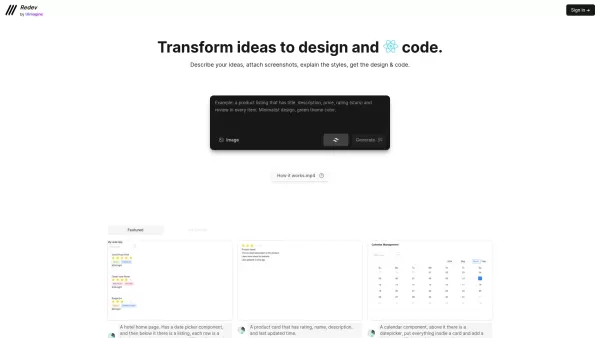
So, what exactly is UImagine? In short, it’s a game-changer for anyone who’s ever had an idea but didn’t know where to start with turning it into reality. Think of it as your personal digital assistant for design and development—it takes your rough concepts, sketches, or even vague descriptions and spits out professional-grade front-end design and functional code in no time flat. No more staring at blank screens or getting stuck on the “how-to” part. UImagine handles the heavy lifting, letting you focus on the fun stuff.
And guess what? You don’t need to be a coding wizard to use it. Just imagine the possibilities: you describe your vision, upload some screenshots if needed, and explain your preferred styles—whether it’s modern, minimalistic, or something wild—and voilà! UImagine does the rest. It’s like having a personal designer and developer rolled into one super-smart tool.
How to Get Started with UImagine
Using UImagine is simpler than you think. Here’s the lowdown:- Head over to their website and sign up (it’s free to try).
- Describe your idea in plain English—or upload a screenshot if you’ve already got something visual in mind.
- Add notes about the style you’re going for, whether it’s color schemes, fonts, or layout preferences.
- Hit submit, sit back, and let UImagine do its thing.
- Once it’s ready, download the final design and code files. Boom—you’re done!
Key Features That Set UImagine Apart
- Instant Transformation: From concept to polished design and working code, UImagine makes it happen lickety-split.
- Style Customization: Need a specific look? Upload screenshots or describe your style preferences, and UImagine tailors the output accordingly.
Real-World Use Cases
Let’s talk real-world applications. UImagine isn’t just for techies—it’s for creatives, entrepreneurs, and anyone with a spark of inspiration. For example:- Automate the creation of a hotel homepage design and code.
- Rapidly build product card templates for e-commerce sites.
- Effortlessly craft a sleek calendar management interface.
Frequently Asked Questions
Here’s the scoop on some common queries:- Can UImagine handle any kind of web interface?
- Absolutely! Whether it’s a landing page, dashboard, or interactive form, UImagine can adapt to virtually any requirement.
- How accurate is the output?
- The results are impressively close to professional standards. While there may be minor tweaks needed depending on your exact needs, UImagine gets you 90%+ of the way there with zero effort.
About UImagine Company
This is where things get exciting. UImagine isn’t just another random tool—it’s backed by a team passionate about democratizing design and development. Their mission? To empower everyone to bring their visions to life without barriers.Ready to Try UImagine?
Curious to see how it works firsthand? Head over to the sign-up page, create an account, and give it a whirl. Who knows? You might end up with a fully functional prototype before you finish your morning coffee!UImagine Screenshot


2026 Latest Best Photoshop AI retouch tools for ecommerce apparel, skin cleanup, and color consistency! This top-rated curated list features powerful game-changing solutions that help you boost writing efficiency, streamline content creation, and achieve perfect visual results effortlessly. Each tool has undergone real-world tests through weekly updated rankings, complete with free vs paid comparison details. Backed by XIX.AI, it’s the must-try guide for anyone aiming to unlock your AI edge. Explore now!
 10 tools
 xix.ai

2026 Latest Best Top-Rated AI Prompt Libraries for optimizing all types of ChatGPT workflows. XIX.AI has curated a powerful, game-changing collection that goes through rigorous real-world tests to ensure top performance. You can find detailed free vs paid comparisons and expert rankings to help you choose the must-try tools that boost your productivity and unlock your AI edge. Explore now!
11 tools
xix.ai

2026 Latest Best AI Quiz Builder Platforms for Teachers, Tutors, and Cohort-Based Learning Programs! XIX.AI has curated a top-rated list of powerful game-changing tools that go through real-world tests to deliver accurate rankings. These must-try platforms help boost writing efficiency, streamline content creation, and simplify quiz design across all learning scenarios. Explore now to discover your perfect tool for unlocking your AI edge in teaching!
13 tools
xix.ai

2026 Latest Best AI Pull Request Review Tools for GitHub Teams are here on XIX.AI! This top-rated curated list showcases powerful game-changing solutions that streamline refactoring, bug fixing, and security gap detection across all team workflows. Enjoy a free vs paid comparison along with real-world tests and detailed rankings to help you find the perfect tool that boosts productivity significantly. Explore now to unlock your AI edge!
12 tools
xix.ai

2026 Latest Best Top-rated AI Text to Speech Tools for Natural Voiceovers are here on XIX.AI! This curated list features powerful, game-changing options that deliver crystal-clear voices for every use case, backed by real-world tests and weekly updated rankings. Get a free vs paid comparison to find the must-try solution that boosts your productivity instantly. Explore now to Unlock your AI edge!
11 tools
xix.ai

2026 Latest Best Manga AI Background Generators Ranked Top-Rated! This curated collection showcases powerful game-changing tools perfect for creating high-quality chapter backgrounds, book covers, and promotional art. Every option has undergone rigorous real-world tests to ensure reliability. Get a free vs paid comparison along with detailed insights. Explore now to discover your perfect tool and unlock your AI edge in manga creation.
6 tools
xix.ai


