


 Home
HomeToolbox - Chrome Extension
AI tool hub with 200+ no signup tools



Helps TikTok sellers, brands, MCNs, and TAPs discover winning products and find creators.

HelpLook is an AI-powered all-in-one knowledge base tool that helps businesses quickly build knowledge bases, help centers, and...

Your AI Workspace

302.AI is an enterprise-grade AI resource platform with pay-as-you-go pricing, API access to a full range of AI models, and ready-to-use online applications.

剧火AI — AI Screenwriter + Director, a One-Person Short Drama Studio In one sentence, what is it?

Ever stumbled upon Cherry Studio AI and wondered what it's all about? Well, let me break it down for you. Cherry Studio AI isn't just another run-of-the-mill AI tool; it's a powerhouse desktop client that lets you dive into advanced AI interactions across

Discover Plume AI: Your Ultimate Academic Writing AssistantAre you tired of struggling with your academic writing? Well, say hello to Plume AI, the innovative AI assistant that's here to revolutionize the way you write! Designed with students in mind, Plume AI harnesses the power of cutting-edge art

Ever wondered how to turn your jumbled thoughts and complex queries into something you can actually grasp? Enter The Visualizer, your new best friend in the world of learning and creativity. This nifty tool takes your written queries, URLs, and even PDFs,

Ever wished for a trusty sidekick to help you navigate the digital world with ease? Enter Sider, your personal AI companion designed to seamlessly blend into your daily routine. Starting off as a handy Chrome/Edge extension, Sider transforms your browsing

Ever wondered what Ninja AI is all about? Well, let me tell you, it's like having a Swiss Army knife for your digital needs! Ninja AI isn't just another AI tool; it's a powerhouse that brings together over 24 top-notch Large Language Models (LLMs) to help
Toolbox - Chrome Extension Product Information
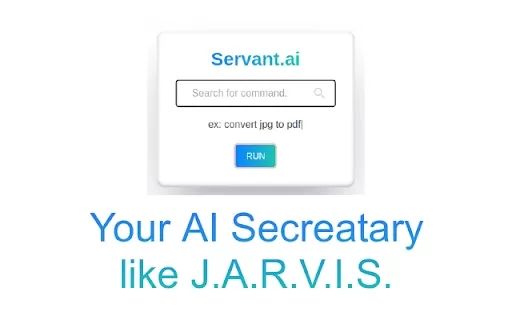
Ever wished you had a digital sidekick like J.A.R.V.I.S. to help you navigate the chaotic world of online tools? Well, the Toolbox AI Chrome extension might just be your new best friend. Imagine having over 200 tools at your fingertips, all without the annoyance of signing up or downloading multiple apps. It's like having a Swiss Army knife for your digital life, ready to tackle any task you throw at it!
How to Use Toolbox AI Chrome Extension?
Using the Toolbox AI Chrome extension is a breeze. Just install it, and voila! You've got instant access to a plethora of tools that can help you with almost anything you need online. Whether you're juggling multiple tasks or just looking for a quick fix, this extension has you covered without any fuss.
Toolbox AI Chrome Extension's Core Features
Let's dive into some of the cool features this extension offers. Ever needed to remove a background from an image? It's got you. Need a slick email signature or a fresh profile picture for your socials? Done and done. Want to create engaging polls, build a resume, or edit images like a pro? You guessed it, Toolbox AI has those tools too. And that's just the tip of the iceberg! From converting image files to generating AI-driven images, creating launch pages, managing to-do lists, and even taking notes online, this extension is a powerhouse.
But wait, there's more! You can access high-quality stock images, filter out spam emails, set timers, create virtual backgrounds for Zoom, and use a modern classroom whiteboard. Need to extract text from images or generate favicons for your website? No problem. And if you're into design, identifying brand colors is a snap. Plus, you can even access free lectures to keep learning on the go.
Toolbox AI Chrome Extension's Use Cases
So, how can you put all these tools to work? If you're into photography or design, the background removal feature is a godsend. Need to look professional in your emails? Whip up a signature in no time. Social media influencers, you can create custom profile pictures that stand out. And if you're running surveys or need feedback, designing polls is a breeze.
Job hunting? Build your resume with ease using predefined templates. Whether you're editing images for fun or work, or converting files, Toolbox AI has you covered. And for those creative projects, generate AI-driven images or build stunning launch pages. Stay organized with to-do lists and online notes, and find the perfect stock images for your designs.
Keep your inbox clean with spam filtering, stay on track with timers, and make your Zoom meetings more interesting with custom backgrounds. Teachers, the modern classroom whiteboard is perfect for interactive lessons. And for those virtual meetings or presentations, video conferencing is seamless. Need to extract text from images or create a favicon? It's all there. Plus, keep your design consistent with brand color identification, and never stop learning with free lectures.
FAQ from Toolbox
- Is Toolbox free to use?
Yes, Toolbox AI Chrome extension is completely free to use. No hidden fees, no catches—just pure, unadulterated access to a treasure trove of tools to make your digital life easier and more productive.
Toolbox - Chrome Extension Screenshot



2026 Latest Best Top-rated AI Object Removal Editors for portraits travel product shots! XIX.AI curates a powerful game-changing collection regularly updated with weekly rankings. These tools offer real-world tests to help you quickly remove unwanted elements, boost content quality, and save tons of time without compromising results. Must-try for anyone aiming to unlock their AI creation edge. Explore now!
 10 tools
 xix.ai

2026 Latest Best Top-rated AI Text to Speech Tools for Online Courses are curated by XIX.AI based on rigorous real-world tests and weekly updated rankings. These powerful tools help creators deliver crystal-clear audio content effortlessly, boosting writing efficiency and streamlining course production. Check out the free vs paid comparison to find your perfect fit. Explore now to unlock your AI edge in online education.
10 tools
xix.ai

2026 Latest Best Top-Rated AI Blog Title Tools for Higher Click Through Rates! XIX.AI has carefully curated a powerful, game-changing collection of top tools that go through rigorous real-world tests. You’ll find a free vs paid comparison, weekly updated rankings, and detailed insights to help you boost your blog’s traffic efficiently. Must-try options are highlighted to help you unlock your AI edge. Explore now!
10 tools
xix.ai

2026 Latest Best Top-rated AI Task Routing Tools for Support Workflows! XIX.AI has curated a highly powerful game-changing collection of must-try solutions, all undergoing rigorous real-world tests and updated weekly. These tools streamline workflows, boost productivity, and help teams deliver faster, more efficient support. Explore now to discover your perfect tool and unlock your AI edge!
17 tools
xix.ai

2026 Latest Best Top-Rated AI Citation and Paper Summary Tools Curated by XIX.AI. Get powerful game-changing solutions for quick content creation, improved writing efficiency, and boosting productivity. We offer a free vs paid comparison along with real-world tests and weekly updated rankings to help you find the must-try tool that fits your needs perfectly. Explore now to Unlock your AI edge.
10 tools
xix.ai

2026 Latest Best Top-Rated AI Productivity Tools for Daily Work! XIX.AI has curated a powerful, game-changing selection based on rigorous weekly updated rankings and real-world tests. You’ll find must-try options that boost writing efficiency, streamline content creation, and help you overcome daily work challenges. Get a free vs paid comparison to find the perfect fit for your needs. Explore now to unlock your AI edge!
9 tools
xix.ai


Just installed Toolbox and it's like having a mini J.A.R.V.I.S. in my browser! The sheer number of tools is mind-blowing, and having them all in one place is a game-changer for my workflow. No more tab-hopping between different sites. It feels a bit like magic, honestly. Can't wait to explore all 200+ features! 🚀
This Toolbox extension is a game-changer! 😎 Over 200 tools right in my browser, no sign-up hassle. It’s like having a digital Swiss Army knife—super handy for quick tasks. Only gripe? Sometimes it’s a bit overwhelming to pick the right tool. Still, totally worth it! 🚀


