


 Home
HomeTheActuals Mic Extension



Helps TikTok sellers, brands, MCNs, and TAPs discover winning products and find creators.

HelpLook is an AI-powered all-in-one knowledge base tool that helps businesses quickly build knowledge bases, help centers, and...

Your AI Workspace

302.AI is an enterprise-grade AI resource platform with pay-as-you-go pricing, API access to a full range of AI models, and ready-to-use online applications.

剧火AI — AI Screenwriter + Director, a One-Person Short Drama Studio In one sentence, what is it?

What is Speech Translator?Speech Translator leverages Google's advanced speech recognition to deliver real-time translation for videos, audio, and live streams. This tool bridges language gaps, enabling seamless conversations and fostering clearer un

Ever wondered how to effortlessly turn your audio and video files into text? Enter Clipto, the powerhouse of AI transcription on the web. Imagine harnessing the same cutting-edge tech that fuels ChatGPT to convert your Zoom meetings, interviews, and

What is Revoldiv AI Chrome Extension? Revoldiv is a Chrome browser extension that instantly transcribes audio and video directly in your browser. It lets users follow along by reading live transcriptions and search for specific spoken words within po

Ever found yourself needing to turn spoken words into written text? Well, let me introduce you to tulz.AI—an AI-powered service that's all about making audio transcription a breeze. Whether it's a podcast, a business meeting, or any other spoken content,

Ever found yourself in need of a quick and accurate transcription of a video or audio file? That's where Video To Text AI comes into play. It's a slick AI-powered tool designed to effortlessly convert your media into text. Whether you're juggling YouTube
TheActuals Mic Extension Product Information
What is TheActuals Mic Extension?
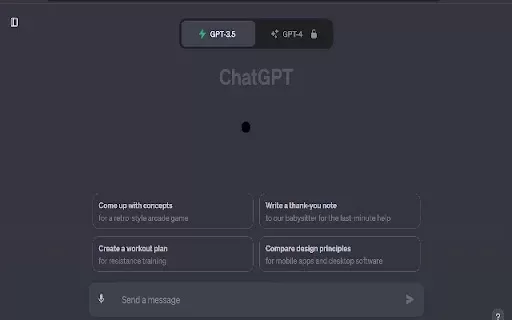
TheActuals Mic Extension is a Chrome browser add-on that works seamlessly with ChatGPT, allowing you to easily convert your speech into text. Ideal for anyone who favors talking over typing, this tool improves your experience by making conversations flow more smoothly. It features precise speech recognition, enabling you to record, transcribe, and use your spoken words in a variety of situations. This extension offers a smart way to generate content and communicate, serving both everyday users and working professionals.
Who is TheActuals Mic Extension for?
- Students
- Professionals
- Content Creators
- Educators
- Business Analysts
How to use TheActuals Mic Extension
- Step 1: Get TheActuals Mic Extension from the Chrome Web Store.
- Step 2: Go to ChatGPT and start a chat.
- Step 3: Select the microphone button to start recording your voice.
- Step 4: Speak clearly and let the extension transcribe your words.
- Step 5: Check the transcribed text and make edits if needed.
- Step 6: Send the text to ChatGPT to continue the conversation.
Platform
- Chrome
TheActuals Mic Extension's Core Features & Benefits
The Core Features
- Speech recognition
- Text transcription
- Smooth integration with ChatGPT
The Benefits
- Saves time
- Boosts accessibility
- Increases communication efficiency
- Simple, user-friendly interface
TheActuals Mic Extension's Main Use Cases & Applications
- Meeting transcriptions
- Article writing
- Content creation
- Language learning support
FAQs of TheActuals Mic Extension
How does TheActuals Mic Extension work?
It uses speech recognition technology to turn spoken words into written text.
Is TheActuals Mic Extension free?
Yes, you can download and use the extension for free from the Chrome Web Store.
Can it be used on mobile devices?
The extension is built for the Chrome browser on desktop.
What languages does it support?
It mainly supports English, though it may also work with other languages.
Are there any privacy concerns?
The extension asks for very few permissions, protecting your privacy.
Do I need an internet connection to use it?
Yes, a reliable internet connection is necessary for best results.
Can I edit the transcribed text?
Yes, you can review and adjust the transcribed text before sending it.
Is there a limit to how long I can record?
Recording length may be subject to browser limits and performance factors.
How do I install the extension?
Install it directly from its Chrome Web Store listing.
Can I use it with other applications?
While optimized for ChatGPT, it may function in other text input areas.
TheActuals Mic Extension Company Information
Website:
https://chrome.google.com/webstore/detail/theactuals-mic-extension/keeokjaeebgmddeedicfpjlcjbclgfcbCompany Name:
TheActualsSupport Email:
NAFacebook:
NAX(Twitter):
NAYouTube:
NAInstagram:
NATiktok:
NALinkedIn:
NA
TheActuals Mic Extension Screenshot

2026 Latest Best Photoshop AI retouch tools for ecommerce apparel, skin cleanup, and color consistency! This top-rated curated list features powerful game-changing solutions that help you boost writing efficiency, streamline content creation, and achieve perfect visual results effortlessly. Each tool has undergone real-world tests through weekly updated rankings, complete with free vs paid comparison details. Backed by XIX.AI, it’s the must-try guide for anyone aiming to unlock your AI edge. Explore now!
 10 tools
 xix.ai

2026 Latest Best Top-Rated AI Prompt Libraries for optimizing all types of ChatGPT workflows. XIX.AI has curated a powerful, game-changing collection that goes through rigorous real-world tests to ensure top performance. You can find detailed free vs paid comparisons and expert rankings to help you choose the must-try tools that boost your productivity and unlock your AI edge. Explore now!
11 tools
xix.ai

2026 Latest Best AI Quiz Builder Platforms for Teachers, Tutors, and Cohort-Based Learning Programs! XIX.AI has curated a top-rated list of powerful game-changing tools that go through real-world tests to deliver accurate rankings. These must-try platforms help boost writing efficiency, streamline content creation, and simplify quiz design across all learning scenarios. Explore now to discover your perfect tool for unlocking your AI edge in teaching!
13 tools
xix.ai

2026 Latest Best AI Pull Request Review Tools for GitHub Teams are here on XIX.AI! This top-rated curated list showcases powerful game-changing solutions that streamline refactoring, bug fixing, and security gap detection across all team workflows. Enjoy a free vs paid comparison along with real-world tests and detailed rankings to help you find the perfect tool that boosts productivity significantly. Explore now to unlock your AI edge!
12 tools
xix.ai

2026 Latest Best Top-rated AI Text to Speech Tools for Natural Voiceovers are here on XIX.AI! This curated list features powerful, game-changing options that deliver crystal-clear voices for every use case, backed by real-world tests and weekly updated rankings. Get a free vs paid comparison to find the must-try solution that boosts your productivity instantly. Explore now to Unlock your AI edge!
11 tools
xix.ai

2026 Latest Best Manga AI Background Generators Ranked Top-Rated! This curated collection showcases powerful game-changing tools perfect for creating high-quality chapter backgrounds, book covers, and promotional art. Every option has undergone rigorous real-world tests to ensure reliability. Get a free vs paid comparison along with detailed insights. Explore now to discover your perfect tool and unlock your AI edge in manga creation.
6 tools
xix.ai


Love this extension! 🎙️ Finally, I can just talk to ChatGPT instead of typing everything. It's super convenient for brainstorming on the go. The voice recognition is pretty accurate, though it sometimes struggles with heavy accents. Definitely a time-saver for those who prefer speaking over typing. Highly recommend for anyone who wants to speed up their workflow! ✨


