


 Home
HomeThe Pippin Chrome Extension
Pippin Chrome AI Job Search Assistant



Helps TikTok sellers, brands, MCNs, and TAPs discover winning products and find creators.

HelpLook is an AI-powered all-in-one knowledge base tool that helps businesses quickly build knowledge bases, help centers, and...

Your AI Workspace

302.AI is an enterprise-grade AI resource platform with pay-as-you-go pricing, API access to a full range of AI models, and ready-to-use online applications.

剧火AI — AI Screenwriter + Director, a One-Person Short Drama Studio In one sentence, what is it?

Ever wished for a trusty sidekick to help you navigate the digital world with ease? Enter Sider, your personal AI companion designed to seamlessly blend into your daily routine. Starting off as a handy Chrome/Edge extension, Sider transforms your browsing

What is Altsite?Altsite is a browser extension that helps users find websites similar to the one they're currently visiting. Using advanced AI technology, it analyzes website content and instantly generates a list of related sites. This tool is ideal

What is Concisely?Concisely is a cutting-edge Chrome extension that redefines email reading by using advanced AI to deliver one-sentence summaries of entire email threads. It allows busy professionals to capture the main idea instantly, eliminating t

What is SciSpace?SciSpace is your go-to AI-powered buddy for diving into the world of scientific research papers. It's like having a super-smart assistant that helps you not just read but really understand and analyze those dense academic texts. With SciSpace, you can highlight bits of text, ask que

What is Comment Generator?Comment Generator is an innovative AI tool that crafts authentic and compelling comments for Instagram and Threads. This Chrome extension uses sophisticated algorithms to automate comment writing, saving you time while prese
The Pippin Chrome Extension Product Information
What is The Pippin Chrome Extension?
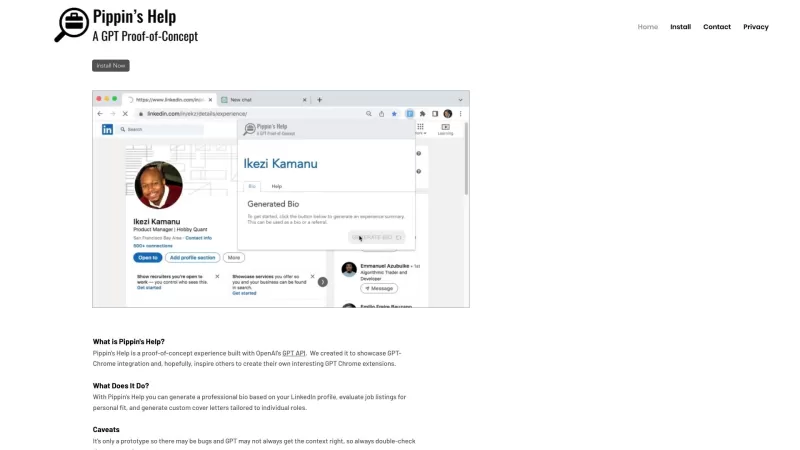
The Pippin Chrome Extension is your go-to tool for navigating the job market with ease. It's a nifty little GPT-powered assistant that uses OpenAI's tech to help you stand out. Whether you're looking to jazz up your LinkedIn bio, figure out if a job's right for you, or whip up a cover letter that'll catch an employer's eye, Pippin's got your back.
How to Use The Pippin Chrome Extension?
Getting started with Pippin is a breeze. Just follow these steps:
- Hop onto the ChatGPT webpage and sign in. It's like opening the door to a world of possibilities.
- Log into your LinkedIn account in the same browser. This lets Pippin peek at your profile and work its magic.
- Click on the Pippin's Help extension from your menu bar. It's like summoning your personal job search genie.
- Pick your poison - choose from Bio, Role fit, or Cover Letter tabs. Each one's designed to make your job hunt smoother.
- Hit the Generate button and watch as Pippin crafts content tailored just for you. It's like having a professional writer at your fingertips!
The Pippin Chrome Extension's Core Features
- Generate professional bios based on your LinkedIn profile: Say goodbye to generic bios. Pippin crafts a bio that screams 'you'.
- Evaluate job listings for personal fit: Ever wonder if a job's really for you? Pippin helps you figure that out.
- Generate custom cover letters tailored to individual roles: No more one-size-fits-all cover letters. Pippin makes sure yours stands out.
The Pippin Chrome Extension's Use Cases
- Creating a compelling and professional bio for your LinkedIn profile: Make your profile pop with a bio that showcases your unique skills and experiences.
- Assessing job listings to determine if they align with your skills and interests: Pippin helps you sift through the noise and find the jobs that are truly a match.
- Crafting personalized cover letters that stand out to potential employers: With Pippin, your cover letter will be as unique as you are, helping you land that dream job.
FAQ from The Pippin Chrome Extension
- Q1: Can I use Pippin on multiple devices?
- A1: Absolutely! As long as you're logged into the same account, Pippin will work its magic across all your devices.
- Q2: How does Pippin ensure the privacy of my LinkedIn data?
- A2: Pippin takes your privacy seriously. It only accesses the data needed to generate your content and doesn't store or share your personal info.
- Q3: Can I customize the generated content?
- A3: Of course! Pippin gives you a starting point, but feel free to tweak and tailor the content to fit your style.
- Q4: What if I'm not satisfied with the generated content?
- A4: No worries! Just hit the Generate button again, and Pippin will come up with a fresh take.
The Pippin Chrome Extension Support Email & Customer Service Contact & Refund Contact
Got questions or need a hand? Reach out to Pippin's support team at [email protected]. For more ways to get in touch, check out [the contact us page](mailto:[email protected]).
The Pippin Chrome Extension Screenshot

2026 Latest Best Top-Rated AI Prompt Libraries for optimizing all types of ChatGPT workflows. XIX.AI has curated a powerful, game-changing collection that goes through rigorous real-world tests to ensure top performance. You can find detailed free vs paid comparisons and expert rankings to help you choose the must-try tools that boost your productivity and unlock your AI edge. Explore now!
 11 tools
 xix.ai

2026 Latest Best AI Quiz Builder Platforms for Teachers, Tutors, and Cohort-Based Learning Programs! XIX.AI has curated a top-rated list of powerful game-changing tools that go through real-world tests to deliver accurate rankings. These must-try platforms help boost writing efficiency, streamline content creation, and simplify quiz design across all learning scenarios. Explore now to discover your perfect tool for unlocking your AI edge in teaching!
13 tools
xix.ai

2026 Latest Best AI Pull Request Review Tools for GitHub Teams are here on XIX.AI! This top-rated curated list showcases powerful game-changing solutions that streamline refactoring, bug fixing, and security gap detection across all team workflows. Enjoy a free vs paid comparison along with real-world tests and detailed rankings to help you find the perfect tool that boosts productivity significantly. Explore now to unlock your AI edge!
12 tools
xix.ai

2026 Latest Best Top-rated AI Text to Speech Tools for Natural Voiceovers are here on XIX.AI! This curated list features powerful, game-changing options that deliver crystal-clear voices for every use case, backed by real-world tests and weekly updated rankings. Get a free vs paid comparison to find the must-try solution that boosts your productivity instantly. Explore now to Unlock your AI edge!
11 tools
xix.ai

2026 Latest Best Manga AI Background Generators Ranked Top-Rated! This curated collection showcases powerful game-changing tools perfect for creating high-quality chapter backgrounds, book covers, and promotional art. Every option has undergone rigorous real-world tests to ensure reliability. Get a free vs paid comparison along with detailed insights. Explore now to discover your perfect tool and unlock your AI edge in manga creation.
6 tools
xix.ai

2026 Latest Best Top-rated AI Object Removal Editors for portraits travel product shots! XIX.AI curates a powerful game-changing collection regularly updated with weekly rankings. These tools offer real-world tests to help you quickly remove unwanted elements, boost content quality, and save tons of time without compromising results. Must-try for anyone aiming to unlock their AI creation edge. Explore now!
10 tools
xix.ai


¡Esta extensión de Chrome es increíble! Me ayudó a redactar un perfil de LinkedIn que realmente destaca 😊. Aunque a veces las sugerencias son un poco genéricas, en general ahorra mucho tiempo. ¿Será que todos empezaremos a usar IA para buscar trabajo?
The Pippin Chrome Extension is super handy for job hunting! 😎 It jazzed up my LinkedIn bio in minutes and gave me solid advice on job fit. Love how it uses AI to make things quick and polished, though I wish it had more customization options for tone. Still, a total game-changer for standing out!
The Pippin Chrome Extension is a lifesaver for job hunting! It makes my LinkedIn bio pop and helps me decide if a job's worth applying for. Only wish it could also help with interview prep. Still, it's a must-have! 😊
ピピンのクローム拡張機能は、仕事探しに本当に助かります!LinkedInのプロフィールが目立つようになり、仕事が自分に合っているかどうかも判断しやすくなりました。面接の準備にも対応してくれたら完璧なんですけどね。それでも必須のアイテムです!😊
피핀 크롬 확장 프로그램 덕분에 취업 준비가 훨씬 쉬워졌어요! LinkedIn 프로필이 돋보이고, 지원할 가치가 있는지 판단하는 데도 도움이 됩니다. 면접 준비까지 도와주면 좋겠지만, 그래도 꼭 필요한 도구예요! 😊


