


 Home
HomeThe New GitBook
GitBook: AI-Powered Documentation for Engineering Teams



Helps TikTok sellers, brands, MCNs, and TAPs discover winning products and find creators.

HelpLook is an AI-powered all-in-one knowledge base tool that helps businesses quickly build knowledge bases, help centers, and...

Your AI Workspace

302.AI is an enterprise-grade AI resource platform with pay-as-you-go pricing, API access to a full range of AI models, and ready-to-use online applications.

剧火AI — AI Screenwriter + Director, a One-Person Short Drama Studio In one sentence, what is it?

What is GPT2Markdown?GPT2Markdown is a Chrome extension that streamlines the process of exporting your ChatGPT conversations into Markdown format. With a single click, it allows you to download your chat history as a Markdown (.md) file directly to y

What is ConceptMap AI? ConceptMap AI is a free tool for creating concept maps, built for knowledge professionals. It enables users to generate concept maps in seconds using artificial intelligence. By having a conversation with the AI, you can shape
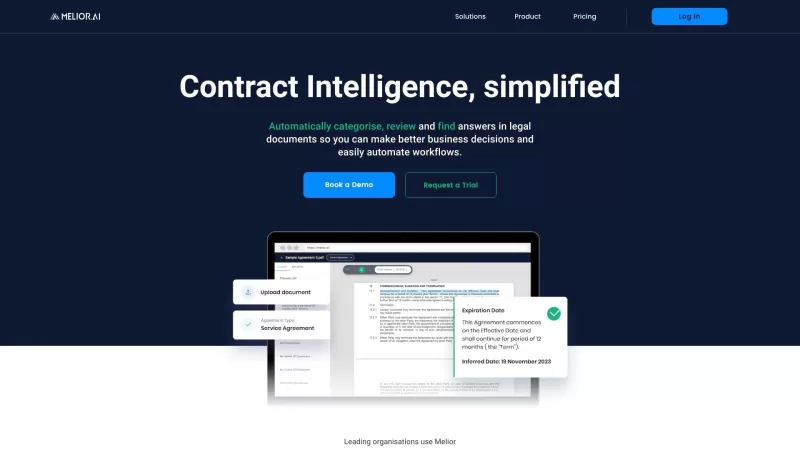
Melior AI isn't just another tool; it's a game-changer in the world of contract management. Think of it as your smart assistant that dives deep into legal documents, no matter the language, and pulls out exactly what you need. Whether you're categorizing

What is Dawiso? Dawiso is a user-friendly data governance platform that brings order, clarity, and collaboration to organizational data. It consolidates metadata via an intelligent data catalog, busin
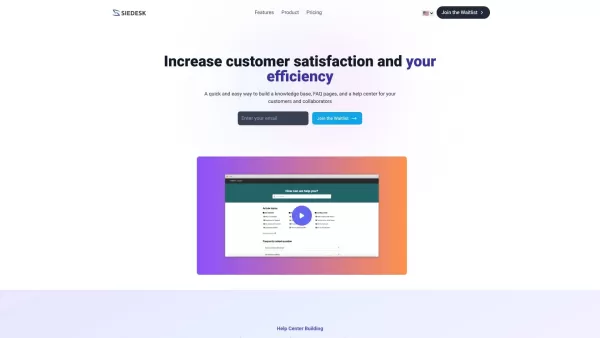
What is Siedesk - Help Center & Knowledge Base?Siedesk is a complete solution that simplifies your knowledge management workflow. It allows you to build both internal and external knowledge bases and FAQ pages, all enhanced by artificial intelligence
The New GitBook Product Information
What is The New GitBook?
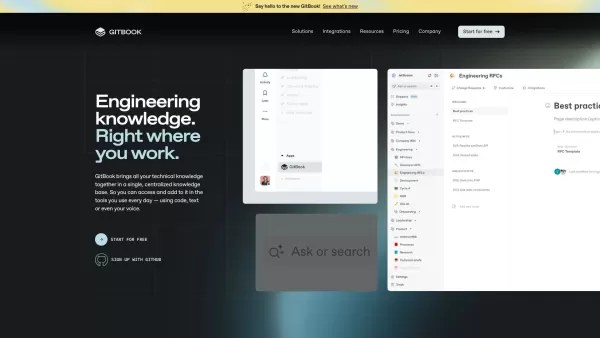
GitBook is an intuitive knowledge management platform built for engineering teams. It combines docs-as-code support, AI-driven search, and detailed analytics to streamline the creation, management, and collaboration of technical content. Focused on simplifying the sharing of knowledge, GitBook integrates smoothly with your current workflows and tools. This makes it a flexible solution for organizations that want to upgrade their documentation practices and boost team productivity.
Who will use The New GitBook?
- Engineering teams
- Technical writers
- Developers
- Product managers
- Startups
How to use the The New GitBook?
- Step 1: Sign up or log in to GitBook.
- Step 2: Create a new workspace or join an existing one.
- Step 3: Begin a new project and set up your documentation structure.
- Step 4: Use the editor to write and style your content.
- Step 5: Invite team members to collaborate.
- Step 6: Publish and share your documentation with readers.
- Step 7: Find information quickly using the AI-powered search.
- Step 8: Track and analyze how your docs are used with the platform's insights.
Platform
- web
The New GitBook's Core Features & Benefits
The Core Features
- Docs-as-code support
- AI-powered search
- Collaboration tools
- Workflow integration
- Customizable templates
The Benefits
- Streamlined knowledge sharing
- Faster collaboration
- Higher-quality documentation
- Better team productivity
- Quick access to information
The New GitBook's Main Use Cases & Applications
- Technical documentation
- Knowledge bases
- Internal wikis
- Product documentation
- API documentation
The New GitBook's Pros & Cons
The Pros
AI-enhanced, adaptable documentation that elevates user experience and boosts conversions.
Easy integration and synchronization with GitHub and GitLab.
Integrated analytics to monitor KPIs and enhance documentation performance.
One-click hosted publishing with broad customization and branding possibilities.
AI-powered features, such as Ask AI, for rapid issue-solving and contextual assistance.
Support for interactive API documentation and AI-driven localized content.
The Cons
Not open source, which restricts customization and community-driven enhancements.
No direct mobile app or browser extension links available.
Pricing information is only accessible on the website, with no clear details on the main landing page.
The New GitBook's Pricing
Has free plan | YES |
|---|---|
Free trial details | 14-day free trial for Premium and Ultimate tiers |
Pricing model | Freemium |
Is credit card required | No |
Paid from | 65 USD |
Has lifetime plan | No |
Billing frequency | Monthly |
Details of Pricing Plan
Free
0 USD
- Block-based editor & integrations
- Sync with GitHub or GitLab
- Interactive OpenAPI docs
- Publish on a gitbook.io domain
- One user
Premium
65 USD
- All Basic features plus
- Custom domain support
- Branded documentation
- AI-driven instant answers
- Insights and user feedback
- Site redirects
Ultimate
249 USD
- All Premium features plus
- Structured docs with sections & groups
- Search across all documentation
- Authenticated access control
- Custom fonts
- Adaptive content
- Docs assistant (arriving soon)
Enterprise
Custom pricing USD
- All Ultimate features plus
- SAML single sign-on
- Migration support
- Dedicated Account Manager
- Invoice & wire transfer options
- Custom contract terms
- Security audits
Discount:
Get two months free when you subscribe to an annual plan
For current pricing, check: https://gitbook.com/pricing
FAQs of The New GitBook
What is GitBook used for?
GitBook is built for handling and distributing technical documentation and knowledge across engineering teams.
Is GitBook free to use?
Yes, GitBook provides both free and paid plans for different team sizes and requirements.
Is GitBook safe?
GitBook is committed to security and uses methods to protect user data and privacy.
Are GitBook and GitHub the same?
No, GitBook specializes in documentation management, while GitHub is a platform for hosting code.
Can I integrate GitBook with other tools?
Yes, GitBook supports integration with multiple tools and workflows to enhance documentation processes.
Does GitBook support collaborative editing?
Yes, GitBook includes real-time collaboration features so teams can work together on documentation.
Can I customize GitBook templates?
Yes, GitBook offers a range of customizable templates to fit various content needs.
What platforms does GitBook support?
GitBook runs entirely in the web browser and works on all modern platforms.
Does GitBook provide analytics?
Yes, GitBook includes usage insights and analytics to help teams refine their documentation strategy.
How do I contact GitBook support?
Visit GitBook's website and use their contact page to reach support.
The New GitBook Company Information
Website:
https://www.gitbook.comCompany Name:
GitBookSupport Email:
NAFacebook:
NAX(Twitter):
https://twitter.com/gitbookioYouTube:
NAInstagram:
NATiktok:
NALinkedIn:
https://www.linkedin.com/company/gitbook
The New GitBook Screenshot


2026 Latest Best Top-rated AI Text to Speech Tools for Online Courses are curated by XIX.AI based on rigorous real-world tests and weekly updated rankings. These powerful tools help creators deliver crystal-clear audio content effortlessly, boosting writing efficiency and streamlining course production. Check out the free vs paid comparison to find your perfect fit. Explore now to unlock your AI edge in online education.
 10 tools
 xix.ai

2026 Latest Best Top-Rated AI Blog Title Tools for Higher Click Through Rates! XIX.AI has carefully curated a powerful, game-changing collection of top tools that go through rigorous real-world tests. You’ll find a free vs paid comparison, weekly updated rankings, and detailed insights to help you boost your blog’s traffic efficiently. Must-try options are highlighted to help you unlock your AI edge. Explore now!
10 tools
xix.ai

2026 Latest Best Top-rated AI Task Routing Tools for Support Workflows! XIX.AI has curated a highly powerful game-changing collection of must-try solutions, all undergoing rigorous real-world tests and updated weekly. These tools streamline workflows, boost productivity, and help teams deliver faster, more efficient support. Explore now to discover your perfect tool and unlock your AI edge!
17 tools
xix.ai

2026 Latest Best Top-Rated AI Citation and Paper Summary Tools Curated by XIX.AI. Get powerful game-changing solutions for quick content creation, improved writing efficiency, and boosting productivity. We offer a free vs paid comparison along with real-world tests and weekly updated rankings to help you find the must-try tool that fits your needs perfectly. Explore now to Unlock your AI edge.
10 tools
xix.ai

2026 Latest Best Top-Rated AI Productivity Tools for Daily Work! XIX.AI has curated a powerful, game-changing selection based on rigorous weekly updated rankings and real-world tests. You’ll find must-try options that boost writing efficiency, streamline content creation, and help you overcome daily work challenges. Get a free vs paid comparison to find the perfect fit for your needs. Explore now to unlock your AI edge!
9 tools
xix.ai

2026 Latest Best Top-Rated AI Systematic Review Tools for Research Screening are here on XIX.AI! This curated collection includes powerful, game-changing solutions that go through rigorous real-world tests to deliver accurate results. We also offer a free vs paid comparison along with weekly updated rankings to help you find the must-try option that boosts your research efficiency significantly. Explore now to unlock your AI edge in academic work!
11 tools
xix.ai


