


 Home
HomeTabMagic - Chrome Extension
Chrome Tab Management Extension



Helps TikTok sellers, brands, MCNs, and TAPs discover winning products and find creators.

HelpLook is an AI-powered all-in-one knowledge base tool that helps businesses quickly build knowledge bases, help centers, and...

Your AI Workspace

302.AI is an enterprise-grade AI resource platform with pay-as-you-go pricing, API access to a full range of AI models, and ready-to-use online applications.

剧火AI — AI Screenwriter + Director, a One-Person Short Drama Studio In one sentence, what is it?

What is AI Excel Bot?AI Excel Bot uses advanced AI algorithms to help you build complex Excel and Google Sheets formulas in seconds. By leveraging natural language processing, it makes writing, editing, and understanding formulas much easier. Whether

What is GPT2Markdown?GPT2Markdown is a Chrome extension that streamlines the process of exporting your ChatGPT conversations into Markdown format. With a single click, it allows you to download your chat history as a Markdown (.md) file directly to y

AI Chatbot Hub is your go-to no-code platform for crafting and deploying AI chatbots that streamline customer interactions and boost internal operations. No need to be a coding whiz—just dive in and start creating chatbots that can capture leads, schedule

What is Sakura AI?Sakura AI harnesses cutting-edge artificial intelligence to provide a conversational interface that helps with a wide range of tasks, from managing schedules to answering questions. It uses advanced voice recognition and understandi

Ever wished for a trusty sidekick to boost your productivity while you surf the web? Well, say hello to the MaxAI AI Chrome extension! This little gem is your go-to for real-time suggestions and a whole suite of AI tools that can transform your online exp
TabMagic - Chrome Extension Product Information
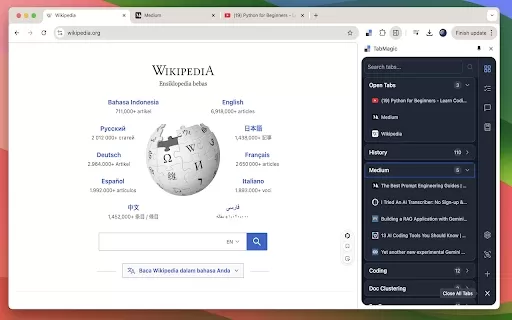
Ever found yourself lost in a sea of open tabs, wishing there was a way to keep everything in order without breaking a sweat? Enter TabMagic, a Chrome extension that's like a superhero for your browser, swooping in to save the day with its AI-powered tab management features. It's not just about keeping your tabs neat and tidy; TabMagic goes the extra mile by offering some pretty cool AI tricks up its sleeve.
How to Get Started with TabMagic?
Getting started with TabMagic is a breeze. Just head over to the Chrome Web Store, search for TabMagic, and hit that "Add to Chrome" button. Once it's installed, you're ready to dive into a world where tab chaos is a thing of the past. Use it to group your tabs into labeled categories, save your go-to tabs for easy access, and even let the AI summarize the content of your tabs or chat with you about them. It's like having a personal assistant right in your browser!
TabMagic's Core Features: A Closer Look
TabMagic isn't just another tab organizer; it's packed with features that make it a must-have for anyone who lives in their browser. First up, you can organize your tabs into labeled groups. No more sifting through a mess to find what you need—everything's right where you left it. Then there's the ability to save your frequently used tabs. Say goodbye to bookmark clutter and hello to instant access to your favorite sites.
But wait, there's more! Ever faced a wall of text and wished you could just get the gist of it? TabMagic's AI can summarize tab content for you, giving you the key points at a glance. And if you're curious about something in an article, why not chat with the tab content? It's like having a conversation with the webpage itself—pretty cool, right?
Real-World Uses for TabMagic
Imagine you're knee-deep in research for a project. With TabMagic, you can organize all those research tabs into neat categories, making it easy to switch between topics without losing your place. Or maybe you have a set of websites you visit every day. With TabMagic, you can save these tabs and access them with just a click, streamlining your daily routine.
And let's not forget those times when you stumble upon a long article but don't have the time to read it. TabMagic's summary feature lets you get the main points in seconds, so you can keep up with the latest without spending hours reading.
FAQ from TabMagic
- Do I need an API key for certain features?
- Some of TabMagic's advanced AI features might require an API key, but don't worry—the basic tab management functions are available without one.
- Is TabMagic free to use?
- Yes, TabMagic is free to use! However, certain premium features might come with a small cost, but the core functionalities are all yours at no charge.
TabMagic - Chrome Extension Screenshot





2026 Latest Best Top-rated AI Object Removal Editors for portraits travel product shots! XIX.AI curates a powerful game-changing collection regularly updated with weekly rankings. These tools offer real-world tests to help you quickly remove unwanted elements, boost content quality, and save tons of time without compromising results. Must-try for anyone aiming to unlock their AI creation edge. Explore now!
 10 tools
 xix.ai

2026 Latest Best Top-rated AI Text to Speech Tools for Online Courses are curated by XIX.AI based on rigorous real-world tests and weekly updated rankings. These powerful tools help creators deliver crystal-clear audio content effortlessly, boosting writing efficiency and streamlining course production. Check out the free vs paid comparison to find your perfect fit. Explore now to unlock your AI edge in online education.
10 tools
xix.ai

2026 Latest Best Top-Rated AI Blog Title Tools for Higher Click Through Rates! XIX.AI has carefully curated a powerful, game-changing collection of top tools that go through rigorous real-world tests. You’ll find a free vs paid comparison, weekly updated rankings, and detailed insights to help you boost your blog’s traffic efficiently. Must-try options are highlighted to help you unlock your AI edge. Explore now!
10 tools
xix.ai

2026 Latest Best Top-rated AI Task Routing Tools for Support Workflows! XIX.AI has curated a highly powerful game-changing collection of must-try solutions, all undergoing rigorous real-world tests and updated weekly. These tools streamline workflows, boost productivity, and help teams deliver faster, more efficient support. Explore now to discover your perfect tool and unlock your AI edge!
17 tools
xix.ai

2026 Latest Best Top-Rated AI Citation and Paper Summary Tools Curated by XIX.AI. Get powerful game-changing solutions for quick content creation, improved writing efficiency, and boosting productivity. We offer a free vs paid comparison along with real-world tests and weekly updated rankings to help you find the must-try tool that fits your needs perfectly. Explore now to Unlock your AI edge.
10 tools
xix.ai

2026 Latest Best Top-Rated AI Productivity Tools for Daily Work! XIX.AI has curated a powerful, game-changing selection based on rigorous weekly updated rankings and real-world tests. You’ll find must-try options that boost writing efficiency, streamline content creation, and help you overcome daily work challenges. Get a free vs paid comparison to find the perfect fit for your needs. Explore now to unlock your AI edge!
9 tools
xix.ai


Finally, a Chrome extension that actually understands my chaos! 🤯 TabMagic is a lifesaver for my 50+ open tabs. The AI categorization is surprisingly accurate, saving me hours of manual sorting. It feels like having a digital assistant that never sleeps. Highly recommend for anyone drowning in browser tabs! 🚀✨
TabMagic hat die Verwaltung meiner Tabs revolutioniert. Es ist super intuitiv und hält alles organisiert, aber manchmal kämpft es, wenn zu viele Tabs gleichzeitig geöffnet sind. Trotzdem ist es ein Muss für jeden, der im Browser-Chaos untergeht!
TabMagic a été une révolution pour gérer mes onglets. C'est super intuitif et tout est bien organisé, mais parfois ça peine quand il y a trop d'onglets ouverts en même temps. Néanmoins, c'est indispensable pour quiconque se noie dans le chaos du navigateur !
TabMagicはタブの管理に革命をもたらしました。直感的で全てを整理してくれますが、時々一度に開いているタブが多すぎると苦労します。それでも、ブラウザの混乱に溺れている人にとって必須です!
TabMagic ha sido un cambio de juego para gestionar mis pestañas. Es súper intuitivo y mantiene todo organizado, pero a veces lucha cuando hay demasiadas pestañas abiertas a la vez. Aún así, es imprescindible para cualquiera que se ahogue en el caos del navegador!


