


 Home
HomeSynth Extension
AI Meeting Assistant: Capture & Manage Notes



Helps TikTok sellers, brands, MCNs, and TAPs discover winning products and find creators.

HelpLook is an AI-powered all-in-one knowledge base tool that helps businesses quickly build knowledge bases, help centers, and...

Your AI Workspace

302.AI is an enterprise-grade AI resource platform with pay-as-you-go pricing, API access to a full range of AI models, and ready-to-use online applications.

剧火AI — AI Screenwriter + Director, a One-Person Short Drama Studio In one sentence, what is it?

Ever wondered how to get a leg up in *Call of Duty: Mobile*? Well, redeem codes are your golden ticket to a whole bunch of in-game goodies. These codes can give you a sweet boost to your Weapon XP or Battle Pass XP, making it a breeze to level up your arsenal and unlock those coveted new weapons, at
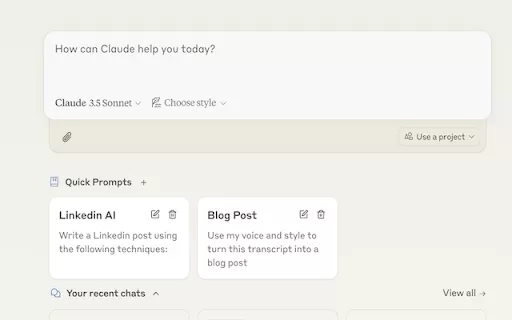
Ever find yourself stuck in a loop, typing the same prompts over and over? Enter Claude, the AI-powered Chrome extension that's here to save your sanity. This nifty tool is all about managing and saving your prompts, so you can keep your creative juices flowing without the frustration of repetition.

If you're looking to level up your typing game, the AI Typing Assistant is your go-to tool. It's like having a personal coach that tailors its advice just for you, based on how you type. Ever wish you could type faster and with fewer mistakes? This a

Pixelcode is a revolutionary tool that transforms screenshots of code into editable text, saving you from the tedious task of typing out code manually. Imagine snapping a picture of a code snippet and instantly having it ready to edit in your preferred co

What is Giststack? Giststack is an AI-driven platform that assists users, especially solopreneurs and marketers, in tackling the hurdles of social media content creation. It gathers content from your preferred websites and newsletters, spots trending
Synth Extension Product Information
What is Synth Extension?
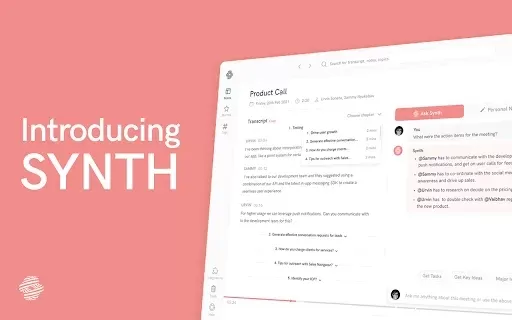
Synth Extension is an innovative AI-powered tool that helps users effortlessly capture audio, take notes, and organize information from meetings and lectures. It seamlessly integrates with popular CRMs, knowledge management systems, Slack, and ChatGPT, boosting your productivity and keeping your notes perfectly structured. Its intuitive interface ensures you remain focused on the conversation while it automatically gathers critical insights and data for later review. Designed for students, professionals, and anyone who needs to manage information efficiently, Synth simplifies and enhances your entire note-taking process.
Who will use Synth Extension?
- Students
- Professionals
- Educators
- Research Analysts
- Meeting Organizers
How to use the Synth Extension?
- Step 1: Install the Synth Extension from the Chrome Web Store.
- Step 2: Launch Synth and connect it to your favorite platforms, such as your CRM and Slack.
- Step 3: Begin your meeting or lecture and turn on Synth to start recording audio and taking notes.
- Step 4: Use the neatly organized notes for follow-up tasks and future reference.
Platform
- Web
- Chrome
Synth Extension's Core Features & Benefits
The Core Features
- High-quality audio recording during meetings
- Intelligent note-taking functionality
- Integration with Slack and ChatGPT
- Real-time collaboration tools
The Benefits
- Boosts productivity
- Enhances information retention
- Streamlines your workflow
- Improves team collaboration
Synth Extension's Main Use Cases & Applications
- Capturing detailed lecture notes
- Recording important business meetings
- Managing team collaboration sessions
- Organizing research data and findings
FAQs of Synth Extension
What is Synth Extension?
Synth is an AI-powered assistant designed for audio recording and note-taking during meetings.
How does Synth improve productivity?
Synth optimizes your workflow by automatically organizing your notes for easy follow-up.
Can I use Synth with different platforms?
Yes, Synth offers integrations with various platforms including Slack, CRMs, and ChatGPT.
Is the Synth Extension free to use?
Please visit the Chrome Web Store for current pricing information on the Synth Extension.
How do I install Synth Extension?
You can install it directly from the Chrome Web Store.
What types of notes can Synth capture?
Synth captures both text-based notes and audio recordings from meetings and lectures.
Which devices support Synth?
Synth is available as a web-based tool and functions on the Chrome browser.
What features enhance collaborative work?
Synth includes built-in real-time collaboration tools to support effective teamwork.
How do I access my notes later?
You can access all notes captured by Synth via your account on the connected platforms.
Does Synth work offline?
No, Synth requires an active internet connection to operate fully.
Synth Extension Company Information
Synth Extension Screenshot

Discover the 2026 best AI notetakers for engineering syncs. Our top-rated, curated list helps you effortlessly capture technical architecture decisions and code context. Compare free vs paid tools with real-world tests and weekly updated rankings. Find your perfect productivity boost at XIX.AI. Explore now!
 10 tools
 xix.ai

2026 Latest Top Hybrid Meeting AI Assistants: Discover the best AI tools for capturing crystal-clear multi-speaker audio in conference rooms. Our curated list compares top-rated, powerful solutions to enhance your hybrid meeting productivity. Get weekly updated rankings and real-world tests to find your perfect game-changing assistant. Unlock seamless collaboration today with XIX.AI.
10 tools
xix.ai


Just tried Synth Extension for my weekly team sync and wow, it's a game-changer! The auto-note feature saved me so much time, and linking highlights to our CRM was seamless. A bit worried about privacy with audio capture, but so far it feels secure. Definitely keeping this installed! 🎧


