


 Home
HomeSTYLAR - Chrome Extension
AI Virtual Try-On for Fashion | Stylar



Helps TikTok sellers, brands, MCNs, and TAPs discover winning products and find creators.

HelpLook is an AI-powered all-in-one knowledge base tool that helps businesses quickly build knowledge bases, help centers, and...

Your AI Workspace

302.AI is an enterprise-grade AI resource platform with pay-as-you-go pricing, API access to a full range of AI models, and ready-to-use online applications.

剧火AI — AI Screenwriter + Director, a One-Person Short Drama Studio In one sentence, what is it?

Ever wished for a trusty sidekick to help you navigate the digital world with ease? Enter Sider, your personal AI companion designed to seamlessly blend into your daily routine. Starting off as a handy Chrome/Edge extension, Sider transforms your browsing

What is Concisely?Concisely is a cutting-edge Chrome extension that redefines email reading by using advanced AI to deliver one-sentence summaries of entire email threads. It allows busy professionals to capture the main idea instantly, eliminating t

What is Altsite?Altsite is a browser extension that helps users find websites similar to the one they're currently visiting. Using advanced AI technology, it analyzes website content and instantly generates a list of related sites. This tool is ideal

What is Comment Generator?Comment Generator is an innovative AI tool that crafts authentic and compelling comments for Instagram and Threads. This Chrome extension uses sophisticated algorithms to automate comment writing, saving you time while prese

Pixelcode is a revolutionary tool that transforms screenshots of code into editable text, saving you from the tedious task of typing out code manually. Imagine snapping a picture of a code snippet and instantly having it ready to edit in your preferred co
STYLAR - Chrome Extension Product Information
What is STYLAR - Chrome Extension?
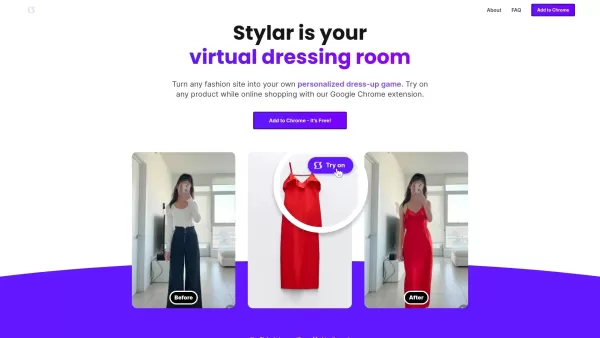
Stylar is an innovative AI-powered platform designed to revolutionize online fashion shopping. Through its intuitive Chrome extension, you can upload a photo of yourself to digitally try on a wide range of clothing before buying. This tool streamlines your shopping journey, reduces the likelihood of returns, and builds shopper confidence by showing you how items truly look and fit on your own body.
Who will use STYLAR - Chrome Extension?
- Stylish shoppers and fashion lovers
- Anyone who buys clothes online
- E-commerce and retail businesses
- Fashion brands and designers
- Users of virtual fitting technology
How to use the STYLAR - Chrome Extension?
- Step 1: Add the Stylar extension to Chrome from the Web Store.
- Step 2: Upload a clear, full-body picture of yourself.
- Step 3: Explore the catalog of available clothing and accessories.
- Step 4: Click on an item you’d like to try on virtually.
- Step 5: See a realistic preview of the outfit on your photo.
Platform
- Web
- Chrome Browser
STYLAR - Chrome Extension's Core Features & Benefits
The Core Features
- AI-driven virtual try-on technology
- Simple full-body photo upload
- Access to a vast selection of fashion brands
- Clean, easy-to-use interface
The Benefits
- A more confident and enjoyable shopping experience
- Fewer product returns
- Greater trust in online purchases
- Try thousands of brands in one place
STYLAR - Chrome Extension's Main Use Cases & Applications
- Buying clothes online with confidence
- Creating a personal virtual dressing room
- Brands showcasing products interactively
STYLAR - Chrome Extension's Pros & Cons
The Pros
A free app powered by AI to change your outfit digitally
Works with clothing from any brand and any style
Try on the latest trending fashion items virtually
Also available as an app on the iOS App Store
The Cons
No confirmed availability for Android or other operating systems
Specific pricing is not detailed on the main website
The software is not open source
Limited public information on extra features or user community support
STYLAR - Chrome Extension's Pricing
Has free plan | No |
|---|---|
Free trial details | |
Pricing model | |
Is credit card required | No |
Paid from | |
Has lifetime plan | No |
Billing frequency |
For the latest pricing, please visit: https://www.stylar.com
FAQs of STYLAR - Chrome Extension
Is Stylar free to use?
Yes, the Stylar Chrome extension is completely free to use.
How does Stylar ensure a realistic fit?
It employs advanced AI and computer vision to create a true-to-life simulation of how garments fit your unique body shape.
What if the clothing looks different when I receive it?
While Stylar provides a highly accurate digital preview, slight variations can occur due to individual manufacturing.
Can I use Stylar with any browser?
Currently, Stylar is only available as an extension for the Google Chrome browser.
Do I need to create an account to use Stylar?
No account is needed; simply install the extension to start using it.
Is my data secure with Stylar?
Absolutely. Stylar is committed to user privacy and secures all personal data.
Can I share my virtual try-on photos?
Yes, you can easily share your virtual outfits with friends and family directly from the platform.
How do I provide feedback about the product?
You can submit your feedback via the official Stylar support email address.
What types of clothing can I try on?
You can try on a diverse range of items, including tops, dresses, jackets, and more from numerous brands.
How many brands are available?
Stylar gives you access to try on clothing from more than 20,000 global brands.
STYLAR - Chrome Extension Company Information
Website:
https://www.stylar.comCompany Name:
StylarSupport Email:
Facebook:
NAX(Twitter):
NAYouTube:
NAInstagram:
NATiktok:
NALinkedIn:
NA
STYLAR - Chrome Extension Screenshot





2026 Latest Best AI Tools for Digital Runway Shows: Discover top-rated solutions to generate virtual models walking in custom garments. Our curated list features powerful, game-changing tools for creating stunning digital fashion presentations. Compare free vs paid options with weekly updated rankings based on real-world tests. Unlock your creative potential and streamline your design workflow with XIX.AI's expert picks. Find your perfect tool today!
 10 tools
 xix.ai

2026 Latest Best AI Video Generators for Fashion Designers: Explore top-rated tools that simulate dynamic fabric physics and textures. Our curated selection helps you visualize designs with realistic movement, streamline prototyping, and boost creative workflow. Discover powerful, game-changing solutions for your fashion projects. Find your perfect AI video tool on XIX.AI.
10 tools
xix.ai


