


 Home
HomeSmart Paste
Smart Paste Automates Data Entry



Helps TikTok sellers, brands, MCNs, and TAPs discover winning products and find creators.

HelpLook is an AI-powered all-in-one knowledge base tool that helps businesses quickly build knowledge bases, help centers, and...

Your AI Workspace

302.AI is an enterprise-grade AI resource platform with pay-as-you-go pricing, API access to a full range of AI models, and ready-to-use online applications.

剧火AI — AI Screenwriter + Director, a One-Person Short Drama Studio In one sentence, what is it?

If you're diving into the world of AI and need a tool to streamline your interactions with models like ChatGPT, Claude, and Gemini, let me introduce you to TaoPrompt. This isn't just another AI tool; it's a professional prompt generator that's designed to

If you're looking to level up your typing game, the AI Typing Assistant is your go-to tool. It's like having a personal coach that tailors its advice just for you, based on how you type. Ever wish you could type faster and with fewer mistakes? This a

Ever felt like your YouTube videos could use a bit of a speed boost? Enter Speedtube AI Chrome Extension, a game-changer for those who want to optimize their viewing experience. It uses AI to smartly adjust the playback speed according to the type of cont
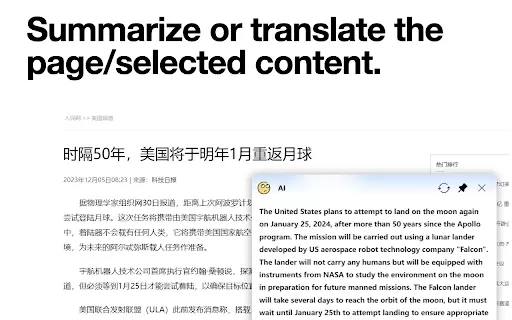
What is the AI小窗 Chrome Extension? AI小窗 is an intelligent browsing assistant compatible with ERNIE Bot, Tongyi Qianwen, and OpenAI. It delivers a smarter and more efficient browsing experience, offering features such as customizable small windows, in

What is the Cici AI Chrome Extension? Cici is your personal browser AI assistant, powered by GPT technology. It can answer any of your questions, summarize complex webpages, provide fast full-text translation, intelligently organize and summarize sea
Smart Paste Product Information
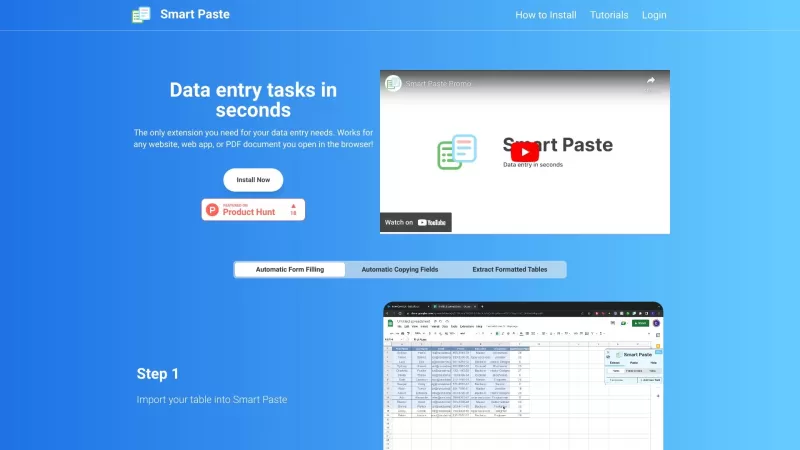
Ever found yourself bogged down by the tedious task of entering data into websites, web apps, or PDFs? Enter Smart Paste, the browser extension that's here to make your life a whole lot easier. With its slick automation features, you can breeze through form filling, copy fields with a snap, and even extract tables like a pro. Say goodbye to the drudgery of manual data entry and hello to efficiency!
How to Use Smart Paste?
Getting started with Smart Paste is a walk in the park. Just install the extension in your browser, and you're ready to roll. For automatic form filling, simply select the fields you need on a website and pop them into your table. Then, with a swift move, paste that extracted data into your spreadsheet. Need to copy fields? No problem! Just hit 'Select a table' in the Smart Paste sidebar, choose your table, and click 'Copy table to clipboard'. Then, paste it right into your spreadsheet. And for those formatted tables? Import your table into Smart Paste, match the table header to the correct input field, and fill out your form by picking the right entry. It's that simple!
Smart Paste's Core Features
Smart Paste isn't just a one-trick pony. It's packed with features that'll make your data entry tasks feel like a breeze:
- Automatic Form Filling: Fill out forms in a flash.
- Automatic Copying Fields: Copy data from fields with ease.
- Extracting Formatted Tables: Pull out those tables and use them where you need.
- Quick Data Entry Tasks: Speed through your data entry like never before.
- Works with Any Website, Web App, or PDF Document: No matter where your data is, Smart Paste has got you covered.
- Data Never Leaves Your Computer: Your data stays safe and secure, right on your machine.
Smart Paste's Use Cases
Wondering where Smart Paste can fit into your daily grind? Here are some ways it can revolutionize your workflow:
- Transferring Data Between Websites and PDFs: Move data seamlessly from one place to another.
- Automating Repetitive Tasks with Hotkeys: Set up hotkeys to automate those repetitive tasks you dread.
- Quickly Filling Forms from Tables: Populate forms from tables in no time.
- Filling Input Boxes, Radio Buttons, Checkboxes, etc.: Handle all types of form inputs with ease.
- Reducing Errors by Showing the Table on the Side: Keep an eye on your data and reduce mistakes.
FAQ from Smart Paste
- How can Smart Paste help save time?
- Smart Paste automates the tedious parts of data entry, letting you focus on more important tasks.
- Is my data secure with Smart Paste?
- Absolutely, your data stays on your computer and never leaves it.
- Can Smart Paste extract tables from local PDFs?
- Yes, it can! Just import your PDF and let Smart Paste do the rest.
- Does Smart Paste support automatic form filling?
- It sure does! Smart Paste makes form filling a breeze.
- Does Smart Paste have customer support?
- Yes, you can reach out to Smart Paste support at [email protected].
For those looking to dive deeper, check out the Smart Paste login at https://www.smartpaste.io/login. Curious about pricing? Head over to https://www.smartpaste.io/. And if you're a visual learner, don't miss the Smart Paste YouTube playlist at https://www.youtube.com/playlist?list=PLVnC_yq9CR7O8oYeGEdgm-uRZDSjfOLsw.
Smart Paste Screenshot


2026 Latest Best Top-rated AI Data Cleaning Tools for quick fixing of missing values and duplicates. This curated list showcases powerful, game-changing solutions that boost productivity significantly. Each option has undergone rigorous real-world tests to ensure reliability. Get a free vs paid comparison and discover the must-try tool that fits your needs best. Explore now at XIX.AI to Unlock your AI edge.
 11 tools
 xix.ai


Smart Paste is a game-changer! 😍 I used to dread filling out forms, but this extension makes it so quick and painless. Just copy, paste, and boom—done! Works like a charm on PDFs too. Only wish it had a dark mode for my late-night data entry sessions. Totally recommend it!
Smart Paste has been a lifesaver for me! No more tedious data entry into websites and PDFs. It's so slick and easy to use, though sometimes it gets a bit finicky with certain formats. Still, a must-have for anyone looking to save time! 🕒
Smart Paste é incrível, facilitou muito o preenchimento de dados em sites e PDFs! Só acho que poderia ser um pouco mais flexível com certos formatos. Mesmo assim, é uma ferramenta indispensável para quem quer economizar tempo! 🕒
Smart Pasteは本当に便利です!ウェブサイトやPDFへのデータ入力が簡単になりました。ただ、特定の形式で少し扱いづらい時があります。それでも、時間を節約したい人には必須のアプリですね!🕒
Smart Paste 덕분에 웹사이트나 PDF에 데이터 입력하는 일이 훨씬 쉬워졌어요! 다만, 특정 형식에서는 조금 까다로운 면이 있어요. 그래도 시간을 절약하고 싶다면 꼭 써봐야 할 앱이에요! 🕒


