


 Home
HomeSense
Sense: Organize and Sync Team Info



Helps TikTok sellers, brands, MCNs, and TAPs discover winning products and find creators.

HelpLook is an AI-powered all-in-one knowledge base tool that helps businesses quickly build knowledge bases, help centers, and...

Your AI Workspace

302.AI is an enterprise-grade AI resource platform with pay-as-you-go pricing, API access to a full range of AI models, and ready-to-use online applications.

剧火AI — AI Screenwriter + Director, a One-Person Short Drama Studio In one sentence, what is it?

Ever stumbled upon Cherry Studio AI and wondered what it's all about? Well, let me break it down for you. Cherry Studio AI isn't just another run-of-the-mill AI tool; it's a powerhouse desktop client that lets you dive into advanced AI interactions across

Discover Plume AI: Your Ultimate Academic Writing AssistantAre you tired of struggling with your academic writing? Well, say hello to Plume AI, the innovative AI assistant that's here to revolutionize the way you write! Designed with students in mind, Plume AI harnesses the power of cutting-edge art

Ever wondered how to turn your jumbled thoughts and complex queries into something you can actually grasp? Enter The Visualizer, your new best friend in the world of learning and creativity. This nifty tool takes your written queries, URLs, and even PDFs,

Ever wished for a trusty sidekick to help you navigate the digital world with ease? Enter Sider, your personal AI companion designed to seamlessly blend into your daily routine. Starting off as a handy Chrome/Edge extension, Sider transforms your browsing

Ever wondered what Ninja AI is all about? Well, let me tell you, it's like having a Swiss Army knife for your digital needs! Ninja AI isn't just another AI tool; it's a powerhouse that brings together over 24 top-notch Large Language Models (LLMs) to help
Sense Product Information
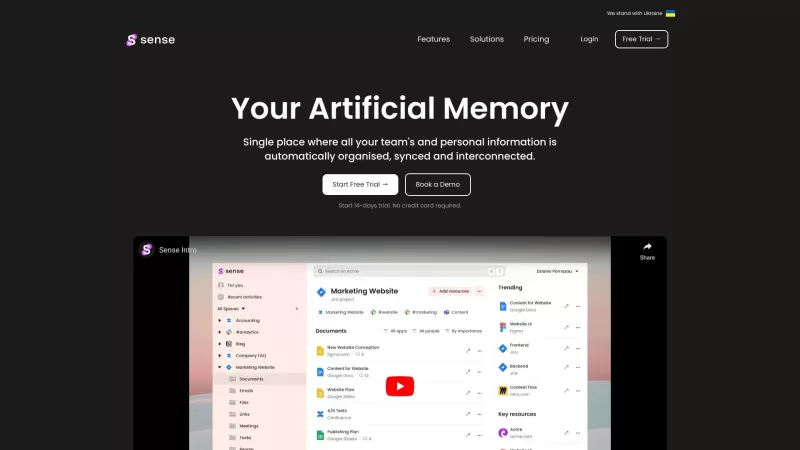
Ever feel like your work life is spiraling into chaos? Enter Sense, your new best friend in the world of digital organization. It's not just another app—it's a game-changer that transforms your scattered work into a neatly organized oasis. Imagine having all your team's and personal info in one spot, magically sorted, synced, and interconnected. Sounds like a dream, right?
How to Dive Into Sense?
Getting started with Sense is a breeze. Just head over to their website and either request access or jump into a free trial. Once you're in, connect all the apps and tools your team relies on. Sense will then work its magic, automatically organizing and syncing your documents, links, files, and conversations. Need to find something fast? Use Sense's unified search to comb through everything in a snap. Plus, it smartly suggests who should see what, making sure your info reaches the right people.
Sense's Core Features: What Makes It Tick?
Automatic Organization: Say Goodbye to Mess
Sense takes the hassle out of organizing by automatically sorting your docs, links, files, and chats. It's like having a personal assistant who never sleeps.
Unified Search: Find Anything, Anywhere
With Sense, searching is a breeze. Whether it's across different apps or deep within your documents, you'll find what you need in no time.
Smart Sharing Suggestions: Get Info to the Right People
Sense knows who needs to see what and when. It suggests sharing options to keep your team in the loop without you lifting a finger.
Self-Organized Spaces: Your Project's Home Base
Each project gets its own space in Sense, acting as the ultimate source of truth. Everything related to your project lives here, neatly organized.
Interconnected Content: See the Big Picture
Sense links related content and conversations automatically. It's like having a map that shows how everything fits together.
Personal Hub: Your Daily Command Center
Your personal hub in Sense keeps you on top of tasks and notifications. It's your daily checklist and reminder rolled into one.
Chrome Extension: Quick Access and Context
With the Sense Chrome extension, you can search quickly and get an overview of your context without breaking your workflow.
Sense's Use Cases: Why It's a Must-Have
Taming the Information Beast
Sense is perfect for organizing and syncing both team and personal information. No more digging through endless folders or emails.
Seamless Search Across Platforms
Need to find that one document buried in your app stack? Sense's unified search makes it easy, saving you time and frustration.
Ensuring Relevant Sharing
Sense ensures that important information reaches the right team members, making collaboration smoother and more effective.
Streamlining Your Workday
By automating organization and search, Sense simplifies your work routines and cuts down on manual tasks. More time for the work that matters!
FAQ from Sense: Got Questions?
- What data do you store?
- Can anybody see anything?
- Can people get access to restricted assets?
- How are assets related?
- Can I use Sense individually?
- Is there a free trial period?
Sense Support Email & Customer service contact & Refund contact etc.
More Contact, visit the contact us page(https://www.senseapp.ai/support)
Sense Company
Sense Company name: Sense.
Sense Login
Sense Login Link: https://senseai.online
Sense Sign up
Sense Sign up Link: https://senseai.online/signup
Sense Pricing
Sense Pricing Link: https://www.senseapp.ai/pricing
Sense Linkedin
Sense Linkedin Link: https://www.linkedin.com/company/senseappai/
Sense Twitter
Sense Twitter Link: https://twitter.com/SenseWorkspace
Sense Screenshot



2026 Latest Best Top-rated AI Object Removal Editors for portraits travel product shots! XIX.AI curates a powerful game-changing collection regularly updated with weekly rankings. These tools offer real-world tests to help you quickly remove unwanted elements, boost content quality, and save tons of time without compromising results. Must-try for anyone aiming to unlock their AI creation edge. Explore now!
 10 tools
 xix.ai

2026 Latest Best Top-rated AI Text to Speech Tools for Online Courses are curated by XIX.AI based on rigorous real-world tests and weekly updated rankings. These powerful tools help creators deliver crystal-clear audio content effortlessly, boosting writing efficiency and streamlining course production. Check out the free vs paid comparison to find your perfect fit. Explore now to unlock your AI edge in online education.
10 tools
xix.ai

2026 Latest Best Top-Rated AI Blog Title Tools for Higher Click Through Rates! XIX.AI has carefully curated a powerful, game-changing collection of top tools that go through rigorous real-world tests. You’ll find a free vs paid comparison, weekly updated rankings, and detailed insights to help you boost your blog’s traffic efficiently. Must-try options are highlighted to help you unlock your AI edge. Explore now!
10 tools
xix.ai

2026 Latest Best Top-rated AI Task Routing Tools for Support Workflows! XIX.AI has curated a highly powerful game-changing collection of must-try solutions, all undergoing rigorous real-world tests and updated weekly. These tools streamline workflows, boost productivity, and help teams deliver faster, more efficient support. Explore now to discover your perfect tool and unlock your AI edge!
17 tools
xix.ai

2026 Latest Best Top-Rated AI Citation and Paper Summary Tools Curated by XIX.AI. Get powerful game-changing solutions for quick content creation, improved writing efficiency, and boosting productivity. We offer a free vs paid comparison along with real-world tests and weekly updated rankings to help you find the must-try tool that fits your needs perfectly. Explore now to Unlock your AI edge.
10 tools
xix.ai

2026 Latest Best Top-Rated AI Productivity Tools for Daily Work! XIX.AI has curated a powerful, game-changing selection based on rigorous weekly updated rankings and real-world tests. You’ll find must-try options that boost writing efficiency, streamline content creation, and help you overcome daily work challenges. Get a free vs paid comparison to find the perfect fit for your needs. Explore now to unlock your AI edge!
9 tools
xix.ai


