


 Home
HomeSendShort
Create viral shorts with AI-powered video editing.



Helps TikTok sellers, brands, MCNs, and TAPs discover winning products and find creators.

HelpLook is an AI-powered all-in-one knowledge base tool that helps businesses quickly build knowledge bases, help centers, and...

Your AI Workspace

302.AI is an enterprise-grade AI resource platform with pay-as-you-go pricing, API access to a full range of AI models, and ready-to-use online applications.

剧火AI — AI Screenwriter + Director, a One-Person Short Drama Studio In one sentence, what is it?

Ever wondered what lies beneath the fabric? Well, Undress AI promises to give you a peek with its deepnude technology. It's like having a digital artist at your fingertips, ready to create those "what if" scenarios without any of the hassle. This tool isn

What is Celebrity AI?CelebrityAI revolutionizes digital content creation with its cutting-edge artificial intelligence platform that generates lifelike celebrity videos and voice messages. Using sophisticated technologies including deep neural networ

If you're diving into the world of AI and need a tool to streamline your interactions with models like ChatGPT, Claude, and Gemini, let me introduce you to TaoPrompt. This isn't just another AI tool; it's a professional prompt generator that's designed to
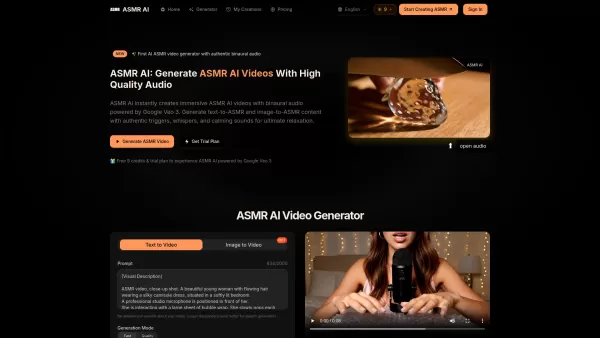
What is ASMR AI?ASMR AI represents the cutting edge of digital relaxation technology - an AI-driven platform specializing in hyper-realistic ASMR video generation. Harnessing the power of Google's Veo 3 technology, it crafts immersive binaural audio

So, what’s this whole Distribute | Death To Whitepapers thing about? Think of it as your secret weapon for creating killer content—fast. In under 10 minutes, you can whip up something truly valuable, whether it’s a sleek one-pager, a micro-website, or eve
SendShort Product Information
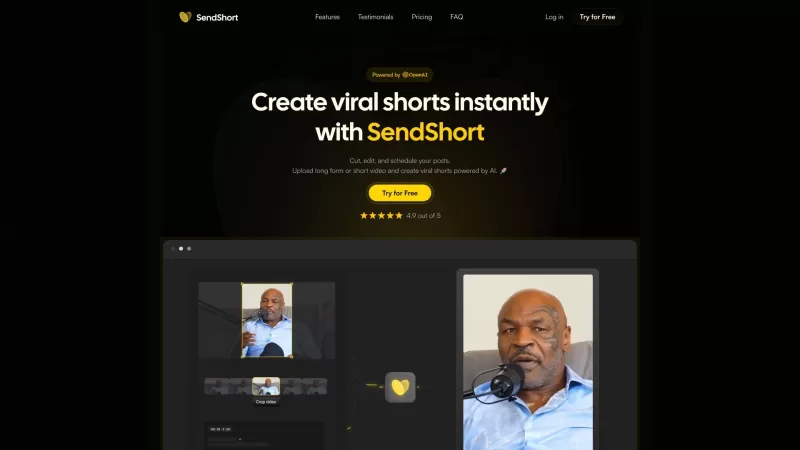
SendShort is your go-to platform for transforming your long-form or short video content into viral shorts, all with the power of AI. Ever wondered how those bite-sized videos go viral? SendShort makes it happen, and here's how you can dive in:
How to Use SendShort?
Step 1: Start by uploading your short or long videos. It’s the first step to creating something amazing.
Step 2: Get creative with editing and cropping. Trim your video to perfection, and make sure it’s ready to captivate your audience.
Step 3: Plan ahead by scheduling and managing your social media posts. Keep your content flowing smoothly across platforms.
SendShort's Core Features
- **Create viral shorts instantly:** With SendShort, you can whip up those viral shorts in no time. It’s like magic, but better!
- **Cut, edit, and schedule posts:** Say goodbye to hours of editing. SendShort streamlines the process, letting you focus on what you do best—creating.
- **Automated cropping:** No more guessing games on what to cut. SendShort does the heavy lifting for you.
- **Subtitles templates from viral content creators:** Want to know the secret sauce behind those popular videos? SendShort gives you access to subtitle templates used by the pros.
- **Personalized templates:** Make your content uniquely yours with personalized templates that speak to your style.
- **B-Rolls:** Add that extra flair to your videos with B-Rolls that elevate your storytelling.
- **Over 50 languages:** Reach a global audience without language barriers. SendShort supports over 50 languages.
- **Performance analytics:** Keep track of how your videos are doing. SendShort provides insights to help you grow.
- **Inbox management:** Stay on top of your game with efficient inbox management tools.
SendShort's Use Cases
- **Content creators:** Whether you're a YouTuber or a TikTok star, SendShort helps you create content that resonates.
- **Video editors:** Streamline your editing process and produce high-quality content faster.
- **Marketing agencies:** Boost your clients' online presence with engaging, shareable videos.
- **E-commerce brands:** Showcase your products in a way that grabs attention and drives sales.
- **Podcasts:** Turn your long-form content into bite-sized, viral clips that attract more listeners.
FAQ from SendShort
- What type of videos can I upload?
- SendShort accepts both short and long videos. Whether it's a quick clip or a full-length feature, we've got you covered.
- Which languages are supported?
- Over 50 languages are supported, making it easy to reach a diverse audience.
- Can I add captions?
- Absolutely! SendShort offers various subtitle templates to make your videos more accessible and engaging.
- I am a beginner and I don't know how to do video editing, can I use SendShort?
- Definitely! SendShort is designed to be user-friendly, even if you're new to video editing. Our AI helps you create professional-looking content with ease.
- How can I ask more questions?
- Join our vibrant community on the SendShort Discord for more questions and discussions. You can find us at Discord Link 1 or Discord Link 2. For more Discord messages, click [here](/discord/rmmxmrwyfx).
For any support, reach out to us via email at [email protected]. For more contact options, visit our contact us page.
SendShort, the company behind this innovative platform, is all about making your content stand out. Want to dive in? Log in at SendShort Login or sign up at SendShort Sign Up. Curious about pricing? Check out our SendShort Pricing.
For more insights and inspiration, follow us on social media:
- YouTube: SendShort YouTube
- TikTok: SendShort TikTok
- LinkedIn: SendShort LinkedIn
- Twitter: SendShort Twitter
- Instagram: SendShort Instagram
SendShort Screenshot


2026 Latest Best Top-rated AI Object Removal Editors for portraits travel product shots! XIX.AI curates a powerful game-changing collection regularly updated with weekly rankings. These tools offer real-world tests to help you quickly remove unwanted elements, boost content quality, and save tons of time without compromising results. Must-try for anyone aiming to unlock their AI creation edge. Explore now!
 10 tools
 xix.ai

2026 Latest Best Top-rated AI Text to Speech Tools for Online Courses are curated by XIX.AI based on rigorous real-world tests and weekly updated rankings. These powerful tools help creators deliver crystal-clear audio content effortlessly, boosting writing efficiency and streamlining course production. Check out the free vs paid comparison to find your perfect fit. Explore now to unlock your AI edge in online education.
10 tools
xix.ai

2026 Latest Best Top-Rated AI Blog Title Tools for Higher Click Through Rates! XIX.AI has carefully curated a powerful, game-changing collection of top tools that go through rigorous real-world tests. You’ll find a free vs paid comparison, weekly updated rankings, and detailed insights to help you boost your blog’s traffic efficiently. Must-try options are highlighted to help you unlock your AI edge. Explore now!
10 tools
xix.ai

2026 Latest Best Top-rated AI Task Routing Tools for Support Workflows! XIX.AI has curated a highly powerful game-changing collection of must-try solutions, all undergoing rigorous real-world tests and updated weekly. These tools streamline workflows, boost productivity, and help teams deliver faster, more efficient support. Explore now to discover your perfect tool and unlock your AI edge!
17 tools
xix.ai

2026 Latest Best Top-Rated AI Citation and Paper Summary Tools Curated by XIX.AI. Get powerful game-changing solutions for quick content creation, improved writing efficiency, and boosting productivity. We offer a free vs paid comparison along with real-world tests and weekly updated rankings to help you find the must-try tool that fits your needs perfectly. Explore now to Unlock your AI edge.
10 tools
xix.ai

2026 Latest Best Top-Rated AI Productivity Tools for Daily Work! XIX.AI has curated a powerful, game-changing selection based on rigorous weekly updated rankings and real-world tests. You’ll find must-try options that boost writing efficiency, streamline content creation, and help you overcome daily work challenges. Get a free vs paid comparison to find the perfect fit for your needs. Explore now to unlock your AI edge!
9 tools
xix.ai


SendShort ha simplificado tanto mi flujo de trabajo de edición de videos. Antes me pasaba horas recortando metraje, pero ahora la IA selecciona automáticamente los momentos más virales. ¡Es como tener un editor personal! 😎 ¿Alguien más ha notado un aumento en el compromiso de su audiencia después de usar esto?
Just tried SendShort for my YouTube clips and wow 🤯! It automatically picked the most engaging moments from my 30-min vlog and turned them into 3 perfect shorts. The AI even added captions and transitions smoothly. Only wish it had more music options - but definitely a game-changer for content creators!


