


 Home
HomeScrive
AI-Optimized LinkedIn Messages Chrome Extension



Helps TikTok sellers, brands, MCNs, and TAPs discover winning products and find creators.

HelpLook is an AI-powered all-in-one knowledge base tool that helps businesses quickly build knowledge bases, help centers, and...

Your AI Workspace

302.AI is an enterprise-grade AI resource platform with pay-as-you-go pricing, API access to a full range of AI models, and ready-to-use online applications.

剧火AI — AI Screenwriter + Director, a One-Person Short Drama Studio In one sentence, what is it?

Ever wished for a trusty sidekick to help you navigate the digital world with ease? Enter Sider, your personal AI companion designed to seamlessly blend into your daily routine. Starting off as a handy Chrome/Edge extension, Sider transforms your browsing

What is Concisely?Concisely is a cutting-edge Chrome extension that redefines email reading by using advanced AI to deliver one-sentence summaries of entire email threads. It allows busy professionals to capture the main idea instantly, eliminating t

What is Altsite?Altsite is a browser extension that helps users find websites similar to the one they're currently visiting. Using advanced AI technology, it analyzes website content and instantly generates a list of related sites. This tool is ideal

What is Comment Generator?Comment Generator is an innovative AI tool that crafts authentic and compelling comments for Instagram and Threads. This Chrome extension uses sophisticated algorithms to automate comment writing, saving you time while prese

Pixelcode is a revolutionary tool that transforms screenshots of code into editable text, saving you from the tedious task of typing out code manually. Imagine snapping a picture of a code snippet and instantly having it ready to edit in your preferred co
Scrive Product Information
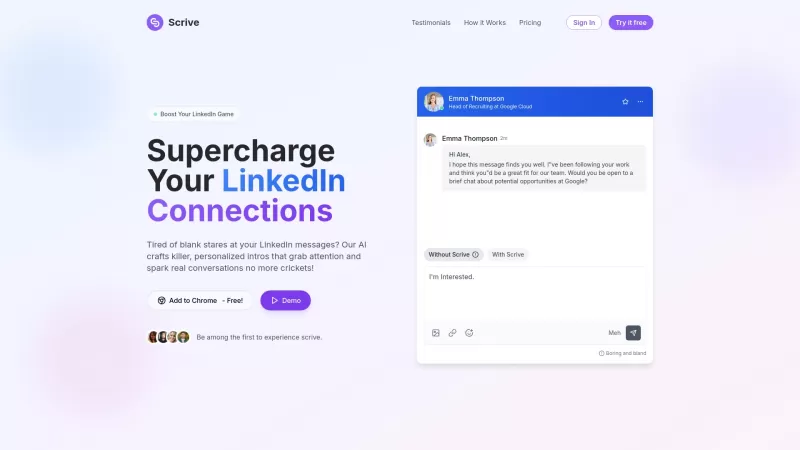
Ever found yourself staring at a blank message box on LinkedIn, wondering how to craft that perfect pitch? Enter Scrive, a nifty Chrome extension that's here to revolutionize your LinkedIn messaging game. With Scrive, you're not just sending messages; you're crafting professional, engaging communications with the help of AI. It's like having a personal writing coach right in your browser, guiding you to create messages that not only get read but also get responses.
How to Use Scrive?
Getting started with Scrive is a breeze. First, you'll want to install the Chrome extension. Once it's up and running, dive into drafting your LinkedIn messages. Don't worry about getting it perfect on the first go—Scrive's AI is there to help you refine your drafts. It'll suggest tweaks to boost clarity and engagement, turning your messages into compelling reads that stand out in a crowded inbox.
Scrive's Core Features
What makes Scrive a game-changer? Let's break it down:
- Message Optimization Using AI: Scrive's AI doesn't just suggest; it transforms your messages into polished, professional communications.
- Draft Refinement for Clarity and Engagement: Say goodbye to vague or boring messages. Scrive helps you refine your drafts to ensure they're clear and engaging.
- Quick Response Generation: Need to reply fast? Scrive's got you covered with quick, effective responses that keep the conversation flowing.
Scrive's Use Cases
So, how can Scrive make a difference in your LinkedIn strategy? Here are a couple of scenarios:
- Craft Personalized LinkedIn Messages That Get Replies: Whether you're reaching out to a potential client or reconnecting with an old colleague, Scrive helps you craft messages that resonate and prompt a response.
- Refine Introductions and Follow-ups for Professional Networking: First impressions matter, and so do follow-ups. Scrive ensures your introductions and follow-up messages are on point, helping you build and maintain professional relationships.
FAQ from Scrive
- Is Scrive really free to try?
- Yes, you can give Scrive a spin for free and see how it can transform your LinkedIn messaging.
- What is the limit of messages I can generate with the Starter plan?
- With the Starter plan, you're allowed to generate a certain number of messages each month. Check out the pricing page for the exact details!
- Scrive Company
Scrive Company name: Scrive.
- Scrive Login
Scrive Login Link: https://scrive.pro/auth/signin
- Scrive Sign up
Scrive Sign up Link: https://scrive.pro/auth/signup
- Scrive Pricing
Scrive Pricing Link: https://scrive.pro/?utm_source=toolify#pricing
- Scrive LinkedIn
Scrive LinkedIn Link: https://www.linkedin.com/in/yassineouchen/
- Scrive Twitter
Scrive Twitter Link: https://twitter.com/yassin_ouchn
Scrive Screenshot


2026 Latest Best Manga AI Background Generators Ranked Top-Rated! This curated collection showcases powerful game-changing tools perfect for creating high-quality chapter backgrounds, book covers, and promotional art. Every option has undergone rigorous real-world tests to ensure reliability. Get a free vs paid comparison along with detailed insights. Explore now to discover your perfect tool and unlock your AI edge in manga creation.
 6 tools
 xix.ai

2026 Latest Best Top-rated AI Object Removal Editors for portraits travel product shots! XIX.AI curates a powerful game-changing collection regularly updated with weekly rankings. These tools offer real-world tests to help you quickly remove unwanted elements, boost content quality, and save tons of time without compromising results. Must-try for anyone aiming to unlock their AI creation edge. Explore now!
10 tools
xix.ai

2026 Latest Best Top-rated AI Text to Speech Tools for Online Courses are curated by XIX.AI based on rigorous real-world tests and weekly updated rankings. These powerful tools help creators deliver crystal-clear audio content effortlessly, boosting writing efficiency and streamlining course production. Check out the free vs paid comparison to find your perfect fit. Explore now to unlock your AI edge in online education.
10 tools
xix.ai

2026 Latest Best Top-Rated AI Blog Title Tools for Higher Click Through Rates! XIX.AI has carefully curated a powerful, game-changing collection of top tools that go through rigorous real-world tests. You’ll find a free vs paid comparison, weekly updated rankings, and detailed insights to help you boost your blog’s traffic efficiently. Must-try options are highlighted to help you unlock your AI edge. Explore now!
10 tools
xix.ai

2026 Latest Best Top-rated AI Task Routing Tools for Support Workflows! XIX.AI has curated a highly powerful game-changing collection of must-try solutions, all undergoing rigorous real-world tests and updated weekly. These tools streamline workflows, boost productivity, and help teams deliver faster, more efficient support. Explore now to discover your perfect tool and unlock your AI edge!
17 tools
xix.ai

2026 Latest Best Top-Rated AI Citation and Paper Summary Tools Curated by XIX.AI. Get powerful game-changing solutions for quick content creation, improved writing efficiency, and boosting productivity. We offer a free vs paid comparison along with real-world tests and weekly updated rankings to help you find the must-try tool that fits your needs perfectly. Explore now to Unlock your AI edge.
10 tools
xix.ai


Scrive's a game-changer for LinkedIn! 😎 Crafting messages used to stress me out, but this extension spits out polished, personalized intros in seconds. I got more replies in a week than I did all last month! Only gripe? Sometimes the suggestions feel a bit too formal for my vibe. Still, it’s a must-have for networking! 🚀


