


 Home
HomeScribePro.ai - Meeting assistant
Privacy-Focused Meeting Assistant | ScribePro.ai



Helps TikTok sellers, brands, MCNs, and TAPs discover winning products and find creators.

HelpLook is an AI-powered all-in-one knowledge base tool that helps businesses quickly build knowledge bases, help centers, and...

Your AI Workspace

302.AI is an enterprise-grade AI resource platform with pay-as-you-go pricing, API access to a full range of AI models, and ready-to-use online applications.

剧火AI — AI Screenwriter + Director, a One-Person Short Drama Studio In one sentence, what is it?

What is Speech Translator?Speech Translator leverages Google's advanced speech recognition to deliver real-time translation for videos, audio, and live streams. This tool bridges language gaps, enabling seamless conversations and fostering clearer un

Ever wondered how to effortlessly turn your audio and video files into text? Enter Clipto, the powerhouse of AI transcription on the web. Imagine harnessing the same cutting-edge tech that fuels ChatGPT to convert your Zoom meetings, interviews, and

What is Revoldiv AI Chrome Extension? Revoldiv is a Chrome browser extension that instantly transcribes audio and video directly in your browser. It lets users follow along by reading live transcriptions and search for specific spoken words within po

Ever found yourself needing to turn spoken words into written text? Well, let me introduce you to tulz.AI—an AI-powered service that's all about making audio transcription a breeze. Whether it's a podcast, a business meeting, or any other spoken content,

Ever found yourself in need of a quick and accurate transcription of a video or audio file? That's where Video To Text AI comes into play. It's a slick AI-powered tool designed to effortlessly convert your media into text. Whether you're juggling YouTube
ScribePro.ai - Meeting assistant Product Information
What is ScribePro.ai - Meeting assistant?
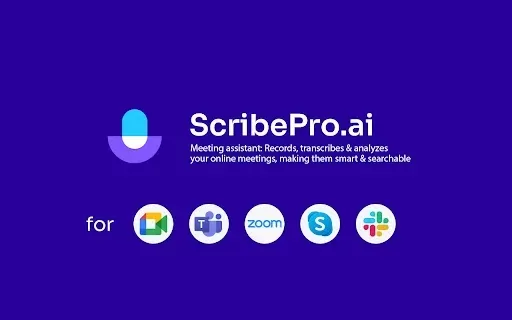
ScribePro.ai is an intelligent meeting assistant that records and transcribes your online meetings. It prioritizes your privacy with no tracking or advertisements for a smooth experience. The tool delivers real-time transcriptions in more than 100 languages, so you can easily follow the conversation. After the meeting, it creates concise summaries and provides powerful search features to help you find key details quickly. A structured timeline also helps you navigate the discussion to ensure you never miss an important point.
Who is ScribePro.ai - Meeting assistant for?
- Business Professionals
- Remote Teams
- Educators and Trainers
- Content Creators
- Freelancers
How to use ScribePro.ai - Meeting assistant
- Step 1: Add the ScribePro.ai extension from the Chrome Web Store.
- Step 2: Log into your ScribePro.ai account.
- Step 3: Join your meeting and begin recording.
- Step 4: Follow along with live, real-time transcription.
- Step 5: Stop the recording once the meeting concludes.
- Step 6: Review, search, and manage your transcribed notes.
Platform
- Chrome Browser
ScribePro.ai - Meeting assistant's Core Features & Benefits
The Core Features
- Live Real-Time Transcription
- Automated Meeting Summaries
- Powerful Search Across Transcripts
- Audio Playback with Timeline
- Support for 100+ Languages
The Benefits
- Creates thorough, reliable meeting records
- Saves time otherwise spent on manual notes
- Makes meeting content accessible to all participants
- Enables easy reference and supports better decision-making
- Boosts engagement by letting you focus on the discussion
ScribePro.ai - Meeting assistant's Main Use Cases & Applications
- Documenting business meetings and decisions
- Transcribing lectures and training sessions
- Summarizing workshops and seminars
- Managing records of client and sales calls
- Enhancing collaboration in virtual teams
FAQs of ScribePro.ai - Meeting assistant
How does ScribePro.ai ensure privacy?
ScribePro.ai protects your privacy by not tracking your activity and displaying no ads.
What languages does ScribePro.ai support?
It provides transcription and summaries in over 100 languages.
Can I search through past transcripts?
Yes. ScribePro.ai includes a powerful search to quickly find information in past meetings.
How accurate is the transcription?
ScribePro.ai delivers highly accurate transcriptions, even during live sessions.
Is there a mobile version available?
Currently, ScribePro.ai is available as a Chrome extension for desktop browsers.
What type of meetings can I use this for?
You can use it for any online meeting, including business calls, classes, workshops, and client sessions.
Does it provide meeting summaries?
Yes. After each meeting, ScribePro.ai automatically generates a concise summary of the key points.
Is there a free trial available?
Yes, you can try ScribePro.ai for free with our trial offer.
Can I integrate it with other apps?
The tool currently works as a standalone Chrome extension.
What happens if I miss a recording?
You can always access notes and transcripts from your previously recorded meetings.
ScribePro.ai - Meeting assistant Company Information
- ScribePro.ai
- https://scribepro.ai
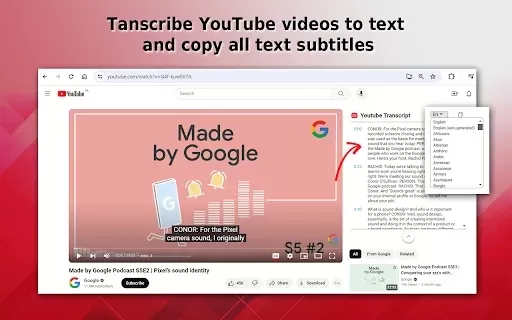
ScribePro.ai - Meeting assistant Screenshot
Discover the 2026 best SOC2 compliant AI meeting assistants for secure, automated board minutes. Our top-rated, curated list features powerful, game-changing tools with free vs paid comparisons and real-world tests. Unlock compliant productivity at XIX.AI.
 10 tools
 xix.ai


Love using ScribePro.ai! The real-time transcription is super accurate and the privacy-first approach is a huge plus – no ads, no tracking, just smooth meeting notes. Perfect for my chaotic team standups! 🎧📝


