


 Home
HomeScreenSnapAI
Effortlessly manage macOS screenshots with AI.



Helps TikTok sellers, brands, MCNs, and TAPs discover winning products and find creators.

HelpLook is an AI-powered all-in-one knowledge base tool that helps businesses quickly build knowledge bases, help centers, and...

Your AI Workspace

302.AI is an enterprise-grade AI resource platform with pay-as-you-go pricing, API access to a full range of AI models, and ready-to-use online applications.

剧火AI — AI Screenwriter + Director, a One-Person Short Drama Studio In one sentence, what is it?

Ever stumbled upon Cherry Studio AI and wondered what it's all about? Well, let me break it down for you. Cherry Studio AI isn't just another run-of-the-mill AI tool; it's a powerhouse desktop client that lets you dive into advanced AI interactions across

Discover Plume AI: Your Ultimate Academic Writing AssistantAre you tired of struggling with your academic writing? Well, say hello to Plume AI, the innovative AI assistant that's here to revolutionize the way you write! Designed with students in mind, Plume AI harnesses the power of cutting-edge art

Ever wondered how to turn your jumbled thoughts and complex queries into something you can actually grasp? Enter The Visualizer, your new best friend in the world of learning and creativity. This nifty tool takes your written queries, URLs, and even PDFs,

Ever wished for a trusty sidekick to help you navigate the digital world with ease? Enter Sider, your personal AI companion designed to seamlessly blend into your daily routine. Starting off as a handy Chrome/Edge extension, Sider transforms your browsing

Ever wondered what Ninja AI is all about? Well, let me tell you, it's like having a Swiss Army knife for your digital needs! Ninja AI isn't just another AI tool; it's a powerhouse that brings together over 24 top-notch Large Language Models (LLMs) to help
ScreenSnapAI Product Information
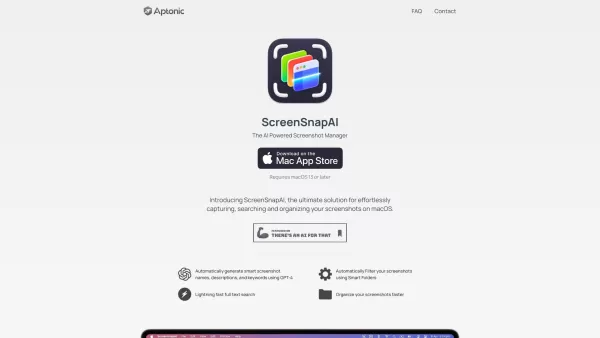
Imagine you've got a mountain of screenshots cluttering your macOS, and you're desperately trying to find that one specific image from last week. Enter ScreenSnapAI, your new best friend for effortlessly capturing, searching, and organizing those screenshots.
How to Dive into ScreenSnapAI?
Getting started with ScreenSnapAI is as easy as pie. Just hop over to the Mac App Store, download and install the app, and voila! You're ready to harness the power of AI to manage your screenshots like a pro.
Unveiling ScreenSnapAI's Core Features
Smart Naming with GPT-4
Ever wish your screenshots could name themselves? With ScreenSnapAI, they do! Using the magic of GPT-4, your screenshots automatically get smart names, descriptions, and keywords. No more "Screenshot_20231201.png" nonsense.
Smart Folders for Easy Filtering
Who has time to manually sort through screenshots? ScreenSnapAI uses Smart Folders to automatically filter your screenshots, making organization a breeze.
Blazing Fast Full Text Search
Need to find a screenshot in a hurry? ScreenSnapAI's lightning-fast full text search has got you covered. Type in a keyword, and watch it pull up your screenshot in seconds.
Organize Screenshots Like a Boss
With ScreenSnapAI, organizing your screenshots isn't just faster; it's smarter. Say goodbye to endless scrolling and hello to a tidy, efficient workspace.
ScreenSnapAI's Real-World Magic
Taming the Screenshot Chaos
If you've got a large collection of screenshots that's driving you up the wall, ScreenSnapAI is your hero. It effortlessly organizes them, so you can actually find what you need when you need it.
AI-Powered Search to the Rescue
Ever tried to find a specific screenshot and ended up in a rabbit hole of old images? With ScreenSnapAI's AI-powered search, you'll pinpoint that screenshot faster than you can say "Where did I put that?"
FAQ from ScreenSnapAI
- What's the pricing?
- Curious about how much ScreenSnapAI will set you back? Check out the pricing details to see if it fits your budget.
- What are the differences between the free and pro versions of ScreenSnapAI?
- Wondering what extra perks come with the pro version? Dive into the differences to see if upgrading is worth it for you.
- Can I bring my own OpenAI API key?
- Want to use your own OpenAI API key with ScreenSnapAI? Find out if it's possible and how to set it up.
- Is this available outside the Mac App Store?
- Not a fan of the Mac App Store? See if ScreenSnapAI offers alternative download options.
Need help or have a question? Reach out to the ScreenSnapAI support team at [email protected].
Behind this innovative tool is Aptonic LLC, the company that's making screenshot management a whole lot easier.
ScreenSnapAI Screenshot



2026 Latest Best Top-rated AI Object Removal Editors for portraits travel product shots! XIX.AI curates a powerful game-changing collection regularly updated with weekly rankings. These tools offer real-world tests to help you quickly remove unwanted elements, boost content quality, and save tons of time without compromising results. Must-try for anyone aiming to unlock their AI creation edge. Explore now!
 10 tools
 xix.ai

2026 Latest Best Top-rated AI Text to Speech Tools for Online Courses are curated by XIX.AI based on rigorous real-world tests and weekly updated rankings. These powerful tools help creators deliver crystal-clear audio content effortlessly, boosting writing efficiency and streamlining course production. Check out the free vs paid comparison to find your perfect fit. Explore now to unlock your AI edge in online education.
10 tools
xix.ai

2026 Latest Best Top-Rated AI Blog Title Tools for Higher Click Through Rates! XIX.AI has carefully curated a powerful, game-changing collection of top tools that go through rigorous real-world tests. You’ll find a free vs paid comparison, weekly updated rankings, and detailed insights to help you boost your blog’s traffic efficiently. Must-try options are highlighted to help you unlock your AI edge. Explore now!
10 tools
xix.ai

2026 Latest Best Top-rated AI Task Routing Tools for Support Workflows! XIX.AI has curated a highly powerful game-changing collection of must-try solutions, all undergoing rigorous real-world tests and updated weekly. These tools streamline workflows, boost productivity, and help teams deliver faster, more efficient support. Explore now to discover your perfect tool and unlock your AI edge!
17 tools
xix.ai

2026 Latest Best Top-Rated AI Citation and Paper Summary Tools Curated by XIX.AI. Get powerful game-changing solutions for quick content creation, improved writing efficiency, and boosting productivity. We offer a free vs paid comparison along with real-world tests and weekly updated rankings to help you find the must-try tool that fits your needs perfectly. Explore now to Unlock your AI edge.
10 tools
xix.ai

2026 Latest Best Top-Rated AI Productivity Tools for Daily Work! XIX.AI has curated a powerful, game-changing selection based on rigorous weekly updated rankings and real-world tests. You’ll find must-try options that boost writing efficiency, streamline content creation, and help you overcome daily work challenges. Get a free vs paid comparison to find the perfect fit for your needs. Explore now to unlock your AI edge!
9 tools
xix.ai


ScreenSnapAI is a lifesaver! 🙌 My Mac was a screenshot mess, but this tool’s AI naming and search make finding stuff a breeze. Love how it organizes everything automatically—feels like magic! 🪄 Only wish it worked on Windows too.
ScreenSnapAI é um salva-vidas! Meu Mac estava uma bagunça com capturas de tela, mas agora encontro tudo em segundos. É tão fácil de usar e a função de busca é perfeita! Só queria que tivesse mais opções de personalização para organizar. Ainda assim, é essencial! 😊
ScreenSnapAI es un salvavidas! Mi Mac estaba un desastre con capturas de pantalla, pero ahora puedo encontrar cualquier cosa en segundos. Es tan fácil de usar y la función de búsqueda es precisa! Solo desearía que tuviera más opciones de personalización para organizar. Aún así, es imprescindible! 😊
ScreenSnapAI is a lifesaver! My Mac was a mess with screenshots, but now I can find anything in seconds. It's so easy to use and the search function is spot on! Only wish it had more customization options for organizing. Still, a must-have! 😊
ScreenSnapAI 덕분에 맥북의 스크린샷 정리가 쉬워졌어요! 찾고 싶은 이미지를 금방 찾을 수 있어서 너무 좋아요. 다만, 정리 옵션이 좀 더 다양했으면 좋겠어요. 그래도 필수 앱이에요! 😊


