


 Home
HomeSchedule AI
Schedule AI Enhances Appointment Scheduling



Helps TikTok sellers, brands, MCNs, and TAPs discover winning products and find creators.

HelpLook is an AI-powered all-in-one knowledge base tool that helps businesses quickly build knowledge bases, help centers, and...

Your AI Workspace

302.AI is an enterprise-grade AI resource platform with pay-as-you-go pricing, API access to a full range of AI models, and ready-to-use online applications.

剧火AI — AI Screenwriter + Director, a One-Person Short Drama Studio In one sentence, what is it?

What is Dosu?Dosu is an intelligent AI assistant that uses machine learning to simplify and automate user workflows. It handles repetitive activities, organizes emails, schedules appointments, and delivers tailored support. By utilizing natural langu
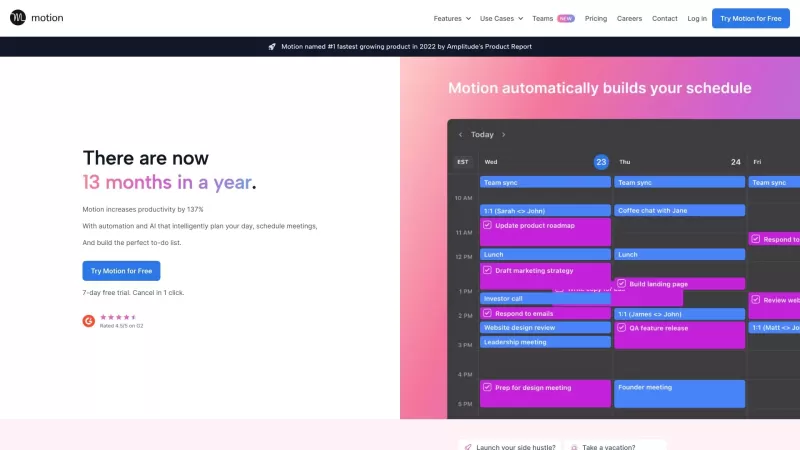
Ever feel like there just aren't enough hours in the day? Motion is here to help, promising to boost your productivity by a whopping 25%! This app leverages AI to streamline your daily grind, making it easier to manage your schedule and tasks.How to Use M
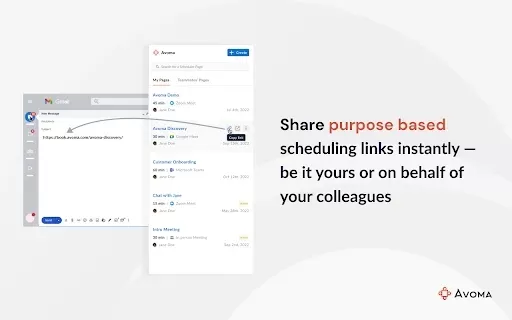
What is Avoma Scheduler?Avoma Scheduler streamlines the entire meeting process by allowing you to generate personalized booking links, automate reminders for no-shows, and simplify canceling or rescheduling meetings. It syncs effortlessly with your c

What is Meetz AI?Meetz is a sophisticated AI assistant dedicated to automating sales lead generation and email outreach. It empowers businesses to create personalized cold emails and automate follow-up sequences, guaranteeing messages connect with th
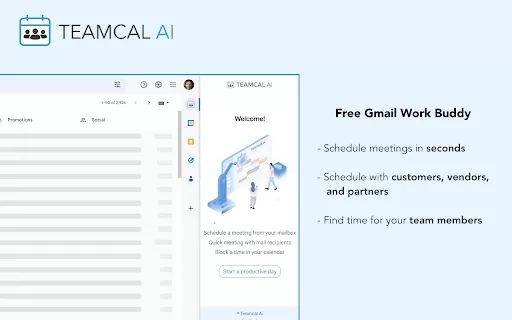
Ever found yourself juggling a million emails just to schedule a simple meeting? Enter TEAMCAL AI, the Chrome extension that's like having a personal assistant right inside your Gmail. It's not just another tool; it's a game-changer for anyone who's ever
Schedule AI Product Information
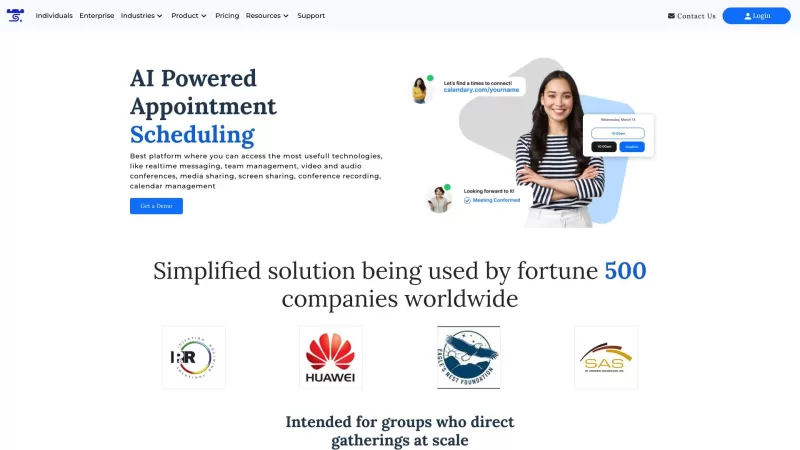
Ever found yourself juggling multiple calendars and time zones just to set up a simple meeting? Enter Schedule AI, your new best friend in the world of online appointment scheduling. This nifty tool is designed to streamline the process of scheduling and managing meetings, making it a breeze for teams to connect and boost their productivity. It's like having a personal assistant who's always on top of your schedule, but without the coffee runs.
How to Use Schedule AI?
Getting started with Schedule AI is as easy as pie. First, head over to our website and sign up for an account. Once you're logged in, you'll find yourself in the heart of our scheduling platform. From here, you can start creating appointments like a pro. Just invite your participants by sending them calendar invites or handy links. Don't worry about the time zones; Schedule AI will automatically sort that out and find the best meeting slots based on everyone's availability. Plus, you can tweak meeting preferences and set reminders to keep everyone on track. It's like magic, but better!
Schedule AI's Core Features
What makes Schedule AI stand out? Let's dive into its core features:
- Automated Scheduling: Say goodbye to the back-and-forth emails. Schedule AI finds the best meeting times automatically, based on when everyone's free.
- Time Zone Coordination: No more confusion about whether it's AM or PM in Tokyo. The software adjusts schedules to fit different time zones seamlessly.
- Calendar Integration: It plays nice with all your favorite calendar apps, making sure your schedule stays in sync.
- Customization Options: Want to set specific meeting preferences or reminders? You got it. Customize away to your heart's content.
- Participant Management: Invite participants with ease and keep tabs on their responses. It's like herding cats, but way less stressful.
Schedule AI's Use Cases
Whether you're running a small startup or a large corporation, Schedule AI is your go-to for efficient scheduling. It's perfect for team meetings, client appointments, interviews, and any other collaborative sessions that need a bit of organization. And the best part? It works just as well for remote meetings as it does for in-person ones. So, whether you're across the table or across the globe, Schedule AI has got you covered.
FAQ from Schedule AI
- Can Schedule AI be integrated with my existing calendar app?
- Absolutely! Schedule AI integrates seamlessly with popular calendar apps, so you can keep everything in one place.
- Can I schedule meetings with participants from different time zones?
- Yes, you can! Schedule AI takes care of time zone differences, making sure everyone's on the same page.
- Can I customize meeting preferences and set reminders?
- Of course! You can tailor your meetings to your liking and set reminders to keep everyone in the loop.
- Is Schedule AI suitable for both remote and in-person meetings?
- Definitely! Whether you're meeting face-to-face or virtually, Schedule AI is designed to handle it all.
Need help or have questions? Drop us a line at [email protected]. Our team is here to assist you with any customer service, refunds, or other inquiries.
Curious about the brains behind Schedule AI? Our headquarters are located at First Canadian Place, 100 King St W Suite 5600, Toronto, ON M5X 1C9, Canada. Want to know more about us? Check out our about us page.
Ready to dive in? Log in to your Schedule AI account at https://scheduleai.co/login. And if you're wondering about the cost, take a peek at our pricing page.
Stay connected with us on social media! Follow us on LinkedIn, Twitter, and Instagram to get the latest updates and tips on using Schedule AI to its fullest potential.
Schedule AI Screenshot


2026 Latest Best Top-rated AI Object Removal Editors for portraits travel product shots! XIX.AI curates a powerful game-changing collection regularly updated with weekly rankings. These tools offer real-world tests to help you quickly remove unwanted elements, boost content quality, and save tons of time without compromising results. Must-try for anyone aiming to unlock their AI creation edge. Explore now!
 10 tools
 xix.ai

2026 Latest Best Top-rated AI Text to Speech Tools for Online Courses are curated by XIX.AI based on rigorous real-world tests and weekly updated rankings. These powerful tools help creators deliver crystal-clear audio content effortlessly, boosting writing efficiency and streamlining course production. Check out the free vs paid comparison to find your perfect fit. Explore now to unlock your AI edge in online education.
10 tools
xix.ai

2026 Latest Best Top-Rated AI Blog Title Tools for Higher Click Through Rates! XIX.AI has carefully curated a powerful, game-changing collection of top tools that go through rigorous real-world tests. You’ll find a free vs paid comparison, weekly updated rankings, and detailed insights to help you boost your blog’s traffic efficiently. Must-try options are highlighted to help you unlock your AI edge. Explore now!
10 tools
xix.ai

2026 Latest Best Top-rated AI Task Routing Tools for Support Workflows! XIX.AI has curated a highly powerful game-changing collection of must-try solutions, all undergoing rigorous real-world tests and updated weekly. These tools streamline workflows, boost productivity, and help teams deliver faster, more efficient support. Explore now to discover your perfect tool and unlock your AI edge!
17 tools
xix.ai

2026 Latest Best Top-Rated AI Citation and Paper Summary Tools Curated by XIX.AI. Get powerful game-changing solutions for quick content creation, improved writing efficiency, and boosting productivity. We offer a free vs paid comparison along with real-world tests and weekly updated rankings to help you find the must-try tool that fits your needs perfectly. Explore now to Unlock your AI edge.
10 tools
xix.ai

2026 Latest Best Top-Rated AI Productivity Tools for Daily Work! XIX.AI has curated a powerful, game-changing selection based on rigorous weekly updated rankings and real-world tests. You’ll find must-try options that boost writing efficiency, streamline content creation, and help you overcome daily work challenges. Get a free vs paid comparison to find the perfect fit for your needs. Explore now to unlock your AI edge!
9 tools
xix.ai


