


 Home
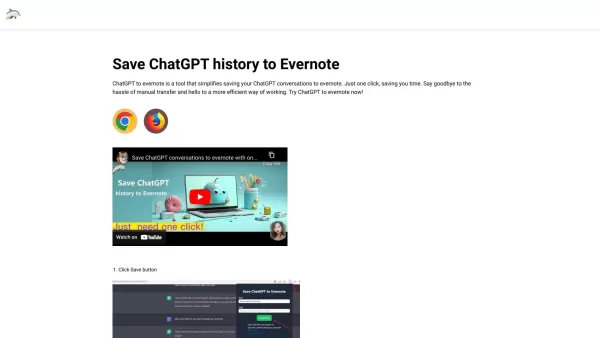
HomeSave ChatGPT history to Evernote
ChatGPT to Evernote Extension: Save & Manage Conversations



Helps TikTok sellers, brands, MCNs, and TAPs discover winning products and find creators.

HelpLook is an AI-powered all-in-one knowledge base tool that helps businesses quickly build knowledge bases, help centers, and...

Your AI Workspace

302.AI is an enterprise-grade AI resource platform with pay-as-you-go pricing, API access to a full range of AI models, and ready-to-use online applications.

剧火AI — AI Screenwriter + Director, a One-Person Short Drama Studio In one sentence, what is it?

What Are Notion Templates for AI? Notion Templates for AI Integration to Supercharge Productivity Looking to harness the power of AI within your workflow? Notion Templates for AI Integration offers tailored solutions designed to streamline your day-to-day

BrandGhost is a game-changer for content creators, offering a slick social media automation platform that makes managing your online presence across various networks a breeze. It's like having a personal assistant dedicated to keeping your social media ga

What is Simbla?Simbla is a cloud-based no-code platform that allows users of any skill level to build professional websites and applications. Its intuitive drag-and-drop interface and responsive templates enable the creation of visually appealing, fu
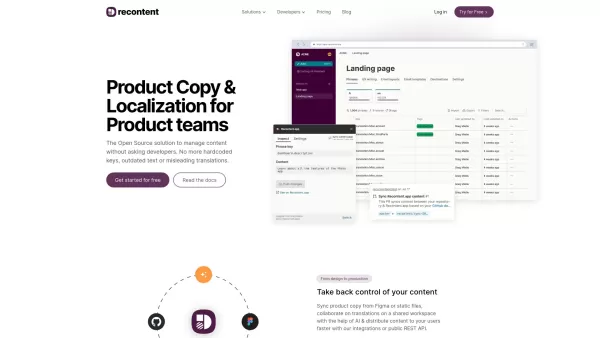
What is Recontent.app?Recontent.app is an open-source solution that empowers product teams to efficiently manage and localize their product copy. By connecting with tools like Figma and GitHub, it enables teams to synchronize text, collaborate on tra
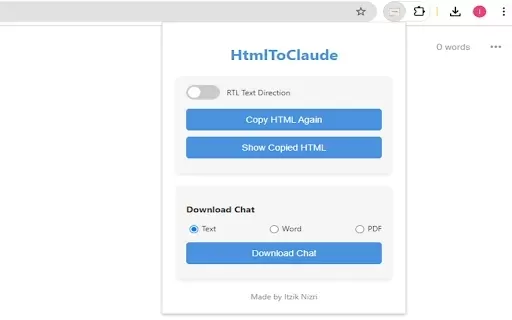
What is HtmlToClaude?HtmlToClaude is a Chrome extension that simplifies your work with Claude AI. It enables you to effortlessly capture HTML content from any webpage and paste it directly into your conversations with Claude. The tool also lets you d
Save ChatGPT history to Evernote Product Information
What is Save ChatGPT history to Evernote?
The Save ChatGPT history to Evernote tool is an integration that enables users to seamlessly save their ChatGPT conversation history directly into their Evernote account. This tool enhances productivity by allowing users to store, manage, and reference their ChatGPT exchanges within Evernote's user-friendly interface. It is particularly valuable for individuals who use ChatGPT for content creation, information summarization, and Q&A, as it keeps all interactions organized and easily accessible for future use.
Who will use Save ChatGPT history to Evernote?
- Content Creators
- Students
- Researchers
- Business Professionals
- Evernote Users
How to use the Save ChatGPT history to Evernote?
- Step 1: Install the ChatGPT to Evernote extension from the Google Chrome Web Store or Microsoft Edge Add-ons.
- Step 2: Open the ChatGPT conversation you want to save.
- Step 3: Click on the ChatGPT to Evernote extension icon in your browser toolbar.
- Step 4: Follow the prompts to log into your Evernote account.
- Step 5: Select or create a notebook where you wish to save the conversation.
- Step 6: Click 'Save' to store the ChatGPT conversation into the chosen Evernote notebook.
Platform
- Web
- Chrome
Save ChatGPT history to Evernote's Core Features & Benefits
The Core Features
- Save ChatGPT History
- Organize Conversations
- Evernote Integration
The Benefits
- Enhance Workflow
- Simplify Content Management
- Easy to Use Interface
Save ChatGPT history to Evernote's Main Use Cases & Applications
- Content Generation and Management
- Research and Information Summarization
- Educational Notes and Study Materials
- Business Documentation
Save ChatGPT history to Evernote's Pros & Cons
The Pros
Simple and intuitive interface for saving ChatGPT conversations
Supports batch saving of conversation history
Customizable titles and tags for saved notes
Multiple pricing plans to suit different user needs
Seamless integration with Evernote
The Cons
Not open source
Limited to Chrome browser users
Pricing information hosted on an external site rather than directly on the product site
No mobile app versions found
No direct GitHub repository available
Save ChatGPT history to Evernote's Pricing
Has free plan | No |
|---|---|
Free trial details | |
Pricing model | Paid |
Is credit card required | No |
Paid from | 3.5 USD |
Has lifetime plan | No |
Billing frequency | Monthly |
Details of Pricing Plan
Base Package
3.5 USD
- Up to 1000 save times per month
- Get support response within 36 hours
Pro Package
4.5 USD
- Up to unlimited save times
- Get support response within 24 hours
Pro Max Package
35 USD
- Up to unlimited save times
- Get support response within 24 hours
For the latest prices, please visit: https://figma-resource.com/pay-for-chatgpt2evernote.html?from=site2
FAQs of Save ChatGPT history to Evernote
What is ChatGPT to Evernote?
It is a browser extension that lets users save their ChatGPT conversations directly into Evernote.
Is ChatGPT to Evernote free to use?
Basic functions are available for free. However, some advanced features may require a subscription.
Do I need an Evernote account?
Yes, an active Evernote account is necessary to save your conversations.
Which browsers are supported?
The tool is compatible with Google Chrome and Microsoft Edge.
Can I choose which notebook to save conversations?
Yes, you can pick an existing notebook or create a new one to store your ChatGPT conversations.
Is the integration secure?
Yes, it uses secure connections to protect your information.
Can I edit saved conversations?
Once saved in Evernote, you can edit, annotate, and organize the conversations as needed.
Are there any storage limits?
Storage limitations depend on your specific Evernote plan.
Can I automate the process?
At this time, saving is a manual process, although using third-party services like Zapier may offer some automation.
Does it support other AI tools?
Currently, the integration is exclusive to ChatGPT.
Save ChatGPT history to Evernote Company Information
Website:
https://chatgpt2evernote.comCompany Name:
ChatGPT to EvernoteSupport Email:
Facebook:
NAX(Twitter):
NAYouTube:
NAInstagram:
NATiktok:
NALinkedIn:
NA
Save ChatGPT history to Evernote Screenshot


2026 Latest Best Top-rated AI Text to Speech Tools for Online Courses are curated by XIX.AI based on rigorous real-world tests and weekly updated rankings. These powerful tools help creators deliver crystal-clear audio content effortlessly, boosting writing efficiency and streamlining course production. Check out the free vs paid comparison to find your perfect fit. Explore now to unlock your AI edge in online education.
 10 tools
 xix.ai

2026 Latest Best Top-Rated AI Blog Title Tools for Higher Click Through Rates! XIX.AI has carefully curated a powerful, game-changing collection of top tools that go through rigorous real-world tests. You’ll find a free vs paid comparison, weekly updated rankings, and detailed insights to help you boost your blog’s traffic efficiently. Must-try options are highlighted to help you unlock your AI edge. Explore now!
10 tools
xix.ai

2026 Latest Best Top-rated AI Task Routing Tools for Support Workflows! XIX.AI has curated a highly powerful game-changing collection of must-try solutions, all undergoing rigorous real-world tests and updated weekly. These tools streamline workflows, boost productivity, and help teams deliver faster, more efficient support. Explore now to discover your perfect tool and unlock your AI edge!
17 tools
xix.ai

2026 Latest Best Top-Rated AI Citation and Paper Summary Tools Curated by XIX.AI. Get powerful game-changing solutions for quick content creation, improved writing efficiency, and boosting productivity. We offer a free vs paid comparison along with real-world tests and weekly updated rankings to help you find the must-try tool that fits your needs perfectly. Explore now to Unlock your AI edge.
10 tools
xix.ai

2026 Latest Best Top-Rated AI Productivity Tools for Daily Work! XIX.AI has curated a powerful, game-changing selection based on rigorous weekly updated rankings and real-world tests. You’ll find must-try options that boost writing efficiency, streamline content creation, and help you overcome daily work challenges. Get a free vs paid comparison to find the perfect fit for your needs. Explore now to unlock your AI edge!
9 tools
xix.ai

2026 Latest Best Top-Rated AI Systematic Review Tools for Research Screening are here on XIX.AI! This curated collection includes powerful, game-changing solutions that go through rigorous real-world tests to deliver accurate results. We also offer a free vs paid comparison along with weekly updated rankings to help you find the must-try option that boosts your research efficiency significantly. Explore now to unlock your AI edge in academic work!
11 tools
xix.ai


