


 Home
HomeSagai - Writing Assistant



Helps TikTok sellers, brands, MCNs, and TAPs discover winning products and find creators.

HelpLook is an AI-powered all-in-one knowledge base tool that helps businesses quickly build knowledge bases, help centers, and...

Your AI Workspace

302.AI is an enterprise-grade AI resource platform with pay-as-you-go pricing, API access to a full range of AI models, and ready-to-use online applications.

剧火AI — AI Screenwriter + Director, a One-Person Short Drama Studio In one sentence, what is it?

Ever wondered how to get a leg up in *Call of Duty: Mobile*? Well, redeem codes are your golden ticket to a whole bunch of in-game goodies. These codes can give you a sweet boost to your Weapon XP or Battle Pass XP, making it a breeze to level up your arsenal and unlock those coveted new weapons, at

Ever find yourself staring at a blank screen, trying to craft the perfect email or nail that final paper? Enter Linguix, your new best friend in the world of writing. This free writing assistant isn't just another tool; it's like having a personal ed

Riki AI is a game-changing tool designed to bring the power of ChatGPT directly into your workflow, no matter where you are or what you’re doing. Imagine having a personal assistant that helps you write, edit, summarize, translate, and even debug—all at t
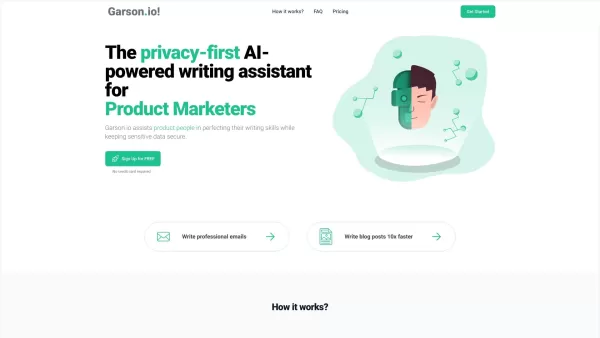
What is Garson.io? Garson.io offers a secure AI writing assistant specifically crafted for professionals who prioritize data privacy. This intelligent tool enhances your writing quality while maintaining strict confidentiality over sensitive informat
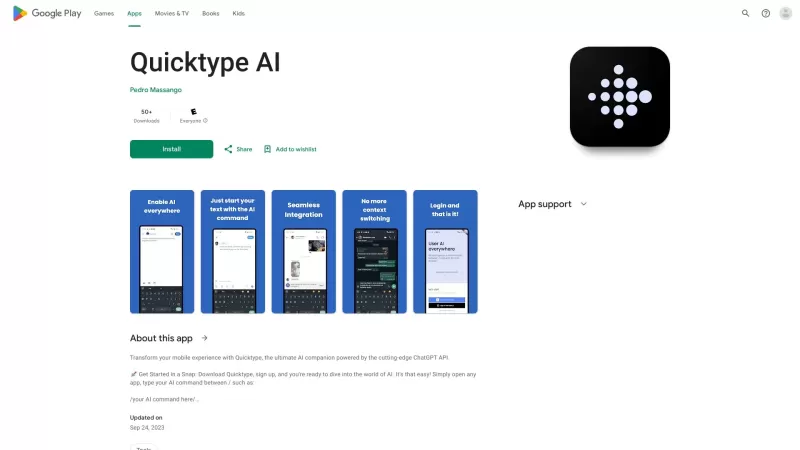
Ever found yourself juggling between different apps and tabs while trying to type something out? It's a real hassle, right? Well, let me introduce you to Elevate—an AI-powered tool designed to revolutionize your typing experience by cutting down on that annoying context switching. Imagine a world wh
Sagai - Writing Assistant Product Information
What is Sagai - Writing Assistant?
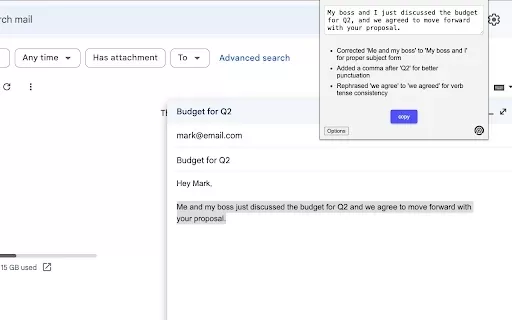
Sagai is an innovative Chrome extension that acts as your personal writing assistant. It integrates directly into your browser to offer real-time suggestions for improving grammar, style, and overall clarity. As you type emails, blog posts, or reports, Sagai analyzes your text to help you communicate more effectively and professionally. This easy-to-use tool serves as a virtual proofreader, ensuring your ideas are well-structured and impactful with minimal effort.
Who will use Sagai - Writing Assistant?
- Students
- Professionals
- Writers
- Bloggers
- Researchers
How to use the Sagai - Writing Assistant?
- Step 1: Install the Sagai extension from the Chrome Web Store.
- Step 2: Navigate to any webpage where you need to write.
- Step 3: Begin composing your text as usual.
- Step 4: Select the text you wish to enhance.
- Step 5: Click the Sagai extension icon to view improvement suggestions.
Platform
- Chrome
Sagai - Writing Assistant's Core Features & Benefits
The Core Features
- Real-time grammar checking
- Clarity enhancement tools
- Style and tone suggestions
- Spelling and error detection
The Benefits
- Elevates overall writing quality
- Reduces time spent on proofreading
- Increases confidence in written communication
- Provides valuable support for non-native English speakers
Sagai - Writing Assistant's Main Use Cases & Applications
- Polishing academic papers and essays
- Crafting professional business emails
- Refining creative writing projects
- Editing and optimizing blog content
FAQs of Sagai - Writing Assistant
What does Sagai do?
Sagai delivers instant writing feedback to enhance clarity and fix grammatical errors.
Is Sagai free to use?
Yes, Sagai offers a free version with access to optional premium upgrades.
Do I need an account to use Sagai?
No account is required. Just install the extension and begin using it immediately.
Can I use Sagai offline?
Sagai needs an active internet connection to function and provide suggestions.
What writing formats does Sagai support?
Sagai works with text input across most online platforms, including emails, documents, and social media.
Can Sagai detect plagiarism?
No, Sagai does not include plagiarism detection capabilities.
What languages does Sagai support?
Sagai currently focuses on providing support for the English language.
How do I uninstall Sagai?
You can remove Sagai through your Chrome browser's extensions management page.
How does Sagai compare to Grammarly?
Sagai specializes in lightweight, real-time assistance within your browser, whereas Grammarly offers more comprehensive analysis and detailed reports.
Is there a limit to the text Sagai checks?
While there's no strict character limit, processing very lengthy texts may affect performance.
Sagai - Writing Assistant Company Information
Website:
NACompany Name:
SagaiSupport Email:
NAFacebook:
NAX (Twitter):
NAYouTube:
NAInstagram:
NATikTok:
NALinkedIn:
NA
Sagai - Writing Assistant Screenshot

2026 Latest Best Top-Rated AI Prompt Libraries for optimizing all types of ChatGPT workflows. XIX.AI has curated a powerful, game-changing collection that goes through rigorous real-world tests to ensure top performance. You can find detailed free vs paid comparisons and expert rankings to help you choose the must-try tools that boost your productivity and unlock your AI edge. Explore now!
 11 tools
 xix.ai

2026 Latest Best AI Quiz Builder Platforms for Teachers, Tutors, and Cohort-Based Learning Programs! XIX.AI has curated a top-rated list of powerful game-changing tools that go through real-world tests to deliver accurate rankings. These must-try platforms help boost writing efficiency, streamline content creation, and simplify quiz design across all learning scenarios. Explore now to discover your perfect tool for unlocking your AI edge in teaching!
13 tools
xix.ai

2026 Latest Best AI Pull Request Review Tools for GitHub Teams are here on XIX.AI! This top-rated curated list showcases powerful game-changing solutions that streamline refactoring, bug fixing, and security gap detection across all team workflows. Enjoy a free vs paid comparison along with real-world tests and detailed rankings to help you find the perfect tool that boosts productivity significantly. Explore now to unlock your AI edge!
12 tools
xix.ai

2026 Latest Best Top-rated AI Text to Speech Tools for Natural Voiceovers are here on XIX.AI! This curated list features powerful, game-changing options that deliver crystal-clear voices for every use case, backed by real-world tests and weekly updated rankings. Get a free vs paid comparison to find the must-try solution that boosts your productivity instantly. Explore now to Unlock your AI edge!
11 tools
xix.ai

2026 Latest Best Manga AI Background Generators Ranked Top-Rated! This curated collection showcases powerful game-changing tools perfect for creating high-quality chapter backgrounds, book covers, and promotional art. Every option has undergone rigorous real-world tests to ensure reliability. Get a free vs paid comparison along with detailed insights. Explore now to discover your perfect tool and unlock your AI edge in manga creation.
6 tools
xix.ai

2026 Latest Best Top-rated AI Object Removal Editors for portraits travel product shots! XIX.AI curates a powerful game-changing collection regularly updated with weekly rankings. These tools offer real-world tests to help you quickly remove unwanted elements, boost content quality, and save tons of time without compromising results. Must-try for anyone aiming to unlock their AI creation edge. Explore now!
10 tools
xix.ai


