


 Home
HomeRecord, Transcribe & ChatGPT for Google Meet



Helps TikTok sellers, brands, MCNs, and TAPs discover winning products and find creators.

HelpLook is an AI-powered all-in-one knowledge base tool that helps businesses quickly build knowledge bases, help centers, and...

Your AI Workspace

302.AI is an enterprise-grade AI resource platform with pay-as-you-go pricing, API access to a full range of AI models, and ready-to-use online applications.

剧火AI — AI Screenwriter + Director, a One-Person Short Drama Studio In one sentence, what is it?

Ever wondered how to get a leg up in *Call of Duty: Mobile*? Well, redeem codes are your golden ticket to a whole bunch of in-game goodies. These codes can give you a sweet boost to your Weapon XP or Battle Pass XP, making it a breeze to level up your arsenal and unlock those coveted new weapons, at
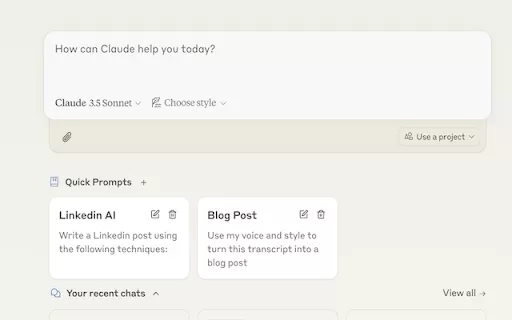
Ever find yourself stuck in a loop, typing the same prompts over and over? Enter Claude, the AI-powered Chrome extension that's here to save your sanity. This nifty tool is all about managing and saving your prompts, so you can keep your creative juices flowing without the frustration of repetition.

If you're looking to level up your typing game, the AI Typing Assistant is your go-to tool. It's like having a personal coach that tailors its advice just for you, based on how you type. Ever wish you could type faster and with fewer mistakes? This a

Pixelcode is a revolutionary tool that transforms screenshots of code into editable text, saving you from the tedious task of typing out code manually. Imagine snapping a picture of a code snippet and instantly having it ready to edit in your preferred co

What is Giststack? Giststack is an AI-driven platform that assists users, especially solopreneurs and marketers, in tackling the hurdles of social media content creation. It gathers content from your preferred websites and newsletters, spots trending
Record, Transcribe & ChatGPT for Google Meet Product Information
What Is Record, Transcribe & ChatGPT for Google Meet?
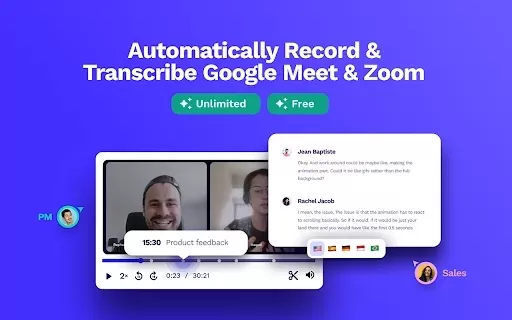
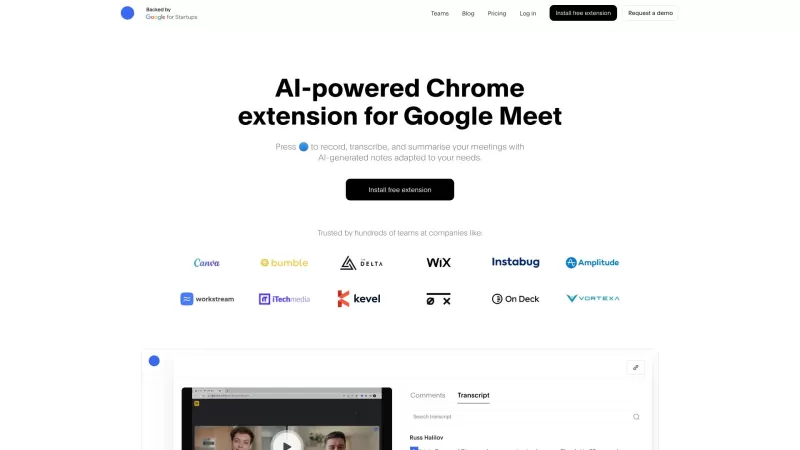
The Record & Transcribe ChatGPT extension allows users to effortlessly record and transcribe their Google Meet sessions completely free of charge. With more than 500,000 users already leveraging it, this tool has become the top choice for anyone needing meeting recordings along with concise notes. By integrating ChatGPT, it goes a step further by generating insightful summaries and key takeaways from discussions, ensuring that no important details are overlooked.
Who Is This Extension Designed For?
- Students
- Professionals
- Educators
- Team Leaders
- Remote Workers
How to Use Record, Transcribe & ChatGPT for Google Meet?
- Step 1: Download the Record & Transcribe ChatGPT extension from the Chrome Web Store.
- Step 2: Open Google Meet and start or join a meeting as usual.
- Step 3: Click the extension icon to begin recording the session.
- Step 4: Once the meeting is over, view the transcript and ChatGPT‑generated summary that are provided right within the extension.
Supported Platforms
- Web
- Chrome
Core Features & Benefits of Record, Transcribe & ChatGPT for Google Meet
The Core Features
- Automatic recording of all Google Meet sessions
- AI‑generated transcripts and concise summaries
- An intuitive and user‑friendly interface
- Seamless integration with ChatGPT
The Benefits
- Saves significant time when taking meeting notes
- Delivers accurate and detailed recordings
- Boosts overall meeting productivity
- Is available entirely free of charge
Main Use Cases for Record, Transcribe & ChatGPT for Google Meet
- Business meetings
- Remote learning sessions
- Job interviews
- Team collaborations
Frequently Asked Questions About Record, Transcribe & ChatGPT for Google Meet
How Does the Recording Process Work?
The extension automatically starts recording as soon as a meeting is launched through it.
Is There a Limit on the Recording Duration?
No, users can record meetings of any length they need.
Can I Edit the Generated Transcripts?
Yes, you can easily modify the transcripts once they have been created.
Are There Any Fees Associated With Using This Extension?
There are no costs at all; it is offered completely free.
Do I Need a Google Account to Use It?
Yes, a Google account is required in order to access Google Meet.
How Do I Access My Transcripts?
You can view the transcripts directly from the extension’s interface after each meeting ends.
Is My Data Kept Secure?
User data is handled securely in full compliance with established privacy policies.
Can It Be Used With Other Video Conferencing Tools?
At present, this tool is designed specifically for Google Meet only.
What Should I Do If I Encounter Technical Issues?
If you run into any problems, you can reach out to support for assistance.
How Accurate Are the Transcriptions?
Thanks to advanced algorithms, the transcription quality is very high.
Company Information for Record, Transcribe & ChatGPT for Google Meet
Record, Transcribe & ChatGPT for Google Meet Screenshot

2026 Latest Best Top-rated AI Competitive Research Tools for Small Businesses! XIX.AI has curated a highly powerful game-changing collection, updated weekly with rigorous real-world tests and detailed rankings. You can find a comprehensive free vs paid comparison to help you identify the must-try tools that boost your productivity and give you a competitive edge. Explore now to discover your perfect tool!
 9 tools
 xix.ai

2026 Latest Best Photoshop AI retouch tools for ecommerce apparel, skin cleanup, and color consistency! This top-rated curated list features powerful game-changing solutions that help you boost writing efficiency, streamline content creation, and achieve perfect visual results effortlessly. Each tool has undergone real-world tests through weekly updated rankings, complete with free vs paid comparison details. Backed by XIX.AI, it’s the must-try guide for anyone aiming to unlock your AI edge. Explore now!
10 tools
xix.ai

2026 Latest Best Top-Rated AI Prompt Libraries for optimizing all types of ChatGPT workflows. XIX.AI has curated a powerful, game-changing collection that goes through rigorous real-world tests to ensure top performance. You can find detailed free vs paid comparisons and expert rankings to help you choose the must-try tools that boost your productivity and unlock your AI edge. Explore now!
11 tools
xix.ai

2026 Latest Best AI Quiz Builder Platforms for Teachers, Tutors, and Cohort-Based Learning Programs! XIX.AI has curated a top-rated list of powerful game-changing tools that go through real-world tests to deliver accurate rankings. These must-try platforms help boost writing efficiency, streamline content creation, and simplify quiz design across all learning scenarios. Explore now to discover your perfect tool for unlocking your AI edge in teaching!
13 tools
xix.ai

2026 Latest Best AI Pull Request Review Tools for GitHub Teams are here on XIX.AI! This top-rated curated list showcases powerful game-changing solutions that streamline refactoring, bug fixing, and security gap detection across all team workflows. Enjoy a free vs paid comparison along with real-world tests and detailed rankings to help you find the perfect tool that boosts productivity significantly. Explore now to unlock your AI edge!
12 tools
xix.ai

2026 Latest Best Top-rated AI Text to Speech Tools for Natural Voiceovers are here on XIX.AI! This curated list features powerful, game-changing options that deliver crystal-clear voices for every use case, backed by real-world tests and weekly updated rankings. Get a free vs paid comparison to find the must-try solution that boosts your productivity instantly. Explore now to Unlock your AI edge!
11 tools
xix.ai


