


 Home
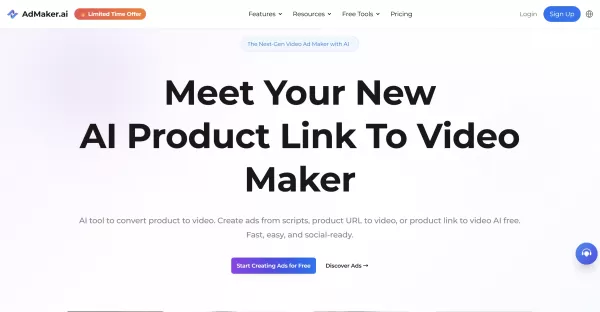
HomeProduct Link To Video Maker
AI Video Ad Maker from Product Links



Helps TikTok sellers, brands, MCNs, and TAPs discover winning products and find creators.

HelpLook is an AI-powered all-in-one knowledge base tool that helps businesses quickly build knowledge bases, help centers, and...

Your AI Workspace

302.AI is an enterprise-grade AI resource platform with pay-as-you-go pricing, API access to a full range of AI models, and ready-to-use online applications.

剧火AI — AI Screenwriter + Director, a One-Person Short Drama Studio In one sentence, what is it?

What is Deepfake Maker? Deepfake Maker is a comprehensive, browser-based AI tool for creating deepfakes, tailored for creators, marketers, and designers who need striking visuals without complicated software. It combines multiple AI capabilities: adv

What is Celebrity AI?CelebrityAI revolutionizes digital content creation with its cutting-edge artificial intelligence platform that generates lifelike celebrity videos and voice messages. Using sophisticated technologies including deep neural networ

What is Makefilm?Makefilm revolutionizes video creation as a comprehensive AI-powered platform that streamlines professional-quality video production. This innovative solution combines multiple smart tools into one seamless workflow - transforming te
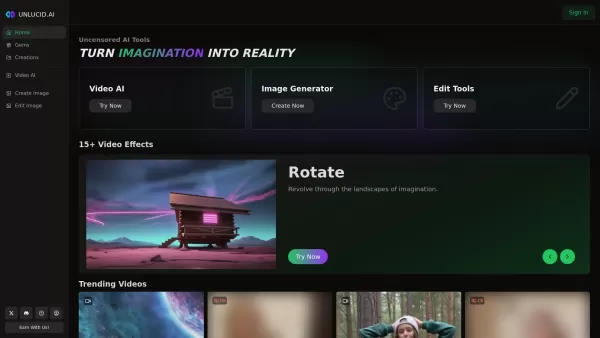
What is Unlucid AI? Unlucid AI provides free, uncensored AI tools empowering creators to craft, edit, and animate videos using advanced AI technology. It transforms imagination into reality with unres

What is AIShowX?AIShowX represents the next generation of creative tools - a comprehensive online platform powered by artificial intelligence that empowers anyone to produce professional-quality videos, images, and audio content with remarkable ease.
Product Link To Video Maker Product Information
What is Product Link To Video Maker?
Product Link To Video Maker is a sophisticated AI-powered tool that automatically creates short promotional videos directly from product web links. It analyzes product pages to extract essential features and benefits, then produces captivating, share-ready videos perfect for social media and online stores. Users can choose from various templates, personalize scripts, incorporate AI avatars, and generate videos formatted for multiple platforms in minutes, enhancing marketing effectiveness and sales. This solution removes the complexity of manual video production, offering a fast, scalable, and user-friendly approach to creating video ads for everyone.
Who uses Product Link To Video Maker?
- E-commerce store owners
- Digital marketing professionals
- Social media managers
- Small business owners
- Content creators
- Advertising agencies
How to use the Product Link To Video Maker
- Step 1: Paste your product's web address into the tool's interface.
- Step 2: Pick a video template designed for your chosen platform.
- Step 3: Personalize the script, visuals, branding, and AI avatars to your liking.
- Step 4: Preview the video to confirm it aligns with your vision.
- Step 5: Export the final video in the desired format for social media or e-commerce.
- Step 6: Share the video in your marketing campaigns to drive interaction and revenue.
Platform
- Web
Product Link To Video Maker's Core Features & Benefits
The Core Features
- Automated conversion of product URLs into videos
- AI-crafted compelling scripts
- Video templates for various platforms
- Customizable branding and AI avatars
- Multi-language support
- Rapid video production in minutes
The Benefits
- No need for manual video editing
- Accelerates advertising creation
- Boosts audience engagement and sales conversions
- Enables large-scale video advertising campaigns
- Intuitive interface suitable for all experience levels
- Cost-efficient video marketing tool
Product Link To Video Maker's Main Use Cases & Applications
- Producing demonstration videos for e-commerce products
- Creating social media advertisements for Amazon and Shopify listings
- Generating video content for beauty and electronics companies
- Converting financial service landing pages into explanatory videos
- Scaling video ad production for marketing firms
Product Link To Video Maker's Pros & Cons
The Pros
Completely automated video generation
Supports various industries and languages
Features AI avatars to boost viewer engagement
Extensive selection of industry-specific templates
The Cons
No dedicated mobile applications available
Limited open-source access
Some customization features may have a learning curve
Product Link To Video Maker's Pricing
Offers a free plan | YES |
|---|---|
Free trial details | |
Pricing model | Freemium |
Is a credit card required | No |
Paid plans start from | 39 USD |
Has a lifetime plan | No |
Billing frequency | Monthly, Annually |
Details of Pricing Plan
Free
0 USD
- 50 credits per month (approximately 2 videos)
- Credits expire every 2 months
- Create video from a URL
- Realistic avatars
- 50+ languages
- Exports include a watermark
- Limited avatar library
- Limited template library
- 9:16 aspect ratio only
- Up to 30-second ad videos
Basic
39 USD
- 500 credits per month (approximately 20 videos)
- Credits expire every 2 months
- All features from the Free plan
- Watermark removal
- Advanced avatar library (100+ avatars)
- Advanced template library (100+ templates)
- Premium stock footage
- 9:16, 16:9 and 1:1 aspect ratios
- Up to 1-minute ad videos
Pro
99 USD
- 1000 credits per month (approximately 40 videos)
- Credits expire every 2 months
- All features from the Basic plan
- Premium avatar library (400+ avatars)
- Premium template library (200+ templates)
Discount:
Save 51% with annual billing
For the latest prices, please visit: https://admaker.ai/pricing
FAQs of Product Link To Video Maker
How does the Product Link To Video Maker work?
The tool uses artificial intelligence to examine your product link, pull out the most important details, generate a script, and automatically assemble a professional video.
What types of product links work with the video maker?
It is compatible with product page URLs from most e-commerce sites, including Amazon listings, Shopify stores, and similar platforms.
Can I customize the videos created?
Absolutely. You can modify scripts, visuals, branding components, and select from different templates to match your brand identity.
How long does it take to convert a link to a video?
Videos are usually generated in 1 to 2 minutes after you submit the product URL.
What video formats are supported?
The tool exports high-quality MP4 videos in multiple aspect ratios, optimized for different social and e-commerce platforms.
How do I turn product images into animated video ads?
Upload your images, select a template, optionally add an AI avatar, and the tool will generate an optimized video advertisement.
Can I create viral product videos without a camera?
Yes. By uploading product images or URLs and using AI avatars, the tool can quickly produce engaging videos designed for high shareability.
How to turn a product URL into video in 3 steps?
Navigate to the Product Video Maker, paste your URL, choose a template, customize the details, and generate your video.
Does it support multiple languages?
Yes, it supports over 15 languages for script generation and customization.
What platforms are supported for video export?
Videos are formatted and ready for use on Instagram, TikTok, YouTube, Facebook, and major e-commerce platforms.
Product Link To Video Maker Company Information
Product Link To Video Maker Screenshot

2026 Latest Best Top-rated AI Competitive Research Tools for Small Businesses! XIX.AI has curated a highly powerful game-changing collection, updated weekly with rigorous real-world tests and detailed rankings. You can find a comprehensive free vs paid comparison to help you identify the must-try tools that boost your productivity and give you a competitive edge. Explore now to discover your perfect tool!
 9 tools
 xix.ai

2026 Latest Best Photoshop AI retouch tools for ecommerce apparel, skin cleanup, and color consistency! This top-rated curated list features powerful game-changing solutions that help you boost writing efficiency, streamline content creation, and achieve perfect visual results effortlessly. Each tool has undergone real-world tests through weekly updated rankings, complete with free vs paid comparison details. Backed by XIX.AI, it’s the must-try guide for anyone aiming to unlock your AI edge. Explore now!
10 tools
xix.ai

2026 Latest Best Top-Rated AI Prompt Libraries for optimizing all types of ChatGPT workflows. XIX.AI has curated a powerful, game-changing collection that goes through rigorous real-world tests to ensure top performance. You can find detailed free vs paid comparisons and expert rankings to help you choose the must-try tools that boost your productivity and unlock your AI edge. Explore now!
11 tools
xix.ai

2026 Latest Best AI Quiz Builder Platforms for Teachers, Tutors, and Cohort-Based Learning Programs! XIX.AI has curated a top-rated list of powerful game-changing tools that go through real-world tests to deliver accurate rankings. These must-try platforms help boost writing efficiency, streamline content creation, and simplify quiz design across all learning scenarios. Explore now to discover your perfect tool for unlocking your AI edge in teaching!
13 tools
xix.ai

2026 Latest Best AI Pull Request Review Tools for GitHub Teams are here on XIX.AI! This top-rated curated list showcases powerful game-changing solutions that streamline refactoring, bug fixing, and security gap detection across all team workflows. Enjoy a free vs paid comparison along with real-world tests and detailed rankings to help you find the perfect tool that boosts productivity significantly. Explore now to unlock your AI edge!
12 tools
xix.ai

2026 Latest Best Top-rated AI Text to Speech Tools for Natural Voiceovers are here on XIX.AI! This curated list features powerful, game-changing options that deliver crystal-clear voices for every use case, backed by real-world tests and weekly updated rankings. Get a free vs paid comparison to find the must-try solution that boosts your productivity instantly. Explore now to Unlock your AI edge!
11 tools
xix.ai


Just tried this for my Shopify store and it's a huge time-saver! The AI actually picked up the right selling points from my product page. The video style is a bit generic though, wish there were more templates. Still, for a quick social media ad, it's pretty solid. 🚀


