


 Home
HomePowerIn - Automate LinkedIn Comments



Helps TikTok sellers, brands, MCNs, and TAPs discover winning products and find creators.

HelpLook is an AI-powered all-in-one knowledge base tool that helps businesses quickly build knowledge bases, help centers, and...

Your AI Workspace

302.AI is an enterprise-grade AI resource platform with pay-as-you-go pricing, API access to a full range of AI models, and ready-to-use online applications.

剧火AI — AI Screenwriter + Director, a One-Person Short Drama Studio In one sentence, what is it?

If you're looking for a way to boost your productivity without sacrificing your privacy, then let me introduce you to CamoCopy. This isn't just another AI assistant; it's a European-born powerhouse designed with your data protection in mind. Imagine havin
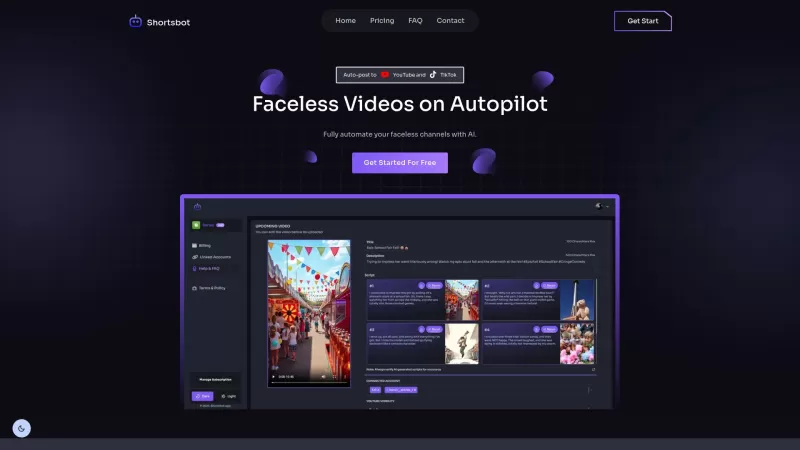
Ever wondered how to keep your TikTok and YouTube channels buzzing with content without lifting a finger? Enter Shortsbot, your new best friend in the world of faceless video creation. This nifty platform takes the hassle out of managing your channels by automating the entire process—from video crea
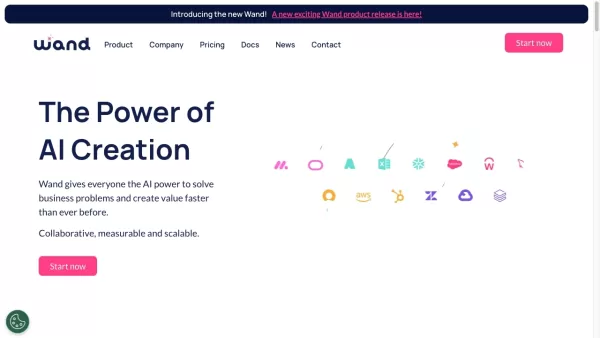
Ever felt like you're stuck trying to solve complex business issues, but your tech skills just aren't up to snuff? Enter Wand, your new best friend in the world of AI. This tool is designed to be a game-changer, allowing anyone, regardless of their techni

Ever wondered what it would be like to see your favorite still photos come alive with movement and emotion? Well, buckle up, because LivePortrait AI is here to make that happen! This innovative platform harnesses the power of advanced technology to animat

What is Giststack? Giststack is an AI-driven platform that assists users, especially solopreneurs and marketers, in tackling the hurdles of social media content creation. It gathers content from your preferred websites and newsletters, spots trending
PowerIn - Automate LinkedIn Comments Product Information
What Is PowerIn? Automate LinkedIn Comments with AI
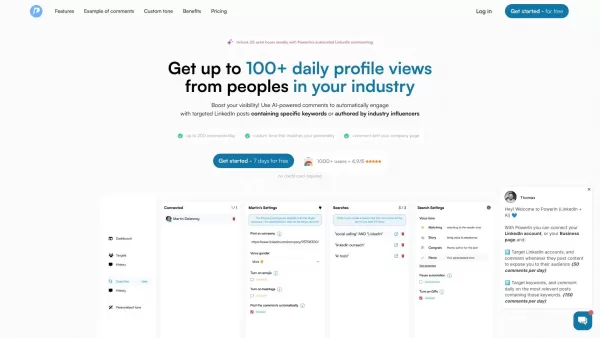
PowerIn is a LinkedIn automation tool that uses artificial intelligence to post relevant and engaging comments on targeted posts within your industry. By automating these interactions, PowerIn boosts your visibility, attracts profile views, and creates networking opportunities. It is an excellent solution for professionals looking to optimize their LinkedIn presence without spending significant time on daily engagement.
Who Uses PowerIn to Automate LinkedIn Comments?
- Professionals
- LinkedIn Influencers
- Business Owners
- Marketers
- Job Seekers
- Recruiters
How to Use PowerIn to Automate LinkedIn Comments
- Step 1: Visit the PowerIn website and sign up.
- Step 2: Connect your LinkedIn account.
- Step 3: Customize your settings, including target keywords and the desired tone for comments.
- Step 4: Activate automation to start posting AI-generated comments.
- Step 5: Monitor your LinkedIn profile for increased engagement and connections.
Platforms
- Web
- Chrome
Core Features and Benefits of PowerIn - Automate LinkedIn Comments
Core Features
- AI-generated comments
- Customizable engagement parameters
- Keyword targeting
- Profile analytics
- Automated daily interactions
Benefits
- Enhanced visibility
- Increased profile views
- Networking opportunities
- Time savings
- Efficient LinkedIn management
Main Use Cases and Applications for PowerIn - Automate LinkedIn Comments
- Boost LinkedIn profile visibility
- Automate professional networking
- Increase engagement on posts
- Drive traffic to personal or business profiles
Pros and Cons of PowerIn - Automate LinkedIn Comments
Pros
Automates LinkedIn engagement to generate leads 24/7
Uses AI to create human-like, personalized comments
Supports targeting by keywords, creators, location, timezone, and language
Operates within LinkedIn's policy to minimize the risk of account restrictions
Offers a free trial with 500 prospects and no credit card required
Secure, and avoids commenting on sensitive content
Provides customizable tone and manual comment approval
Cons
No open-source code or GitHub repository available
Limited to LinkedIn automation; no visible support for other platforms except Twitter (via a separate service)
Potential dependency on LinkedIn platform policies and stability
Pricing for PowerIn - Automate LinkedIn Comments
Free Plan Available | No |
|---|---|
Free Trial Details | 5-day free trial |
Pricing Model | Free Trial |
Credit Card Required | No |
Paid From | $39 USD |
Lifetime Plan Available | No |
Billing Frequency | Monthly |
Pricing Plan Details
Standard
$39 USD
- 1 connected account
- Advanced AI model
- 20 targeted accounts
- Like the commented post
- Toggle hashtags and emojis on/off
- Comment on up to 20 posts per day across 2 searches
- Comment based on a timezone
Corporate
$59 USD
- 1 connected account
- Advanced AI model
- 50 targeted accounts
- Like the commented post
- Toggle hashtags and emojis on/off
- Comment on up to 100 posts per day across 10 searches
- Comment based on a timezone
- Customize waiting days between each post
- Comment as a company page
- Tag post authors
- Up to 150 comments per day
Agency
Custom USD
- Unlimited accounts
- Connect several accounts from a single PowerIn account
- Flexible account connection options
Standard
$69 USD
- 2 connected accounts
- Advanced AI model
- 40 targeted accounts
- Like the commented post
- Toggle hashtags and emojis on/off
- Comment on up to 40 posts per day across 4 searches
- Comment based on a timezone
- Comment as a company page
- Tag post authors
- Up to 80 comments per day
Corporate
$99 USD
- 2 connected accounts
- Advanced AI model
- 100 targeted accounts
- Like the commented post
- Toggle hashtags and emojis on/off
- Comment on up to 200 posts per day across 20 searches
- Comment based on a timezone
- Customize waiting days between each post
- Comment as a company page
- Tag post authors
- Up to 300 comments per day
Agency
Custom USD
- Unlimited accounts
- Connect several accounts from a single PowerIn account
- Flexible account connection options
Discount:
Annual plan available with 20% off
For the latest prices, please visit: https://powerin.io/pricing
FAQs About PowerIn - Automate LinkedIn Comments
What is PowerIn?
PowerIn is a tool designed to automate LinkedIn interactions by posting AI-generated comments on relevant posts.
How do I connect my LinkedIn account?
You can connect your LinkedIn account during the sign-up process on the PowerIn website.
Can I customize the comments?
Yes, you can set parameters, including keywords and tone, to ensure comments match your brand identity.
Is there a free trial available?
Yes, PowerIn offers a 5-day free trial for new users.
Which platforms are supported?
PowerIn is available as a web-based tool and supports the Chrome browser.
Do I need to install any software?
No, PowerIn operates directly from your browser.
How does PowerIn improve my LinkedIn visibility?
By posting AI-generated comments on relevant posts, PowerIn increases your interactions and profile views.
Can I target specific posts for comments?
Yes, you can target posts by keywords or specific creators within your industry.
Is it safe to use PowerIn with my LinkedIn account?
Yes, PowerIn adheres to LinkedIn's guidelines to ensure safe and compliant usage.
How quickly can I see results?
Users often see an increase in profile views and engagement within the first few days of use.
PowerIn - Automate LinkedIn Comments Company Information
Website:
https://powerin.ioCompany Name:
PowerInSupport Email:
N/AFacebook:
N/AX (Twitter):
N/AYouTube:
N/AInstagram:
N/ATikTok:
N/ALinkedIn:
N/A
PowerIn - Automate LinkedIn Comments Screenshot


2026 Latest Best Photoshop AI retouch tools for ecommerce apparel, skin cleanup, and color consistency! This top-rated curated list features powerful game-changing solutions that help you boost writing efficiency, streamline content creation, and achieve perfect visual results effortlessly. Each tool has undergone real-world tests through weekly updated rankings, complete with free vs paid comparison details. Backed by XIX.AI, it’s the must-try guide for anyone aiming to unlock your AI edge. Explore now!
 10 tools
 xix.ai

2026 Latest Best Top-Rated AI Prompt Libraries for optimizing all types of ChatGPT workflows. XIX.AI has curated a powerful, game-changing collection that goes through rigorous real-world tests to ensure top performance. You can find detailed free vs paid comparisons and expert rankings to help you choose the must-try tools that boost your productivity and unlock your AI edge. Explore now!
11 tools
xix.ai

2026 Latest Best AI Quiz Builder Platforms for Teachers, Tutors, and Cohort-Based Learning Programs! XIX.AI has curated a top-rated list of powerful game-changing tools that go through real-world tests to deliver accurate rankings. These must-try platforms help boost writing efficiency, streamline content creation, and simplify quiz design across all learning scenarios. Explore now to discover your perfect tool for unlocking your AI edge in teaching!
13 tools
xix.ai

2026 Latest Best AI Pull Request Review Tools for GitHub Teams are here on XIX.AI! This top-rated curated list showcases powerful game-changing solutions that streamline refactoring, bug fixing, and security gap detection across all team workflows. Enjoy a free vs paid comparison along with real-world tests and detailed rankings to help you find the perfect tool that boosts productivity significantly. Explore now to unlock your AI edge!
12 tools
xix.ai

2026 Latest Best Top-rated AI Text to Speech Tools for Natural Voiceovers are here on XIX.AI! This curated list features powerful, game-changing options that deliver crystal-clear voices for every use case, backed by real-world tests and weekly updated rankings. Get a free vs paid comparison to find the must-try solution that boosts your productivity instantly. Explore now to Unlock your AI edge!
11 tools
xix.ai

2026 Latest Best Manga AI Background Generators Ranked Top-Rated! This curated collection showcases powerful game-changing tools perfect for creating high-quality chapter backgrounds, book covers, and promotional art. Every option has undergone rigorous real-world tests to ensure reliability. Get a free vs paid comparison along with detailed insights. Explore now to discover your perfect tool and unlock your AI edge in manga creation.
6 tools
xix.ai


