


 Home
Home


Helps TikTok sellers, brands, MCNs, and TAPs discover winning products and find creators.

HelpLook is an AI-powered all-in-one knowledge base tool that helps businesses quickly build knowledge bases, help centers, and...

Your AI Workspace

302.AI is an enterprise-grade AI resource platform with pay-as-you-go pricing, API access to a full range of AI models, and ready-to-use online applications.

剧火AI — AI Screenwriter + Director, a One-Person Short Drama Studio In one sentence, what is it?
Pixlr Product Information
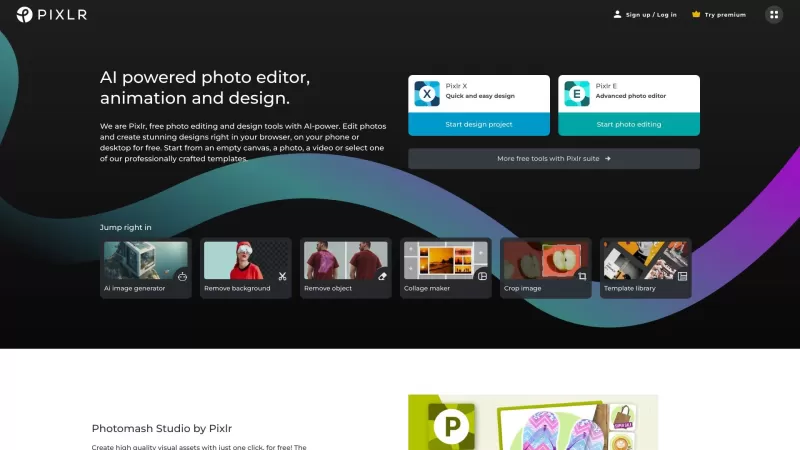
Ever stumbled upon Pixlr and wondered what it's all about? Well, let me fill you in! Pixlr is this fantastic free online platform where you can dive into the world of photo editing and design. It's like having a mini Photoshop in your browser, but way more user-friendly and accessible. Whether you're looking to jazz up your photos, create eye-catching designs, or even play around with AI to generate new images, Pixlr has got you covered. From batch editing to animation design, and even tools to enhance your images, there's a whole toolbox at your fingertips.
How to Dive into Pixlr?
Getting started with Pixlr is a breeze. Just head over to their website, sign up, or log in if you're already a member. Once you're in, you'll find a suite of apps waiting for you. Fancy something quick and easy? Pixlr X is your go-to. Need something more robust for those detailed edits? Pixlr E is where the magic happens. And if you're all about that one-click background removal, Photomash Studio is your friend. Start a new project from scratch, upload your own photo or video, or pick from their slick templates. Then, it's just a matter of exploring the tools and letting your creativity run wild.
The Heart of Pixlr: Core Features
Let's talk about what makes Pixlr tick. There's the AI image generator, which is like having a digital artist on call. Then there's the batch editor for when you've got a ton of images to tweak. Animation design? Check. An enhancer to make your photos pop? Absolutely. And don't forget the background removal, collage maker, and a vast template library. Filters and effects? They've got those in spades. And if you're feeling extra, there's premium access for even more goodies.
When to Use Pixlr?
Pixlr isn't just for one thing; it's a Swiss Army knife for all sorts of projects. Need to edit a photo? Pixlr's on it. Want to whip up a design from scratch? No problem. Enhancing your profile pic for that perfect social media look? Pixlr can help you stand out. From editing product images to creating YouTube thumbnails, designing social media banners, crafting resumes, brochures, business cards, or even putting together a presentation—Pixlr's versatility is unmatched.
FAQ from Pixlr
- Is Pixlr free to use?
- Yes, Pixlr offers a free version with plenty of features to get you started.
- Can I use Pixlr on my mobile device?
- Absolutely, Pixlr has mobile apps so you can edit on the go.
- How can Pixlr help enhance my profile picture?
- With tools like the enhancer and various filters, Pixlr can make your profile pic look professional and eye-catching.
- Are there templates available for design projects?
- Yes, Pixlr has a wide range of templates to kickstart your design projects.
For more support, including email, customer service, and refund inquiries, check out the contact us page.
Pixlr is brought to you by Pixlr Pte Ltd. Curious to learn more about the company? Visit the about us page.
Interested in upgrading your Pixlr experience? Check out their pricing options at Pixlr Pricing.
Stay connected with Pixlr on social media:
- Facebook: Pixlr on Facebook
- YouTube: Pixlr on YouTube
- Twitter: Pixlr on Twitter
- Instagram: Pixlr on Instagram
Pixlr Screenshot

Looking for the 2026 best AI tools to edit your photo wardrobes for free? Discover our expert-curated, weekly updated rankings of top-rated, game-changing creative editors. Compare features, see real-world test results, and find your perfect match to unlock stunning visual transformations. Start creating with XIX.AI now.
 9 tools
 xix.ai


Pixlr is my go-to for quick photo edits when I'm on the move! 🚀 The interface is super intuitive and it has all the basic tools I need. Only wish it had more advanced features like layer masks, but for free? Can't complain! 😊 #LifeSaver


