


 Home
HomePixeebot
Code Security, Performance, Quality Enhancements



Helps TikTok sellers, brands, MCNs, and TAPs discover winning products and find creators.

HelpLook is an AI-powered all-in-one knowledge base tool that helps businesses quickly build knowledge bases, help centers, and...

Your AI Workspace

302.AI is an enterprise-grade AI resource platform with pay-as-you-go pricing, API access to a full range of AI models, and ready-to-use online applications.

剧火AI — AI Screenwriter + Director, a One-Person Short Drama Studio In one sentence, what is it?
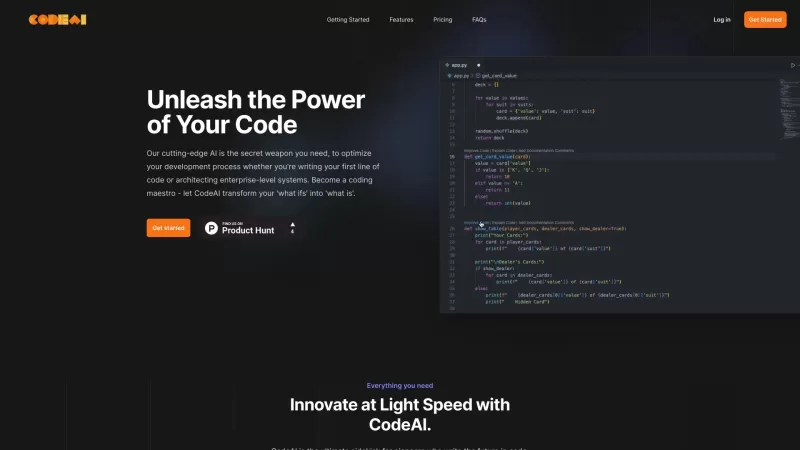
Ever wished you had a trusty sidekick to help you navigate the often complex world of coding? Meet CodeAI, the revolutionary VS Code extension that's like having a super-smart AI buddy by your side. Designed to streamline your development process, CodeAI
What is Jazzberry? Jazzberry is an AI-powered agent that identifies bugs in code through actual code execution. It integrates with GitHub to automatically generate detailed bug reports directly on pull requests. Previously named Prophet, this AI Bug
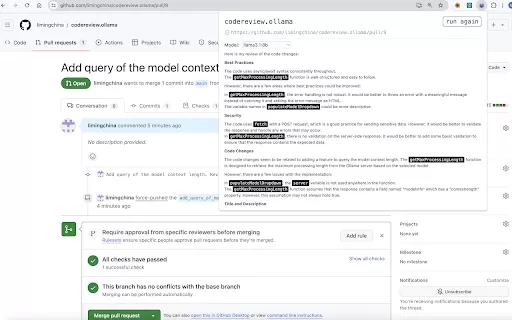
What is the AI Chrome Extension for Reviewing Pull Requests on GitHub or Merge Requests on GitLab with Ollama and LLMs? This tool enables users to streamline code reviews for GitHub Pull Requests or GitLab Merge Requests by harnessing Ollama and Larg
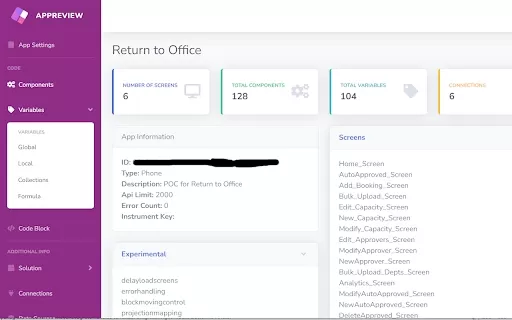
Ever found yourself knee-deep in Microsoft Power Apps, wondering if there's a way to streamline your code review process? Well, let me introduce you to the AppReview AI Chrome extension. This little gem is designed to make your life easier by automaticall
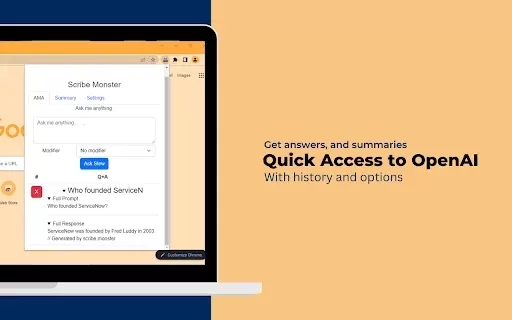
What is ScribeMonster?ScribeMonster is a Chrome extension built for developers seeking to streamline their workflow. By integrating directly into your coding environment, it allows you to generate scripts with OpenAI, edit code, and easily insert JSD
Pixeebot Product Information
Ever wondered what it's like to have your very own automated product security engineer? Enter Pixeebot, your tireless companion in the world of code security. This little gem is designed to keep your projects safe and sound, acting as a vigilant guardian over your repositories and pull requests.
How to Use Pixeebot?
Getting started with Pixeebot is as easy as pie. Just integrate it into your workflow, and watch it work its magic. It keeps an eye on your code, offering instant, high-quality fixes. Whether you prefer the GitHub app or the command line interface, Pixeebot has you covered for a seamless experience.
Pixeebot's Core Features
Automated Code Security Fixes
Pixeebot isn't just about pointing out problems; it jumps right in to fix them. Say goodbye to those nagging security vulnerabilities.
Performance Improvements
Who doesn't love faster, smoother code? Pixeebot works behind the scenes to optimize your project's performance.
Code Quality Enhancements
With Pixeebot, your code doesn't just get safer; it gets better. It's like having a personal code editor that never sleeps.
Pixeebot's Use Cases
Hardening Code
Make your code fortress-like with Pixeebot's help. It's like having an extra layer of armor for your software.
Bug Fixing
Got a pesky bug that's driving you up the wall? Let Pixeebot squash it for you. It's like having a bug zapper for your code.
Improving Performance
Want your app to run like a well-oiled machine? Pixeebot can help tune it up to perform at its best.
FAQ from Pixeebot
- How does Pixeebot work?
- Pixeebot integrates seamlessly into your development environment, scanning your code continuously to identify and fix security issues, enhance performance, and improve overall code quality.
Need to reach out to the Pixeebot team? Drop them an email at [email protected]. For more contact options, check out the contact us page.
Curious about the brains behind Pixeebot? It's brought to you by Pixee Inc.. Dive deeper into their story on the about us page.
Wondering about the cost? Check out the Pixeebot pricing page to see what fits your budget.
Want to connect with Pixeebot on social media? Find them on LinkedIn, Twitter, and even on GitHub.
Pixeebot Screenshot






2026 Latest Best Top-Rated AI Code Review Tools for Safer Pull Requests are here on XIX.AI. This curated list features powerful, game-changing solutions that help developers catch bugs early through rigorous real-world tests and accurate rankings. It includes a free vs paid comparison to help you choose the perfect fit for your workflow. Explore now to Unlock your AI edge in coding efficiency.
 12 tools
 xix.ai

2026 Latest Top-Rated Best AI Code Review Tools for Developers! XIX.AI curates a powerful, game-changing collection of top-rated options that help catch logic bugs and security risks early through rigorous real-world tests. Get a free vs paid comparison to find the perfect tool that boosts your coding productivity significantly. Explore now to unlock your AI edge in software development!
10 tools
xix.ai

2026 Latest Best Top-rated GitHub Copilot Code Review Tools curated for pull requests refactors and security fixes offer powerful game-changing assistance to boost coding efficiency significantly. XIX.AI provides weekly updated free vs paid comparison along with real-world tests and detailed rankings to help you find the perfect solution. Explore now to unlock your AI edge in development.
13 tools
xix.ai
Discover the 2026 latest top-rated AI tools for converting Python to Rust. Our curated, weekly updated rankings feature powerful, game-changing solutions to effortlessly optimize high-performance microservices. Compare free vs paid options with real-world tests. Unlock your AI edge and start building faster today at XIX.AI.
10 tools
xix.ai
Discover the 2026 best AI code reviewers on XIX.AI. Our curated list features top-rated, game-changing tools for automating clean code compliance and refactoring legacy repo files. Compare free vs paid options with real-world tests and weekly updated rankings. Unlock your AI edge today.
10 tools
xix.ai
2026 Latest: Discover the top-rated AI tools for Python auto coding, refactoring, and debugging on XIX.AI. Our hand-picked guide contains must-try, powerful solutions. Compare free vs paid options and weekly updated rankings. Unlock faster development and cleaner code today.
10 tools
xix.ai


Pixeebot is like having a super-smart buddy who never sleeps, keeping my code safe! 😎 It caught a sneaky bug I missed, but sometimes I worry it’s too good and might outsmart me one day!


