


 Home
HomePiny
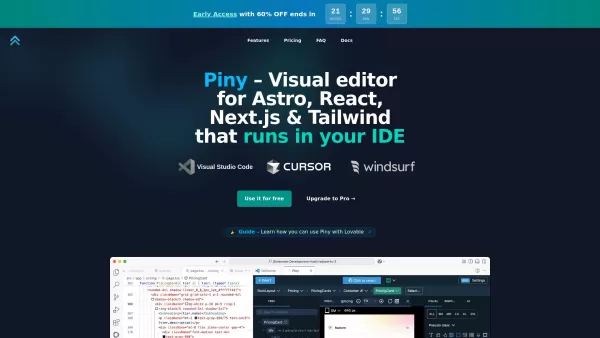
Visual Editor for Astro, React, Next.js & Tailwind CSS in IDE



Helps TikTok sellers, brands, MCNs, and TAPs discover winning products and find creators.

HelpLook is an AI-powered all-in-one knowledge base tool that helps businesses quickly build knowledge bases, help centers, and...

Your AI Workspace

302.AI is an enterprise-grade AI resource platform with pay-as-you-go pricing, API access to a full range of AI models, and ready-to-use online applications.

剧火AI — AI Screenwriter + Director, a One-Person Short Drama Studio In one sentence, what is it?

Ever heard of Grok? It's this nifty AI assistant from xAI that's all about giving you the straight scoop. And the best part? It's totally free! Grok isn't just your average AI; it's packed with cool features like real-time search, image generation, and tr

Ever wondered what Qwen AI is all about? Well, let me introduce you to this gem from Alibaba Cloud. Qwen AI is not your average language model; it's a powerhouse designed to be your go-to buddy for everything from whipping up text to coding, and even reco

Discover Plume AI: Your Ultimate Academic Writing AssistantAre you tired of struggling with your academic writing? Well, say hello to Plume AI, the innovative AI assistant that's here to revolutionize the way you write! Designed with students in mind, Plume AI harnesses the power of cutting-edge art

Ever wished for a trusty sidekick to help you navigate the digital world with ease? Enter Sider, your personal AI companion designed to seamlessly blend into your daily routine. Starting off as a handy Chrome/Edge extension, Sider transforms your browsing

Ever wondered what Ninja AI is all about? Well, let me tell you, it's like having a Swiss Army knife for your digital needs! Ninja AI isn't just another AI tool; it's a powerhouse that brings together over 24 top-notch Large Language Models (LLMs) to help
Piny Product Information
What is Piny?
Piny is an intuitive visual editor integrated directly into Visual Studio Code, Cursor, and Windsurf. It supports Tailwind CSS, Astro, React, and Next.js, allowing real-time code edits without abstractions, cloud dependencies, or vendor lock-in. Developers can visually tweak code, navigate components, and simplify styling without needing specialized libraries or complex setups. Designed for efficiency and precision, Piny works seamlessly with or without coding assistants and adapts to any React or Next.js project.
How to use Piny?
To get started with Piny, install the Piny extension from your IDE’s marketplace, such as the VS Code Marketplace. After installation, right-click in your code and choose "Edit in Piny" to access visual styling tools. Piny is compatible with Astro, React, and Next.js projects.
Piny's Core Features
Visual Tailwind Styling
Tailwind Class Explorer
Modify Tailwind Classes Anywhere
Component Explorer
AI-Enhanced Drag & Drop
Visual Element Selection
Edit Multiple Elements Simultaneously
Project-Wide Navigation
Import Custom Tailwind Themes
Piny's Use Cases
Styling elements visually with Tailwind CSS
Organizing complex Tailwind styles in a clear tree view
Editing Tailwind classes in strings, variables, or non-React/Astro code
Swiftly navigating components and linking routes for previews
Creating UI with AI-powered drag-and-drop tools
Selecting and styling multiple elements at once
Browsing and managing components across a project
Personalizing visual controls with custom Tailwind setups
FAQ from Piny
Is Piny’s "free" version truly free, or just a trial?
Why is there an early access discount?
Does the discounted price apply only to the first year?
How does Visual Select function?
What happens to my projects if Piny shuts down?
How does Piny differ from Pinegrow Web Editor?
Piny Support Email & Customer Service
Reach Piny’s customer support at: [email protected].
Piny Company
Piny Company: Pinegrow Pte. Ltd.
Learn more about Piny at our about page (https://pinegrow.com).
Piny Facebook
Piny Facebook: https://www.facebook.com/pinegrow/
Piny Youtube
Piny YouTube: https://www.youtube.com/c/pinegrow
Piny Twitter
Piny Twitter: https://twitter.com/pinegrow
Piny Screenshot




2026 Latest Best Top-rated AI Object Removal Editors for portraits travel product shots! XIX.AI curates a powerful game-changing collection regularly updated with weekly rankings. These tools offer real-world tests to help you quickly remove unwanted elements, boost content quality, and save tons of time without compromising results. Must-try for anyone aiming to unlock their AI creation edge. Explore now!
 10 tools
 xix.ai

2026 Latest Best Top-rated AI Text to Speech Tools for Online Courses are curated by XIX.AI based on rigorous real-world tests and weekly updated rankings. These powerful tools help creators deliver crystal-clear audio content effortlessly, boosting writing efficiency and streamlining course production. Check out the free vs paid comparison to find your perfect fit. Explore now to unlock your AI edge in online education.
10 tools
xix.ai

2026 Latest Best Top-Rated AI Blog Title Tools for Higher Click Through Rates! XIX.AI has carefully curated a powerful, game-changing collection of top tools that go through rigorous real-world tests. You’ll find a free vs paid comparison, weekly updated rankings, and detailed insights to help you boost your blog’s traffic efficiently. Must-try options are highlighted to help you unlock your AI edge. Explore now!
10 tools
xix.ai

2026 Latest Best Top-rated AI Task Routing Tools for Support Workflows! XIX.AI has curated a highly powerful game-changing collection of must-try solutions, all undergoing rigorous real-world tests and updated weekly. These tools streamline workflows, boost productivity, and help teams deliver faster, more efficient support. Explore now to discover your perfect tool and unlock your AI edge!
17 tools
xix.ai

2026 Latest Best Top-Rated AI Citation and Paper Summary Tools Curated by XIX.AI. Get powerful game-changing solutions for quick content creation, improved writing efficiency, and boosting productivity. We offer a free vs paid comparison along with real-world tests and weekly updated rankings to help you find the must-try tool that fits your needs perfectly. Explore now to Unlock your AI edge.
10 tools
xix.ai

2026 Latest Best Top-Rated AI Productivity Tools for Daily Work! XIX.AI has curated a powerful, game-changing selection based on rigorous weekly updated rankings and real-world tests. You’ll find must-try options that boost writing efficiency, streamline content creation, and help you overcome daily work challenges. Get a free vs paid comparison to find the perfect fit for your needs. Explore now to unlock your AI edge!
9 tools
xix.ai


