


 Home
HomePegasystems



Helps TikTok sellers, brands, MCNs, and TAPs discover winning products and find creators.

HelpLook is an AI-powered all-in-one knowledge base tool that helps businesses quickly build knowledge bases, help centers, and...

Your AI Workspace

302.AI is an enterprise-grade AI resource platform with pay-as-you-go pricing, API access to a full range of AI models, and ready-to-use online applications.

剧火AI — AI Screenwriter + Director, a One-Person Short Drama Studio In one sentence, what is it?
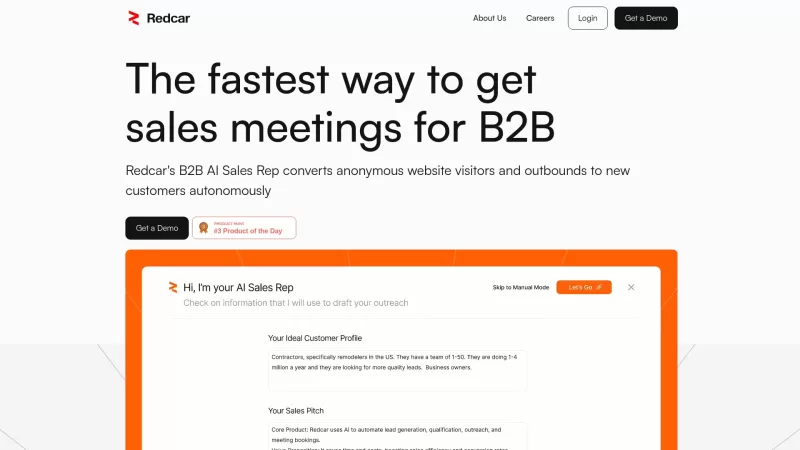
Redcar isn't just another tool; it's like having an AI-powered sales wizard at your fingertips, designed to turbocharge your B2B sales process. It's all about automating the grunt work of lead generation and outreach, so you can focus on what you do best—

What is AI Prospect Book?AI Prospect Book is a Chrome extension designed to revolutionize sales prospecting. It leverages AI-powered insights and tools to help users discover, generate, and organize potential leads from various online sources. Its pr

ZappyChat AI isn't just another chatbot; it's your secret weapon for boosting customer engagement and streamlining your business operations. This high-level AI chatbot is seamlessly integrated into the HighLevel SaaS platform, leveraging the might of Open
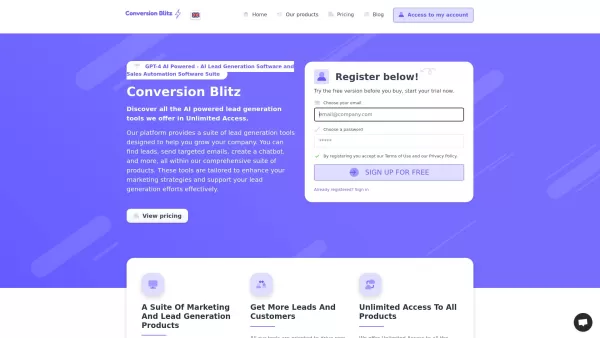
Conversion Blitz isn't just another tool in the crowded world of lead generation and sales automation—it's a powerhouse. Imagine having an AI-driven suite at your fingertips, designed to supercharge your company's growth. From sniffing out leads to sendin

What is PulpSense | Empowering Businesses?PulpSense provides AI-driven solutions designed to enhance your business's operational efficiency. Our services encompass tailored project management systems, custom CRM development, hiring systems, lead gene
Pegasystems Product Information
Understanding Pegasystems
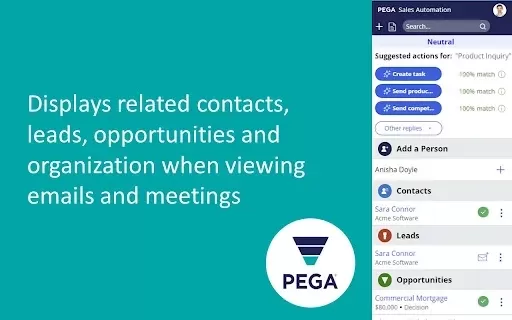
Pega for Gmail is a robust integration that seamlessly connects Gmail with Pega Sales Automation. It enables sales teams to access critical customer insights and manage their interactions directly from their inbox. By delivering real-time data, this extension empowers users to make informed decisions quickly, improving responsiveness and optimizing customer engagement. Pega for Gmail captures relevant information and streamlines communication, making it an indispensable tool for boosting sales productivity and effectively managing customer relationships.
Who Uses Pegasystems?
- Sales Professionals
- Customer Support Representatives
- Business Managers
- Marketing Teams
- Pega Sales Automation Users
How to Use Pegasystems
- Step 1: Install the Pega for Gmail Chrome extension from the Chrome Web Store.
- Step 2: Connect your Pega Sales Automation account to the extension.
- Step 3: Open Gmail to view real-time insights about your contacts.
- Step 4: Leverage these insights to manage customer conversations effectively.
Platform
- Chrome
Pegasystems' Core Features and Benefits
Core Features
- Real-Time Customer Insights
- Gmail Integration
- Streamlined Communication
- Sales Automation
Benefits
- Enhanced Sales Productivity
- Improved Customer Engagement
- Time-Efficient Communication Management
Pegasystems' Main Use Cases and Applications
- Sales Tracking
- Customer Relationship Management
- Marketing Campaigns
- Lead Management
FAQs About Pegasystems
How Do I Install the Pega for Gmail Extension?
You can install it from the Chrome Web Store.
Is There a Cost for Using Pega for Gmail?
It is free for Pega Sales Automation users.
Can I Connect Multiple Gmail Accounts?
Currently, it supports only one account at a time.
Does It Work on Mobile Devices?
No, it is designed exclusively for the Chrome web browser.
What Data Does It Access?
It accesses email data and integrates it with Pega Sales Automation.
Can I Customize the Insights Displayed?
Yes, users can personalize the information shown.
How Does It Improve Sales Productivity?
By providing real-time data, it helps users make informed decisions quickly.
Is Training Required to Use the Extension?
No training is needed; it is user-friendly.
Can I Uninstall the Extension Anytime?
Yes, you can uninstall it through the Chrome settings.
Where Can I Find Support?
Support is available on the Pega website.
Pegasystems Company Information
Website:
https://www.pega.comCompany Name:
Pegasystems Inc.Support Email:
NAFacebook:
NAX (Twitter):
NAYouTube:
NAInstagram:
NATikTok:
NALinkedIn:
NA
Pegasystems Screenshot


2026 Latest Best Top-rated AI Object Removal Editors for portraits travel product shots! XIX.AI curates a powerful game-changing collection regularly updated with weekly rankings. These tools offer real-world tests to help you quickly remove unwanted elements, boost content quality, and save tons of time without compromising results. Must-try for anyone aiming to unlock their AI creation edge. Explore now!
 10 tools
 xix.ai

2026 Latest Best Top-rated AI Text to Speech Tools for Online Courses are curated by XIX.AI based on rigorous real-world tests and weekly updated rankings. These powerful tools help creators deliver crystal-clear audio content effortlessly, boosting writing efficiency and streamlining course production. Check out the free vs paid comparison to find your perfect fit. Explore now to unlock your AI edge in online education.
10 tools
xix.ai

2026 Latest Best Top-Rated AI Blog Title Tools for Higher Click Through Rates! XIX.AI has carefully curated a powerful, game-changing collection of top tools that go through rigorous real-world tests. You’ll find a free vs paid comparison, weekly updated rankings, and detailed insights to help you boost your blog’s traffic efficiently. Must-try options are highlighted to help you unlock your AI edge. Explore now!
10 tools
xix.ai

2026 Latest Best Top-rated AI Task Routing Tools for Support Workflows! XIX.AI has curated a highly powerful game-changing collection of must-try solutions, all undergoing rigorous real-world tests and updated weekly. These tools streamline workflows, boost productivity, and help teams deliver faster, more efficient support. Explore now to discover your perfect tool and unlock your AI edge!
17 tools
xix.ai

2026 Latest Best Top-Rated AI Citation and Paper Summary Tools Curated by XIX.AI. Get powerful game-changing solutions for quick content creation, improved writing efficiency, and boosting productivity. We offer a free vs paid comparison along with real-world tests and weekly updated rankings to help you find the must-try tool that fits your needs perfectly. Explore now to Unlock your AI edge.
10 tools
xix.ai

2026 Latest Best Top-Rated AI Productivity Tools for Daily Work! XIX.AI has curated a powerful, game-changing selection based on rigorous weekly updated rankings and real-world tests. You’ll find must-try options that boost writing efficiency, streamline content creation, and help you overcome daily work challenges. Get a free vs paid comparison to find the perfect fit for your needs. Explore now to unlock your AI edge!
9 tools
xix.ai


