


 Home
HomePARQR
PARQR Chrome Extension: Boost Piazza Course Management



Helps TikTok sellers, brands, MCNs, and TAPs discover winning products and find creators.

HelpLook is an AI-powered all-in-one knowledge base tool that helps businesses quickly build knowledge bases, help centers, and...

Your AI Workspace

302.AI is an enterprise-grade AI resource platform with pay-as-you-go pricing, API access to a full range of AI models, and ready-to-use online applications.

剧火AI — AI Screenwriter + Director, a One-Person Short Drama Studio In one sentence, what is it?

What is Dawiso? Dawiso is a user-friendly data governance platform that brings order, clarity, and collaboration to organizational data. It consolidates metadata via an intelligent data catalog, busin
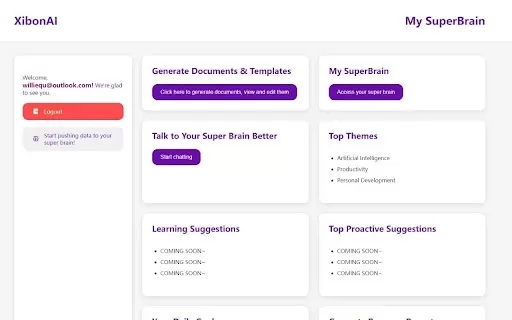
What is Xibon AI? Xibon AI's SuperBrain is an AI-powered tool that boosts productivity and learning by serving as your personal 'SecondBrain/SuperBrain.' It automatically captures, organizes, and summarizes important information as you browse the web
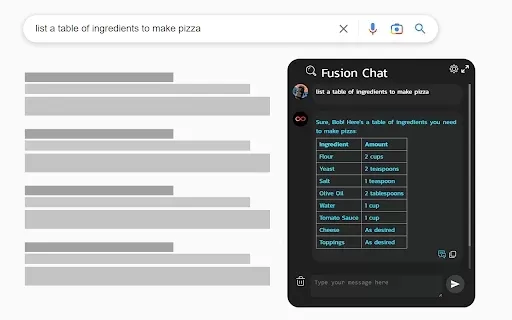
What is ChatGPT 4 for Google - ChatGPT Everywhere?The ChatGPT-4 for Google Chat extension brings the power of OpenAI's ChatGPT directly into your Google Chat workspace. It empowers you to craft replies, pull key information, and optimize your workflo
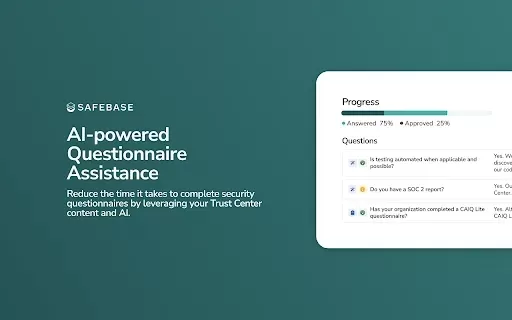
What is the SafeBase Security Questionnaire Plugin?The SafeBase Security Questionnaire Plugin uses AI to help you complete security questionnaires, saving significant time and effort when handling detailed security inquiries. It automatically generat
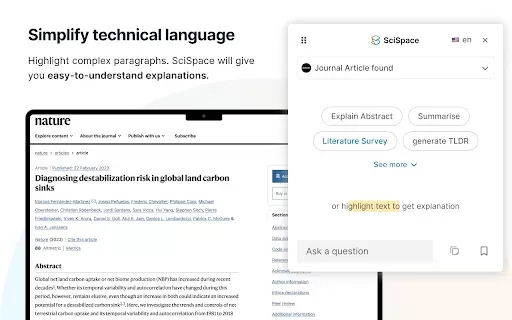
What is SciSpace and how can it save you hours of research time?SciSpace is an AI-powered research assistant that helps you explore scientific literature with ease. It allows you to search through and analyze millions of academic papers from extensiv
PARQR Product Information
What is PARQR?
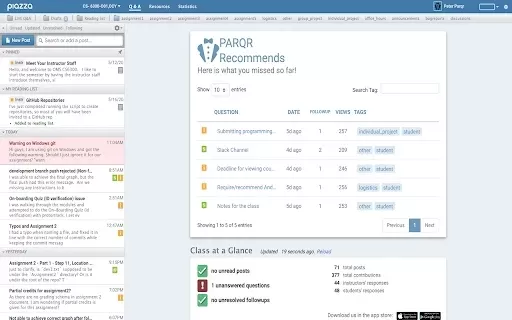
PARQR enhances the Piazza online forum by minimizing duplicate posts and simplifying interactions. It addresses frequent challenges faced by students and instructors on Piazza, offering tools to improve communication and reduce clutter. Users experience faster responses to questions and less administrative work for instructors, simplifying conversation tracking and fostering a well-organized discussion space.
Who will use PARQR?
- Students taking online courses
- Instructors and teaching assistants
- Educational institutions that use Piazza
How to use the PARQR?
- Step 1: Install the PARQR extension from the Chrome Web Store.
- Step 2: Log into your Piazza account.
- Step 3: Utilize PARQR's features to handle discussions and classroom engagement.
Platform
- Web
- Chrome
PARQR's Core Features & Benefits
The Core Features
- Duplicate post reduction
- Streamlined course management
- Improved student-instructor communication
The Benefits
- Saves instructors' time
- Improves student learning experiences
- Effectively organizes discussions
PARQR's Main Use Cases & Applications
- Online education courses
- University settings using Piazza
- Remote learning environments
FAQs of PARQR
What is PARQR?
PARQR is a Chrome extension built to optimize the overall Piazza experience.
Who can use PARQR?
Both students and instructors using Piazza can benefit from PARQR.
How does PARQR work?
PARQR improves communication and cuts down on repetitive posts within Piazza.
Is there any cost associated with PARQR?
PARQR is a free extension available on the Chrome Web Store.
Can PARQR handle large courses?
Yes, it is specifically engineered to manage large-scale online courses.
What functionality does PARQR provide?
It offers features that streamline communication and improve organization on Piazza.
Where can I find PARQR?
PARQR can be downloaded from the Chrome Web Store.
Do I need an account to use PARQR?
Yes, a valid Piazza account is required to use PARQR.
Can instructors customize PARQR settings?
Yes, instructors can tailor the features to meet their specific course needs.
Is PARQR compatible with other devices?
PARQR is primarily designed for use with the Chrome browser.
PARQR Company Information
PARQR Screenshot



2026 Latest Best Top-rated AI Object Removal Editors for portraits travel product shots! XIX.AI curates a powerful game-changing collection regularly updated with weekly rankings. These tools offer real-world tests to help you quickly remove unwanted elements, boost content quality, and save tons of time without compromising results. Must-try for anyone aiming to unlock their AI creation edge. Explore now!
 10 tools
 xix.ai

2026 Latest Best Top-rated AI Text to Speech Tools for Online Courses are curated by XIX.AI based on rigorous real-world tests and weekly updated rankings. These powerful tools help creators deliver crystal-clear audio content effortlessly, boosting writing efficiency and streamlining course production. Check out the free vs paid comparison to find your perfect fit. Explore now to unlock your AI edge in online education.
10 tools
xix.ai

2026 Latest Best Top-Rated AI Blog Title Tools for Higher Click Through Rates! XIX.AI has carefully curated a powerful, game-changing collection of top tools that go through rigorous real-world tests. You’ll find a free vs paid comparison, weekly updated rankings, and detailed insights to help you boost your blog’s traffic efficiently. Must-try options are highlighted to help you unlock your AI edge. Explore now!
10 tools
xix.ai

2026 Latest Best Top-rated AI Task Routing Tools for Support Workflows! XIX.AI has curated a highly powerful game-changing collection of must-try solutions, all undergoing rigorous real-world tests and updated weekly. These tools streamline workflows, boost productivity, and help teams deliver faster, more efficient support. Explore now to discover your perfect tool and unlock your AI edge!
17 tools
xix.ai

2026 Latest Best Top-Rated AI Citation and Paper Summary Tools Curated by XIX.AI. Get powerful game-changing solutions for quick content creation, improved writing efficiency, and boosting productivity. We offer a free vs paid comparison along with real-world tests and weekly updated rankings to help you find the must-try tool that fits your needs perfectly. Explore now to Unlock your AI edge.
10 tools
xix.ai

2026 Latest Best Top-Rated AI Productivity Tools for Daily Work! XIX.AI has curated a powerful, game-changing selection based on rigorous weekly updated rankings and real-world tests. You’ll find must-try options that boost writing efficiency, streamline content creation, and help you overcome daily work challenges. Get a free vs paid comparison to find the perfect fit for your needs. Explore now to unlock your AI edge!
9 tools
xix.ai


