


 Home
HomePapper
Papper: Convert Notes to Tasks, Use Checklists



Helps TikTok sellers, brands, MCNs, and TAPs discover winning products and find creators.

HelpLook is an AI-powered all-in-one knowledge base tool that helps businesses quickly build knowledge bases, help centers, and...

Your AI Workspace

302.AI is an enterprise-grade AI resource platform with pay-as-you-go pricing, API access to a full range of AI models, and ready-to-use online applications.

剧火AI — AI Screenwriter + Director, a One-Person Short Drama Studio In one sentence, what is it?

Ever stumbled upon Cherry Studio AI and wondered what it's all about? Well, let me break it down for you. Cherry Studio AI isn't just another run-of-the-mill AI tool; it's a powerhouse desktop client that lets you dive into advanced AI interactions across

Discover Plume AI: Your Ultimate Academic Writing AssistantAre you tired of struggling with your academic writing? Well, say hello to Plume AI, the innovative AI assistant that's here to revolutionize the way you write! Designed with students in mind, Plume AI harnesses the power of cutting-edge art

Ever wondered how to turn your jumbled thoughts and complex queries into something you can actually grasp? Enter The Visualizer, your new best friend in the world of learning and creativity. This nifty tool takes your written queries, URLs, and even PDFs,

Ever wished for a trusty sidekick to help you navigate the digital world with ease? Enter Sider, your personal AI companion designed to seamlessly blend into your daily routine. Starting off as a handy Chrome/Edge extension, Sider transforms your browsing

Ever wondered what Ninja AI is all about? Well, let me tell you, it's like having a Swiss Army knife for your digital needs! Ninja AI isn't just another AI tool; it's a powerhouse that brings together over 24 top-notch Large Language Models (LLMs) to help
Papper Product Information
What is Papper?
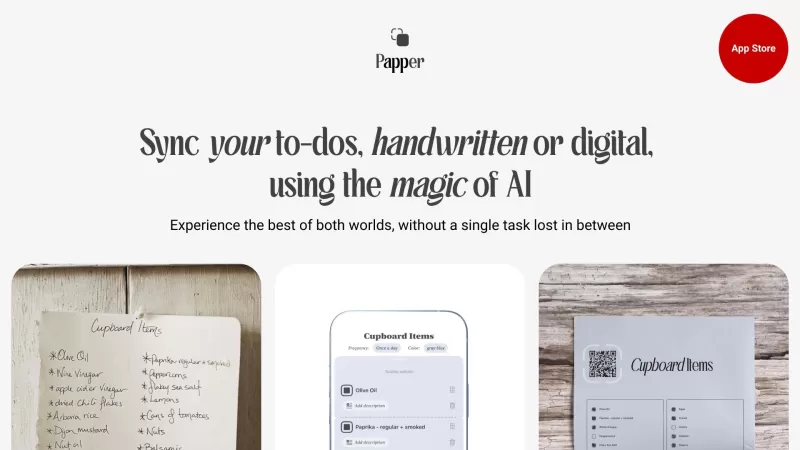
Papper is a nifty iOS app that's all about boosting your organization and productivity. It's pretty cool how it lets you transform your handwritten notes into digital to-do lists. Plus, you can whip up your own checklists, print them out, and even scan your progress right off those lists. And hey, if you're short on time, Papper's got a whole bunch of ready-to-use checklists on all sorts of topics.
How to Use Papper?
Getting started with Papper is a breeze. Just head over to the App Store, download the app, and get it set up on your iOS device. Once you've got it installed, fire up the app and start jotting down your to-do lists by hand or typing them in digitally. You can also craft and print your own checklists. To keep your progress synced, just snap a picture of your handwritten marks on those printed checklists. Papper will then magically update your task progress in the app.
Papper's Core Features
Handwritten Recognition
Ever scribbled a list and wished it was digital? Just snap a photo of your handwritten tasks, and Papper's AI does the rest, turning them into neat digital lists.
Task Management
Papper lets you create and juggle your task lists within the app or link up with Apple Reminders for seamless management.
Focused Design
With Papper's design, you'll find it easier to zero in on one task at a time, helping you stay focused and productive.
Checkers for Repetitive Tasks
Got tasks that pop up again and again? Papper's checkers feature keeps you on top of those recurring duties.
Handmark Syncing
Mark off tasks on your printed lists, and Papper will sync those updates back to your app, keeping everything in sync.
Stylish Printouts
Turn your digital tasks into elegant, distraction-free printouts with Papper's stylish design options.
Papper's Use Cases
Papper's versatility means it's perfect for all sorts of tasks. Whether you're managing your personal to-dos, planning a project, making shopping lists, or organizing an event, Papper has got you covered. It's great for everyone from busy professionals to students.
FAQ from Papper
- What is Papper and what does it do?
- Papper is an iOS app designed to enhance organization and productivity by converting handwritten notes into digital to-do lists, creating and printing checklists, and syncing progress.
- How does Papper convert handwritten notes into to-do lists?
- Papper uses AI technology to recognize and digitize handwritten tasks from a photo, turning them into manageable digital lists.
- Can I update my tasks in Papper by scanning my handwritten marks?
- Yes, you can update your tasks by scanning handwritten marks on printed checklists, and Papper will sync these updates to the app.
- What kind of pre-made checklists are available in Papper?
- Papper offers a variety of pre-made checklists covering topics like personal tasks, project planning, shopping, and event organization.
- What devices is Papper compatible with?
- Papper is compatible with iOS devices, including iPhones and iPads.
- Is Papper free to use?
- While the basic features of Papper might be free, there could be premium features or subscriptions available for enhanced functionality.
Papper Screenshot


2026 Latest Best Top-rated AI Text to Speech Tools for Natural Voiceovers are here on XIX.AI! This curated list features powerful, game-changing options that deliver crystal-clear voices for every use case, backed by real-world tests and weekly updated rankings. Get a free vs paid comparison to find the must-try solution that boosts your productivity instantly. Explore now to Unlock your AI edge!
 11 tools
 xix.ai

2026 Latest Best Manga AI Background Generators Ranked Top-Rated! This curated collection showcases powerful game-changing tools perfect for creating high-quality chapter backgrounds, book covers, and promotional art. Every option has undergone rigorous real-world tests to ensure reliability. Get a free vs paid comparison along with detailed insights. Explore now to discover your perfect tool and unlock your AI edge in manga creation.
6 tools
xix.ai

2026 Latest Best Top-rated AI Object Removal Editors for portraits travel product shots! XIX.AI curates a powerful game-changing collection regularly updated with weekly rankings. These tools offer real-world tests to help you quickly remove unwanted elements, boost content quality, and save tons of time without compromising results. Must-try for anyone aiming to unlock their AI creation edge. Explore now!
10 tools
xix.ai

2026 Latest Best Top-rated AI Text to Speech Tools for Online Courses are curated by XIX.AI based on rigorous real-world tests and weekly updated rankings. These powerful tools help creators deliver crystal-clear audio content effortlessly, boosting writing efficiency and streamlining course production. Check out the free vs paid comparison to find your perfect fit. Explore now to unlock your AI edge in online education.
10 tools
xix.ai

2026 Latest Best Top-Rated AI Blog Title Tools for Higher Click Through Rates! XIX.AI has carefully curated a powerful, game-changing collection of top tools that go through rigorous real-world tests. You’ll find a free vs paid comparison, weekly updated rankings, and detailed insights to help you boost your blog’s traffic efficiently. Must-try options are highlighted to help you unlock your AI edge. Explore now!
10 tools
xix.ai

2026 Latest Best Top-rated AI Task Routing Tools for Support Workflows! XIX.AI has curated a highly powerful game-changing collection of must-try solutions, all undergoing rigorous real-world tests and updated weekly. These tools streamline workflows, boost productivity, and help teams deliver faster, more efficient support. Explore now to discover your perfect tool and unlock your AI edge!
17 tools
xix.ai


La idea de escanear listas escritas a mano es genial, pero me pregunto cómo manejará mi mala letra 😅. La integración con iOS parece prometedora para organizar tareas rápidamente. ¡Ojalá tuviera una versión gratuita para probarla antes de comprar!
Papper es bastante útil para organizar mi vida! Me encanta cómo convierte mis garabatos en listas de tareas ordenadas. La función de lista de verificación es genial, pero a veces la aplicación se bloquea cuando escaneo mi progreso. Aún así, es una herramienta sólida para mantener las cosas bajo control! 📝👌
Papperは生活を整理するのにとても便利です!手書きのメモをきれいなTo-Doリストに変換してくれるのが好きです。チェックリスト機能も素晴らしいですが、進捗をスキャンするときにアプリがクラッシュすることがあります。でも、物事を管理するのに良いツールですね!📝👌
Papper is pretty neat for organizing my life! Love how it turns my scribbles into neat to-do lists. The checklist feature is awesome, but sometimes the app crashes when I scan my progress. Still, it's a solid tool for staying on top of things! 📝👌
Papper é bem legal para organizar minha vida! Adoro como ele transforma meus rabiscos em listas de tarefas organizadas. A função de checklist é incrível, mas às vezes o app trava quando eu escaneio meu progresso. Ainda assim, é uma ferramenta sólida para manter as coisas sob controle! 📝👌


