


 Home
HomePageSage



Helps TikTok sellers, brands, MCNs, and TAPs discover winning products and find creators.

HelpLook is an AI-powered all-in-one knowledge base tool that helps businesses quickly build knowledge bases, help centers, and...

Your AI Workspace

302.AI is an enterprise-grade AI resource platform with pay-as-you-go pricing, API access to a full range of AI models, and ready-to-use online applications.

剧火AI — AI Screenwriter + Director, a One-Person Short Drama Studio In one sentence, what is it?
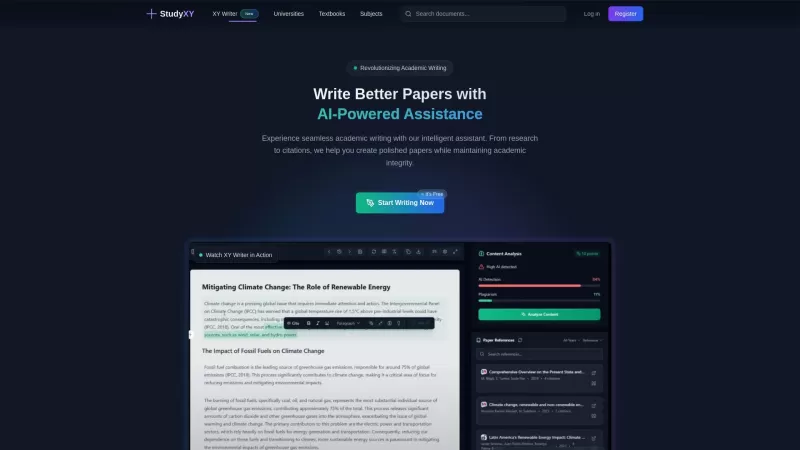
What is XYWriter?XYWriter is your go-to AI-powered academic writing assistant. It's designed to make life easier for students and researchers by helping with everything from managing citations to checking for plagiarism. Plus, it's all about keeping things honest and academically sound.How to Use XY

Ever found yourself drowning in a sea of textbooks and notes, wishing for a lifeline? Enter QuizMate, the Chrome extension that's like having a super-smart study buddy right in your browser. This nifty tool harnesses the power of AI to cut through the clu
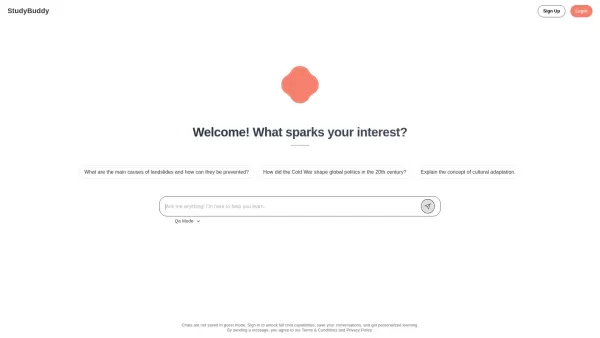
Ever felt like you need a bit more help with your studies but don't know where to turn? Enter StudyBuddy—an AI-powered study tool that's here to revolutionize the way you learn. It's not just another app; it's like having a personal tutor at your fingerti
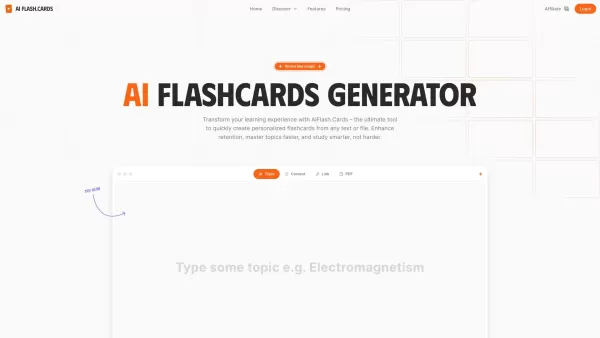
What is AI Flash.Cards?AI Flash.Cards is a smart tool that uses artificial intelligence to create custom flashcards from your text or PDF materials. Just upload your content, and it instantly generates easy-to-review flashcards, helping you remember

What is VidViz GPT: AI for YouTube?VidViz GPT AI is a cutting-edge Chrome extension that swiftly generates summaries of YouTube videos. Powered by advanced artificial intelligence, it distills video content into key points, allowing for more efficien
PageSage Product Information
What is PageSage?
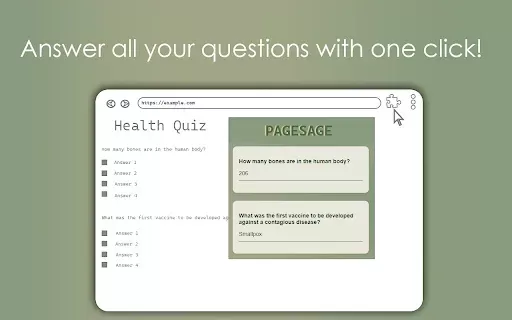
PageSage is an intelligent Chrome extension that revolutionizes how you engage with web content. It automatically analyzes page information, presenting you with relevant questions and instant answers. Ideal for research, study, or casual browsing, PageSage delivers a quicker path to understanding online material. It removes the need to manually search through websites, letting you concentrate on learning and insight.
Who will use PageSage?
- Students
- Researchers
- Professionals
- Casual Browsers
- Educators
How to use PageSage?
- Step 1: Install the PageSage extension from the Chrome Web Store.
- Step 2: Navigate to any webpage you want to analyze.
- Step 3: Click the PageSage icon in your Chrome toolbar.
- Step 4: Review the automatically generated questions and answers about the page.
- Step 5: Select any question to explore the topic in more detail.
Platform
- Chrome
PageSage's Core Features & Benefits
The Core Features
- Instant answers from web content
- Automatic question generation based on the page
- Simple, user-friendly interface
- Boosts research and learning efficiency
The Benefits
- Saves valuable browsing time
- Enhances learning and information retention
- Promotes a deeper understanding of subjects
- Increases overall productivity
PageSage's Main Use Cases & Applications
- Researching online articles and papers
- Studying for tests and exams
- Preparing teaching and educational materials
- Exploring new topics and interests
FAQs of PageSage
How does PageSage work?
PageSage examines the text on a webpage and generates pertinent questions along with their answers.
Is PageSage free to use?
Yes, PageSage is completely free to install and use from the Chrome Web Store.
Can I use PageSage on mobile devices?
At this time, PageSage is only offered as a desktop Chrome extension.
Will PageSage slow down my browser?
PageSage is optimized for minimal resource use and should not noticeably affect your browser's speed.
What kind of questions does PageSage generate?
It creates questions directly related to the core content of the webpage you are visiting.
Does PageSage support multiple languages?
PageSage is primarily designed for English content, though it may function with other languages.
How can I provide feedback on PageSage?
Feedback can be submitted via the extension's settings menu or its Chrome Web Store listing.
Can I uninstall PageSage anytime?
Yes, you can remove PageSage at any time through your Chrome browser's extensions management.
Is PageSage secure to use?
Absolutely. PageSage prioritizes user security and does not gather personal information.
What should I do if PageSage isn’t working?
If you encounter problems, try reloading the webpage or reinstalling the extension.
PageSage Company Information
Website:
https://5-letter-words.comCompany Name:
NASupport Email:
NAFacebook:
NAX(Twitter):
NAYouTube:
NAInstagram:
NATiktok:
NALinkedIn:
NA
PageSage Screenshot




2026 Latest Best Top-rated AI Text to Speech Tools for Online Courses are curated by XIX.AI based on rigorous real-world tests and weekly updated rankings. These powerful tools help creators deliver crystal-clear audio content effortlessly, boosting writing efficiency and streamlining course production. Check out the free vs paid comparison to find your perfect fit. Explore now to unlock your AI edge in online education.
 10 tools
 xix.ai

2026 Latest Best Top-Rated AI Blog Title Tools for Higher Click Through Rates! XIX.AI has carefully curated a powerful, game-changing collection of top tools that go through rigorous real-world tests. You’ll find a free vs paid comparison, weekly updated rankings, and detailed insights to help you boost your blog’s traffic efficiently. Must-try options are highlighted to help you unlock your AI edge. Explore now!
10 tools
xix.ai

2026 Latest Best Top-rated AI Task Routing Tools for Support Workflows! XIX.AI has curated a highly powerful game-changing collection of must-try solutions, all undergoing rigorous real-world tests and updated weekly. These tools streamline workflows, boost productivity, and help teams deliver faster, more efficient support. Explore now to discover your perfect tool and unlock your AI edge!
17 tools
xix.ai

2026 Latest Best Top-Rated AI Citation and Paper Summary Tools Curated by XIX.AI. Get powerful game-changing solutions for quick content creation, improved writing efficiency, and boosting productivity. We offer a free vs paid comparison along with real-world tests and weekly updated rankings to help you find the must-try tool that fits your needs perfectly. Explore now to Unlock your AI edge.
10 tools
xix.ai

2026 Latest Best Top-Rated AI Productivity Tools for Daily Work! XIX.AI has curated a powerful, game-changing selection based on rigorous weekly updated rankings and real-world tests. You’ll find must-try options that boost writing efficiency, streamline content creation, and help you overcome daily work challenges. Get a free vs paid comparison to find the perfect fit for your needs. Explore now to unlock your AI edge!
9 tools
xix.ai

2026 Latest Best Top-Rated AI Systematic Review Tools for Research Screening are here on XIX.AI! This curated collection includes powerful, game-changing solutions that go through rigorous real-world tests to deliver accurate results. We also offer a free vs paid comparison along with weekly updated rankings to help you find the must-try option that boosts your research efficiency significantly. Explore now to unlock your AI edge in academic work!
11 tools
xix.ai


