


 Home
HomeOpenAI Usage Insights - Chrome Extension
OpenAI Usage Monitor Extension



Helps TikTok sellers, brands, MCNs, and TAPs discover winning products and find creators.

HelpLook is an AI-powered all-in-one knowledge base tool that helps businesses quickly build knowledge bases, help centers, and...

Your AI Workspace

302.AI is an enterprise-grade AI resource platform with pay-as-you-go pricing, API access to a full range of AI models, and ready-to-use online applications.

剧火AI — AI Screenwriter + Director, a One-Person Short Drama Studio In one sentence, what is it?

Kula AI is an innovative tool designed to streamline the recruitment process, making it easier for recruiters to reach out to top talent with highly personalized and automated messages. It's like having a smart assistant that helps you connect with the be

What is Krepling?Krepling is an all-in-one cloud commerce platform that empowers entrepreneurs and businesses to launch and grow their digital operations. This innovative solution combines website building, hosting, and business management tools into

Ever wondered how to take your website's SEO to the next level? Enter Positional, your all-in-one SEO toolkit designed to supercharge your inbound marketing and SEO strategies. It's like having a Swiss Army knife for your digital marketing needs, packed with everything from analysis to optimization

What is SQOR.ai?SQOR.ai is a transformative AI platform that seamlessly integrates with your existing SaaS tools. It uses standardized data analysis and predictive analytics to turn raw data into strategic insights. This helps businesses avoid the ty
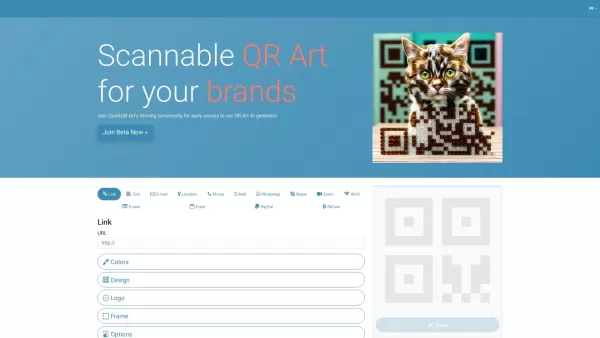
What is Quick QR Art? Quick QR Art is an AI-powered QR code art generator that enables users to design, personalize, and monitor beautiful QR codes. It effortlessly incorporates artistic codes into marketing collateral, packaging, and digital channel
OpenAI Usage Insights - Chrome Extension Product Information
Understanding the OpenAI Usage Insights Chrome Extension
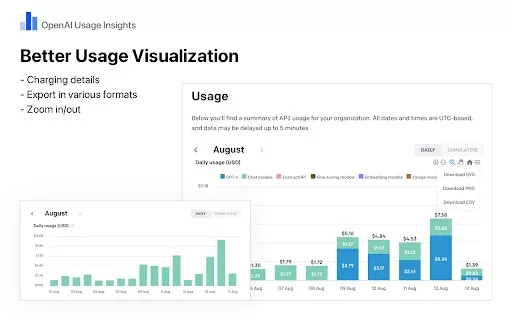
The OpenAI Usage Insights Chrome extension provides enhanced visibility into your OpenAI API consumption. This tool empowers users to monitor and analyze their usage data efficiently. It delivers a clear, monthly cost breakdown per AI model using intuitive stacked charts. For deeper analysis, the extension allows you to seamlessly export your usage data, ensuring a secure and reliable experience for tracking and record-keeping.
How to Get Started with the OpenAI Usage Insights Chrome Extension
1. Install the OpenAI Usage Insights extension from the Chrome Web Store and make sure it's enabled. 2. Go to https://platform.openai.com/account/usage and log in to view your usage dashboard. 3. The enhanced chart will automatically appear on the page, letting you explore the details or export the data for your records.
Core Features of the OpenAI Usage Insights Chrome Extension
Gain a comprehensive monthly cost breakdown per model with clear, insightful stacked charts.
Easily export and save your monthly usage data for further analysis and documentation.
OpenAI Usage Insights Chrome Extension Use Cases
Monitor and analyze your OpenAI usage to optimize spending and resource allocation effectively.
Frequently Asked Questions about OpenAI Usage Insights
How do I install and set up OpenAI Usage Insights?
What key features does the OpenAI Usage Insights extension provide?
OpenAI Usage Insights - Chrome Extension Screenshot




2026 Latest Best Photoshop AI retouch tools for ecommerce apparel, skin cleanup, and color consistency! This top-rated curated list features powerful game-changing solutions that help you boost writing efficiency, streamline content creation, and achieve perfect visual results effortlessly. Each tool has undergone real-world tests through weekly updated rankings, complete with free vs paid comparison details. Backed by XIX.AI, it’s the must-try guide for anyone aiming to unlock your AI edge. Explore now!
 10 tools
 xix.ai

2026 Latest Best Top-Rated AI Prompt Libraries for optimizing all types of ChatGPT workflows. XIX.AI has curated a powerful, game-changing collection that goes through rigorous real-world tests to ensure top performance. You can find detailed free vs paid comparisons and expert rankings to help you choose the must-try tools that boost your productivity and unlock your AI edge. Explore now!
11 tools
xix.ai

2026 Latest Best AI Quiz Builder Platforms for Teachers, Tutors, and Cohort-Based Learning Programs! XIX.AI has curated a top-rated list of powerful game-changing tools that go through real-world tests to deliver accurate rankings. These must-try platforms help boost writing efficiency, streamline content creation, and simplify quiz design across all learning scenarios. Explore now to discover your perfect tool for unlocking your AI edge in teaching!
13 tools
xix.ai

2026 Latest Best AI Pull Request Review Tools for GitHub Teams are here on XIX.AI! This top-rated curated list showcases powerful game-changing solutions that streamline refactoring, bug fixing, and security gap detection across all team workflows. Enjoy a free vs paid comparison along with real-world tests and detailed rankings to help you find the perfect tool that boosts productivity significantly. Explore now to unlock your AI edge!
12 tools
xix.ai

2026 Latest Best Top-rated AI Text to Speech Tools for Natural Voiceovers are here on XIX.AI! This curated list features powerful, game-changing options that deliver crystal-clear voices for every use case, backed by real-world tests and weekly updated rankings. Get a free vs paid comparison to find the must-try solution that boosts your productivity instantly. Explore now to Unlock your AI edge!
11 tools
xix.ai

2026 Latest Best Manga AI Background Generators Ranked Top-Rated! This curated collection showcases powerful game-changing tools perfect for creating high-quality chapter backgrounds, book covers, and promotional art. Every option has undergone rigorous real-world tests to ensure reliability. Get a free vs paid comparison along with detailed insights. Explore now to discover your perfect tool and unlock your AI edge in manga creation.
6 tools
xix.ai


Finally, a way to actually see where my API credits are going! 😅 The dashboard is super clean and makes tracking usage a breeze. No more guessing games with billing. Highly recommend for anyone running heavy LLM workflows. 🚀


