


 Home
HomeNotes for ChatGPT - Chrome Extension
Enhance ChatGPT with customizable notes.



Helps TikTok sellers, brands, MCNs, and TAPs discover winning products and find creators.

HelpLook is an AI-powered all-in-one knowledge base tool that helps businesses quickly build knowledge bases, help centers, and...

Your AI Workspace

302.AI is an enterprise-grade AI resource platform with pay-as-you-go pricing, API access to a full range of AI models, and ready-to-use online applications.

剧火AI — AI Screenwriter + Director, a One-Person Short Drama Studio In one sentence, what is it?

Ever stumbled upon Cherry Studio AI and wondered what it's all about? Well, let me break it down for you. Cherry Studio AI isn't just another run-of-the-mill AI tool; it's a powerhouse desktop client that lets you dive into advanced AI interactions across

Discover Plume AI: Your Ultimate Academic Writing AssistantAre you tired of struggling with your academic writing? Well, say hello to Plume AI, the innovative AI assistant that's here to revolutionize the way you write! Designed with students in mind, Plume AI harnesses the power of cutting-edge art

Ever wondered how to turn your jumbled thoughts and complex queries into something you can actually grasp? Enter The Visualizer, your new best friend in the world of learning and creativity. This nifty tool takes your written queries, URLs, and even PDFs,

Ever wished for a trusty sidekick to help you navigate the digital world with ease? Enter Sider, your personal AI companion designed to seamlessly blend into your daily routine. Starting off as a handy Chrome/Edge extension, Sider transforms your browsing

Ever wondered what Ninja AI is all about? Well, let me tell you, it's like having a Swiss Army knife for your digital needs! Ninja AI isn't just another AI tool; it's a powerhouse that brings together over 24 top-notch Large Language Models (LLMs) to help
Notes for ChatGPT - Chrome Extension Product Information
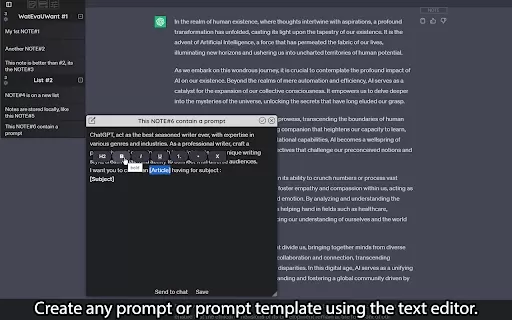
Ever found yourself wishing you could keep better tabs on your ChatGPT conversations? Well, the Notes for ChatGPT AI Chrome extension is here to make your life a whole lot easier. It's not just another tool; it's your new best friend for organizing and boosting productivity with ChatGPT. Imagine having a personal assistant right inside your browser, ready to jot down your thoughts and keep everything neatly sorted.
How to Use Notes for ChatGPT AI Chrome Extension?
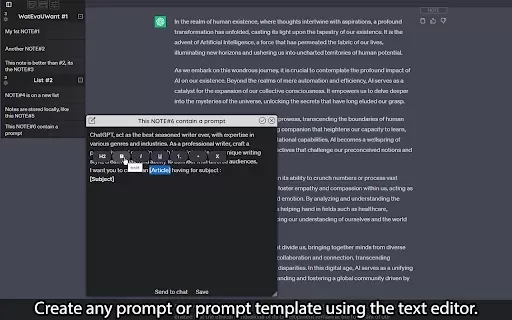
Getting started with this extension is a breeze. First, you'll want to install it from the Chrome Web Store. Once it's up and running, dive in and start creating your own personalized notes. You can customize the titles and content to fit your needs perfectly. Want to keep things tidy? No problem! Organize your notes into lists that you can tailor to your heart's content. And the best part? You can access all these notes right in the middle of your chat sessions, making it super easy to refer back to anything you've jotted down.
Notes for ChatGPT AI Chrome Extension's Core Features
This extension comes packed with features that'll make you wonder how you ever managed without it. Start with the integrated note-taking feature, which lets you capture your thoughts on the fly. You can customize your note titles and content to make them as detailed or as simple as you need. For those who love organization, the list grouping feature is a godsend, allowing you to sort your notes into efficient categories. Ever wanted to rearrange things? Just drag and drop your notes into the perfect order. And if you're in the middle of a chat and see something worth saving, turn those chat messages into notes with just a click. Plus, you can tweak the interface theme to match your style, and don't worry about running out of space—unlimited local storage means you can keep as many notes and lists as you want.
Notes for ChatGPT AI Chrome Extension's Use Cases
What can you do with this extension? Oh, the possibilities are endless! You can create and save personal prompts to streamline your ChatGPT interactions. Need to keep track of responses generated by ChatGPT? Just organize them into notes for easy reference later. And if you stumble upon a chat message that you know you'll want to revisit, convert it into a note in a snap. It's like having a personal archive of your most useful conversations.
FAQ from Notes for ChatGPT
- How to install the extension?
- Head over to the Chrome Web Store, search for "Notes for ChatGPT AI", and click "Add to Chrome". Follow the prompts, and you're all set to start organizing your ChatGPT experience like a pro.
Notes for ChatGPT - Chrome Extension Screenshot


2026 Latest Best Top-Rated AI Prompt Libraries for optimizing all types of ChatGPT workflows. XIX.AI has curated a powerful, game-changing collection that goes through rigorous real-world tests to ensure top performance. You can find detailed free vs paid comparisons and expert rankings to help you choose the must-try tools that boost your productivity and unlock your AI edge. Explore now!
 11 tools
 xix.ai

2026 Latest Best AI Quiz Builder Platforms for Teachers, Tutors, and Cohort-Based Learning Programs! XIX.AI has curated a top-rated list of powerful game-changing tools that go through real-world tests to deliver accurate rankings. These must-try platforms help boost writing efficiency, streamline content creation, and simplify quiz design across all learning scenarios. Explore now to discover your perfect tool for unlocking your AI edge in teaching!
13 tools
xix.ai

2026 Latest Best AI Pull Request Review Tools for GitHub Teams are here on XIX.AI! This top-rated curated list showcases powerful game-changing solutions that streamline refactoring, bug fixing, and security gap detection across all team workflows. Enjoy a free vs paid comparison along with real-world tests and detailed rankings to help you find the perfect tool that boosts productivity significantly. Explore now to unlock your AI edge!
12 tools
xix.ai

2026 Latest Best Top-rated AI Text to Speech Tools for Natural Voiceovers are here on XIX.AI! This curated list features powerful, game-changing options that deliver crystal-clear voices for every use case, backed by real-world tests and weekly updated rankings. Get a free vs paid comparison to find the must-try solution that boosts your productivity instantly. Explore now to Unlock your AI edge!
11 tools
xix.ai

2026 Latest Best Manga AI Background Generators Ranked Top-Rated! This curated collection showcases powerful game-changing tools perfect for creating high-quality chapter backgrounds, book covers, and promotional art. Every option has undergone rigorous real-world tests to ensure reliability. Get a free vs paid comparison along with detailed insights. Explore now to discover your perfect tool and unlock your AI edge in manga creation.
6 tools
xix.ai

2026 Latest Best Top-rated AI Object Removal Editors for portraits travel product shots! XIX.AI curates a powerful game-changing collection regularly updated with weekly rankings. These tools offer real-world tests to help you quickly remove unwanted elements, boost content quality, and save tons of time without compromising results. Must-try for anyone aiming to unlock their AI creation edge. Explore now!
10 tools
xix.ai


