


 Home
HomeMink: Browser Co-Pilot
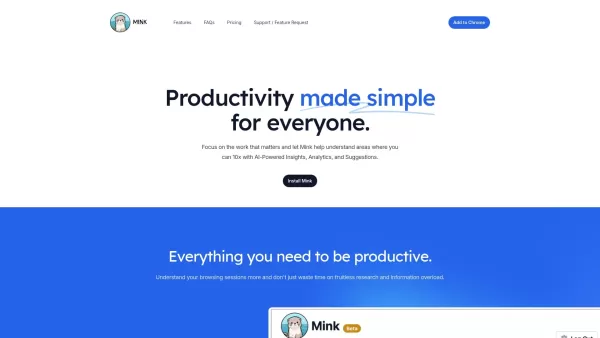
Mink: Browsing Insights for Work Productivity



Helps TikTok sellers, brands, MCNs, and TAPs discover winning products and find creators.

HelpLook is an AI-powered all-in-one knowledge base tool that helps businesses quickly build knowledge bases, help centers, and...

Your AI Workspace

302.AI is an enterprise-grade AI resource platform with pay-as-you-go pricing, API access to a full range of AI models, and ready-to-use online applications.

剧火AI — AI Screenwriter + Director, a One-Person Short Drama Studio In one sentence, what is it?
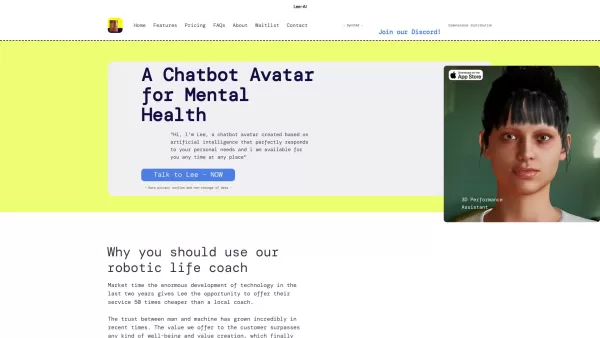
Ever wondered what Lee-AI is all about? Let me tell you, it's not just another chatbot. Lee-AI is your personal AI avatar, designed to cater to your unique needs with responses that feel like they're made just for you. And the best part? It's always there

Ever wondered what it would be like to see your face on your favorite movie star or perhaps swap faces with your pet for a laugh? That's where Faceswap.tech comes into play, offering a cutting-edge AI-powered platform that lets you do just that with stunn

Ever wondered how businesses can harness the power of AI to communicate and analyze data in a way that feels uniquely tailored to their needs? Enter ZBrain, a dynamic AI platform designed to do just that. Imagine having your very own personalized ChatGPT

Ever heard of Freenote? It's not just another note-taking app; it's your personal, open-source AI journal that lets you jot down your thoughts and ideas with a twist. Imagine having an AI buddy that not only helps you find your old musings but also gives

What is PIXM Phishing Protection?PIXM Phishing Protection is a browser extension that leverages artificial intelligence to offer real-time defense against phishing attacks. It inspects the visual elements of websites to immediately detect hazardous o
Mink: Browser Co-Pilot Product Information
What is Mink: Browser Co-Pilot?
Mink is an AI productivity tool that makes your browsing more efficient. It delivers actionable insights into your web habits, provides analytics to show where you can improve, and offers tailored suggestions to help you get more done. Mink also sends daily email summaries of your activity, and all your data is stored locally on your browser to ensure your privacy.
Who should use Mink: Browser Co-Pilot?
- Students
- Remote Workers
- Freelancers
- Professionals
- Productivity Enthusiasts
How do I use Mink: Browser Co-Pilot?
- Step 1: Install Mink from the Chrome Web Store.
- Step 2: Open the Mink extension in your browser.
- Step 3: Allow Mink to monitor your browsing sessions.
- Step 4: Review the insights, analytics, and suggestions Mink provides.
- Step 5: Adjust Mink's settings to match your preferences.
- Step 6: Get daily email digests that recap your browsing activity.
Platform
- Chrome
Mink: Browser Co-Pilot's Core Features & Benefits
The Core Features
- Actionable Insights
- Browsing Analytics
- Productivity Suggestions
- Customizable Settings
- Daily Email Digests
The Benefits
- Increase Productivity
- Better Time Management
- Improved Focus
- Data Privacy
- Personalized Browsing Insights
Mink: Browser Co-Pilot's Main Use Cases & Applications
- Tracking Browsing Habits
- Boosting Work Efficiency
- Daily Activity Summaries
- In-depth Browsing Analytics
- Enhancing Productivity
FAQs of Mink: Browser Co-Pilot
Does Mink handle email digests?
Yes, we send you daily digests summarizing your browsing history and habits.
What happens to my data?
Your data is stored locally on your browser and is not shared elsewhere.
Can Mink help me take control of my life?
Mink is a software tool, but you are ultimately responsible for your own life choices.
How does Mink make money?
Mink is currently free. In the future, we may introduce ads or a small subscription fee.
How does Mink generate insights?
We combine AI technology with your browsing history to create personalized insights.
How much data does Mink store?
Mink retains up to 30 days of your browsing history, but you can adjust this limit in your settings.
Mink: Browser Co-Pilot Company Information
Mink: Browser Co-Pilot Screenshot



2026 Latest Best Top-rated AI Object Removal Editors for portraits travel product shots! XIX.AI curates a powerful game-changing collection regularly updated with weekly rankings. These tools offer real-world tests to help you quickly remove unwanted elements, boost content quality, and save tons of time without compromising results. Must-try for anyone aiming to unlock their AI creation edge. Explore now!
 10 tools
 xix.ai

2026 Latest Best Top-rated AI Text to Speech Tools for Online Courses are curated by XIX.AI based on rigorous real-world tests and weekly updated rankings. These powerful tools help creators deliver crystal-clear audio content effortlessly, boosting writing efficiency and streamlining course production. Check out the free vs paid comparison to find your perfect fit. Explore now to unlock your AI edge in online education.
10 tools
xix.ai

2026 Latest Best Top-Rated AI Blog Title Tools for Higher Click Through Rates! XIX.AI has carefully curated a powerful, game-changing collection of top tools that go through rigorous real-world tests. You’ll find a free vs paid comparison, weekly updated rankings, and detailed insights to help you boost your blog’s traffic efficiently. Must-try options are highlighted to help you unlock your AI edge. Explore now!
10 tools
xix.ai

2026 Latest Best Top-rated AI Task Routing Tools for Support Workflows! XIX.AI has curated a highly powerful game-changing collection of must-try solutions, all undergoing rigorous real-world tests and updated weekly. These tools streamline workflows, boost productivity, and help teams deliver faster, more efficient support. Explore now to discover your perfect tool and unlock your AI edge!
17 tools
xix.ai

2026 Latest Best Top-Rated AI Citation and Paper Summary Tools Curated by XIX.AI. Get powerful game-changing solutions for quick content creation, improved writing efficiency, and boosting productivity. We offer a free vs paid comparison along with real-world tests and weekly updated rankings to help you find the must-try tool that fits your needs perfectly. Explore now to Unlock your AI edge.
10 tools
xix.ai

2026 Latest Best Top-Rated AI Productivity Tools for Daily Work! XIX.AI has curated a powerful, game-changing selection based on rigorous weekly updated rankings and real-world tests. You’ll find must-try options that boost writing efficiency, streamline content creation, and help you overcome daily work challenges. Get a free vs paid comparison to find the perfect fit for your needs. Explore now to unlock your AI edge!
9 tools
xix.ai


