


 Home
HomeMicroGPT
MicroGPT: AI Coding & Debugging Assistant



Helps TikTok sellers, brands, MCNs, and TAPs discover winning products and find creators.

HelpLook is an AI-powered all-in-one knowledge base tool that helps businesses quickly build knowledge bases, help centers, and...

Your AI Workspace

302.AI is an enterprise-grade AI resource platform with pay-as-you-go pricing, API access to a full range of AI models, and ready-to-use online applications.

剧火AI — AI Screenwriter + Director, a One-Person Short Drama Studio In one sentence, what is it?

Ever wished for a trusty sidekick to help you navigate the digital world with ease? Enter Sider, your personal AI companion designed to seamlessly blend into your daily routine. Starting off as a handy Chrome/Edge extension, Sider transforms your browsing

What is Concisely?Concisely is a cutting-edge Chrome extension that redefines email reading by using advanced AI to deliver one-sentence summaries of entire email threads. It allows busy professionals to capture the main idea instantly, eliminating t

What is Altsite?Altsite is a browser extension that helps users find websites similar to the one they're currently visiting. Using advanced AI technology, it analyzes website content and instantly generates a list of related sites. This tool is ideal

What is Comment Generator?Comment Generator is an innovative AI tool that crafts authentic and compelling comments for Instagram and Threads. This Chrome extension uses sophisticated algorithms to automate comment writing, saving you time while prese

Pixelcode is a revolutionary tool that transforms screenshots of code into editable text, saving you from the tedious task of typing out code manually. Imagine snapping a picture of a code snippet and instantly having it ready to edit in your preferred co
MicroGPT Product Information
What is MicroGPT?
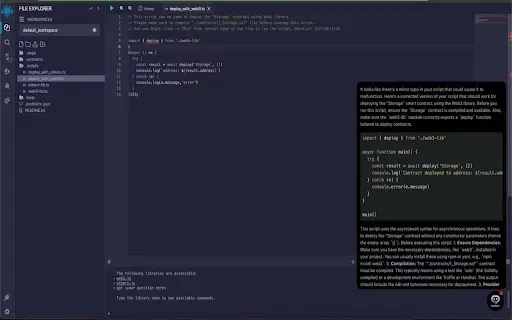
MicroGPT is a powerful Chrome extension designed to elevate your coding workflow. It integrates smoothly with the Remix online IDE, offering real-time debugging, intelligent code completions, and instant documentation access. Powered by AI, MicroGPT accelerates development by automating tedious tasks, enabling developers to invest more energy in creative problem-solving and innovation.
Who uses MicroGPT?
- Software Engineers
- Web Developers
- Freelance Programmers
- Coding Students
Getting started with MicroGPT
- Step 1: Install the MicroGPT extension from the Chrome Web Store.
- Step 2: Launch your coding environment, such as the Remix online IDE.
- Step 3: Begin writing code and receive AI-powered suggestions in real time.
- Step 4: Use the built-in debugging tools to identify and fix issues.
- Step 5: Instantly pull up relevant documentation without interrupting your flow.
Platform
- Chrome
MicroGPT's Core Features & Benefits
Core Features
- Real-time AI coding assistance
- Intelligent debugging tools
- On-demand documentation lookup
Key Benefits
- Boosted coding productivity
- Advanced debugging support
- Less time and effort spent on development
Main Use Cases & Applications
- Debugging code on the fly
- Quickly generating code snippets
- Accessing documentation without switching tabs
MicroGPT FAQs
What is MicroGPT?
MicroGPT is a Chrome extension that uses AI to help you code more efficiently.
How does MicroGPT help in coding?
It delivers real-time code suggestions and debugging support.
Is MicroGPT free to use?
Yes, it's a free extension available on the Chrome Web Store.
Can MicroGPT be used with any IDE?
It is specially optimized for the Remix online IDE.
How do I install MicroGPT?
Find and install it directly from the Chrome Web Store.
Does MicroGPT support multiple programming languages?
Yes, it is compatible with a wide range of programming languages.
Can I provide feedback on MicroGPT?
Absolutely, user feedback is welcome and used to improve the tool.
How frequently is MicroGPT updated?
The extension receives regular updates featuring new capabilities and fixes.
What are the system requirements for MicroGPT?
It requires the Google Chrome browser.
Is my data safe with MicroGPT?
Yes, the extension is built with user privacy and data security in mind.
MicroGPT Company Information
MicroGPT Screenshot


Explore the 2026 best AI debugging and code optimization tools at XIX.AI. Our top-rated, must-try list features curated powerful tools for web developers. Compare free vs paid options, see rankings, and find your perfect game-changing solution for faster, cleaner code. Unlock your AI edge now.
 10 tools
 xix.ai


